
Bills and Payments
-
What is Meralco CAN?
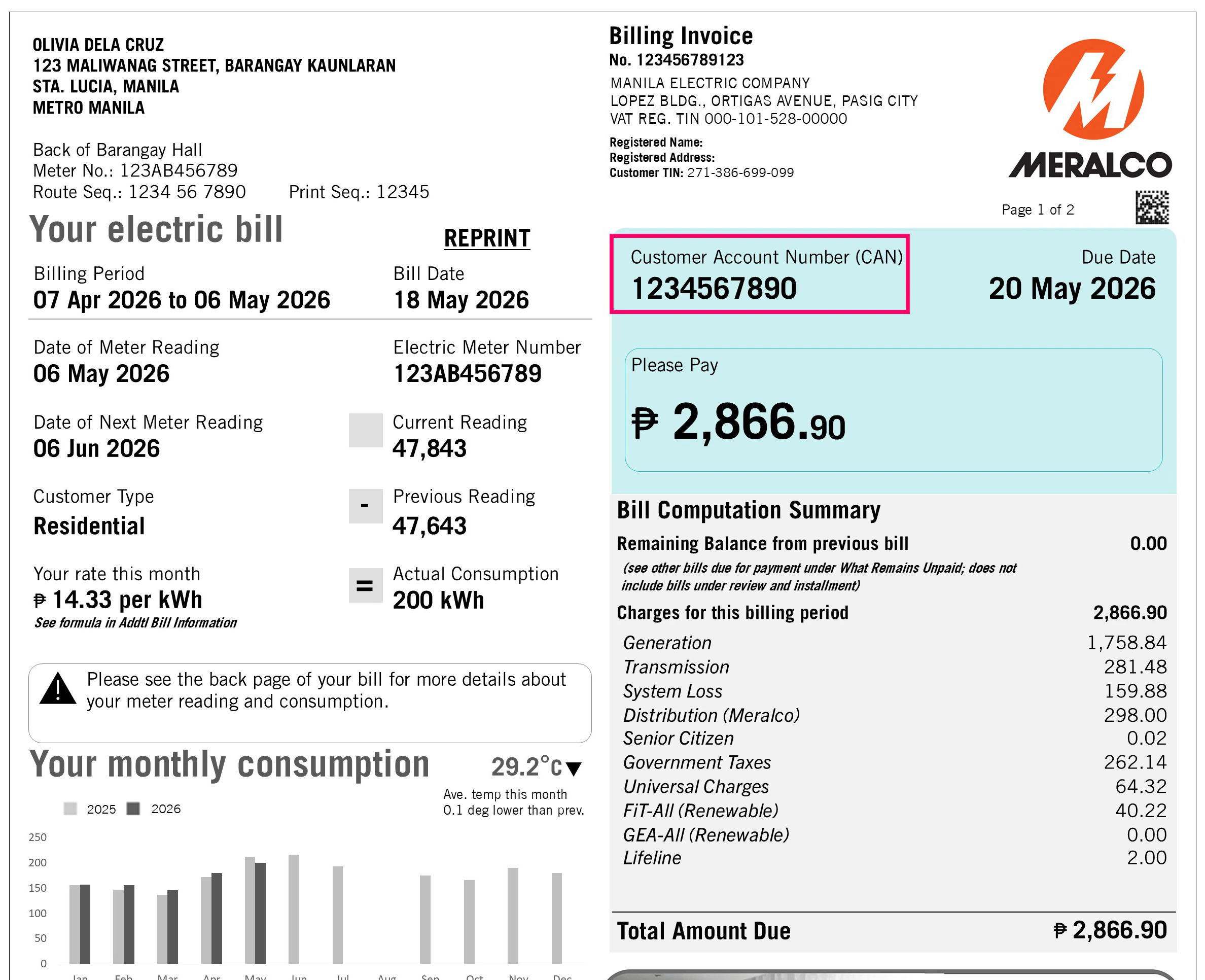
Meralco CAN is your Customer Account Number. It is the 10-digit permanent number that does not expire nor change every month! Use your Meralco CAN to pay through any of Meralco’s authorized payment partners
Some friendly reminders when settling your Meralco bill:
a. Transact using the correct Meralco bill you want to pay
b. Pay the exact amount to be paid stated on your bill
c. Settle your bill on or before its due date to avoid any inconvenience -
Where can I find my Meralco CAN?
Your Meralco CAN is found at the top right portion of your Meralco paper bill, right above the Account summary table. You can also check the PDF copy of your bill in My Meralco and the My Meralco App.
Please note that to pay using your Meralco CAN, you will need all 10 digits.
Updated as of July 2026
-
Where can I use my CAN?
Starting December 1, 2020, just use this Customer Account Number (CAN) to pay thru all Meralco authorized payment partners which can be found here: Payment Channels | Meralco
-
Are Bayad Center Partners included in this transition?
As of October 8, 2020, you can use your Meralco CAN when paying via Bayad Centers over-the-counter. Bayad Center partners such as GCash, Payamaya, coins.ph, and corporate partners such as SM are still transitioning to using CAN and will be available soon.
Please remember to settle the full amount of your bill on or before it’s due date.
-
Do I need CAN to pay via My Meralco?
With My Meralco you can pay your bills without having to key in your Meralco CAN. You only need your CAN when paying through Meralco’s authorized payment partners.
-
Can I scan the barcode next to my Meralco CAN on the Meralco bill to pay online?
Yes you CAN! For your convenience, simple SCAN the CAN barcode when paying with our partner apps!
-
Can I pay any amount using CAN?
Via Bayad Centers, you may pay any of the following amounts:
a. Total Amount Due
b. Current Amount Due (in the Summary for Customer Account Number Table)
c. Balance from Previous billing
d. Total Current Amount (in the Service info table)
Via bank partners, you may pay any of the following amounts:
a. Total Amount Due
b. Total Current Amount (in the Service info table)
We highly advise you to settle the full amount on your bills to avoid any inconveniences.
-
Can I make advance payments using CAN?
Yes, you can make an advance payment using your Meralco CAN as long as you do not have any remaining balances from previous bills. Kindly note that any advance payment will be credited to your next bill.
-
Can I make excess payments using CAN?
Yes, the excess amount that you pay will be credited to your next bill or any remaining balance from a previous bill.
-
Can I make partial payments using CAN?
Yes you CAN! But we highly encourage you to pay the full amount of your bill to avoid any inconveniences or forgotten dues 😊
-
Can I pay my overdue bills using CAN?
You can pay your overdue bills using CAN via Bayad Centers partners as long as your service is not yet disconnected. We highly encourage you to pay the full amount of your bill on or before its due date to avoid any inconveniences.
-
Can I pay my bills over the counter without bringing my bill?
You can pay your bills as long as you know your full amount and your 10-digit Meralco CAN. Kindly make sure that you settle your full amount on of before your due date to avoid any inconveniences. Always bring your Meralco bill with you when you pay over-the-counter to make sure you don’t miss a payment!
-
Can I pay for my disconnected service with CAN?
For disconnected services, kindly proceed to the nearest Meralco Business Center to settle your service for reconnection.
-
I have several services under my Meralco CAN. How can I determine which service gets paid or not?
The fastest way to monitor your payments in all Meralco payment channels is through your payment history in My Meralco. Kindly use our browser version of My Meralco to check all payments made for all the services registered under your account.
-
I have services registered under my Meralco CAN. I paid my bill for service A, but my payment was allocated to service B? Why? What can I do to correct this?
Your Service B may have had an amount that was pending for payment on an earlier due date. To re-allocate your payment, contact any of Meralco’s customer care channels or go to your nearest Meralco business center.
a. Call 24/7 hotline (02) 16211
b. Call 24/7 hotline 16210 (for businesses)
c. Email customercare@meralco.com.ph -
Do I use the Meralco CAN for reporting outages or filing reports?
Meralco CAN is currently used for payments only. For outages, please use your Service ID Number.
-
What are the advantages of enrolling to Auto-Payment Arrangement (APA)?
Auto-Payment Arrangement is a convenient payment method that ensures you never miss a bill. Your bank settles payments for you - whether charge your bill to your credit card or debit from your bank account.
-
When will my credit card/debit card be charged if I choose to enroll to APA?
APA payments are settled by APA agents by the bill's due date.
-
How can I unenroll from APA?
You can unenroll from APA via My Meralco.
Step 1. In the dashboard of My Meralco, look for Accounts or Account Details
Step 2. Select Account to be unenrolled and click Unenroll from APA button.
Step 3. Complete the fields and click on "Submit"
Alternatively, you can also unenroll APA directly through your banks, any Meralco Business Center or through customercare@meralco.com.phSubmit the following documents to our e-mail customercare@meralco.com.ph or any Meralco Business Center:
- Request letter to Unenroll your Account
- Please indicate your Service ID Number.
- For e-mail submission, Subject line will be Request to Unenroll from Auto Payment Arrangement
- Scanned copy of cardholder’s valid ID
-
When will my APA application take effect?
Your APA enrollment will be effective once Meralco receives confirmation from your chosen APA agent/bank that your request has been processed. You will receive an e-mail once your APA enrollment has been processed and approved.
-
Why can't I enroll in APA?
Please go to any Meralco Business Center or call the Meralco hotline (02) 16211 or 16210 (for Business) for assistance.
-
What is Online Billing?
Online Billing is a free service of Meralco wherein you may view a summary of your electric and non-electric bills online. In addition, you may also view the electronic copy of your electric bills invoiced within the past 13 months.
-
What are the benefits of Online Billing?
Here are the benefits of enrolling to Online Billing:
- Notification Sending. You will receive an email notification for your monthly electric bill once it is already available for viewing online.
- Accessibility and Convenience. You will have faster access to your billing information. You may also view current and past electric bills anytime, anywhere, in one convenient location. Instances of lost, misplaced, or damaged bills are also avoided.
- Ease of Payment. You may easily pay electric bills online. A link to the online payment facility is available in the bill delivery notification.
- Consumption Monitoring. You will be able to view your monthly kWh consumption for the current month and the past 12 months. You will also see your average monthly kWh consumption for the same period.
-
How can I avail your Online Billing Service?
Here are the steps on how you can conveniently view your bills online:
Create an account in My Meralco.
Enroll your electric service/s in your My Meralco Account.
-
I cannot view the electronic (pdf) copy of my bill. What could be the reason for this?
You can view an electronic copy (PDF copy) of your electric bills starting with the next billing following the enrollment of your Service to your My Meralco Account.
For your non-electric bills (e.g., disconnection notice, reconnection fee, etc.), only a summary of the bill details will be viewable online.
Note:
Bills will be viewable in your My Meralco Account for 13 months after invoicing.
-
I enrolled in your Online Billing service. Will I still receive a paper copy of my bills?
Yes, you will still receive your paper bills. If you wish to update your bill delivery option by going paperless, you may subscribe to Meralco’s Paperless Billing service.
-
Will I get notified if my payment transaction was successful or not?
Yes, you will be notified in several ways.
For successful transactions, you will get an onscreen thank you message to confirm your payment transaction. This screen will display, among others, the payment reference number of your transaction. In addition, a payment confirmation notification will be sent to your nominated e-mail address. Lastly, you can also check on My Meralco's payment history to check if your payment has been reflected (only for My Meralco payments).
Likewise, failed transactions caused by system or internet connection errors will have prompts or error messages. You will not receive any e-mail from Meralco if your online payment transaction fails.
-
How do I pay via My Meralco?
Use your My Meralco account to pay. The current payment steps are:
You may pay your bill either through the dashboard you will find upon logging in by simply choosing the “Pay Now” button or through the “Billings” tab.
If paying through the “Billings” tab:
- Go to the Billings tab and tick the checkbox next to the unpaid bill you wish to pay.
- Review the bill amount before confirming payment.
- Click on the "Pay and Apply Changes" and/or "Pay Now" button.
- Proceed to the Payment Summary Page and click "Pay Now" again.
- You will be redirected to the BAYAD payment page. Review and confirm BAYAD's Privacy Notice by clicking "Proceed."
- Enter all your payment details.
- Confirm your payment.
- Upon successful payment, BAYAD will display a "Payment Successful" screen.
- My Meralco will show the payment details screen.
- You will receive a confirmation of the transaction via SMS/email.
-
What payment methods can I use to pay my bills in My Meralco?
You can use any of the following cards powered by Mastercard, VISA, or JCB:
1. Credit card
2. Debit card
3. Prepaid Card
-
Where can I view my payment transaction?
All payments, using My Meralco or other channels, are viewable in the payment history page of your My Meralco account. To visit the payment history page, please login to your My Meralco account, click on Bills & Payments, then Payment History.
Note: Only payments made after portal account creation will be displayed in the Payment History page. -
Can I do partial payment?
Yes. Partial payments are allowed for settlement of single bills, however, non-payment of full amount on or before bill’s due date shall subject the service to disconnection.
-
Can I do overpayment?
Yes. Overpayments are allowed if all bills of your Meralco account are selected for payment. Excess payment will automatically be allocated to your account's next bill.
-
Can I schedule payments?
This feature is not yet available but is part of the additional functions we are developing.
-
Can I pay in advance?
Yes. You can do advance payment at either account level or service level. Advance payments are allowed if your account/service has no outstanding bills.
If the account level advance payment facility is not available, ensure that all services under your account are enrolled in the My Meralco to enable feature.
-
Will I receive an OR (Official Receipt) after my online payment?
No. You can request for the OR of your online payment transaction at any Meralco Business Center by just presenting your payment confirmation e-mail.
-
Can I request for payment reversal?
Please go to any Meralco Business Center or call the Meralco hotline (02) 16211 or 16210 (for Business) for assistance.
-
I accidentally paid the wrong Meralco bill, can I still cancel my payment?
Please go to any Meralco Business Center or call the Meralco hotline (02) 16211 or 16210 (for Business) for assistance.
-
How many bills can I pay in a single transaction?
For customers with a My Meralco account, there is no limit to the number of bills you can settle in a single transaction. You can pay for several bills, as long as the service you wish to pay for is registered in your My Meralco account.
-
Are there additional charges if I pay through My Meralco ?
It essentially depends on the payment method/card you use. Some methods incur convenience fees. This will go directly to our payment partner and will be added on top of the total amount selected for payment.
-
Is online payment via My Meralco secure?
Yes, our payment partner, PAYMAYA, is PCI-DSS (Payment Card Industry Data Security Standard) compliant.
-
Can I make a recurring payment on a monthly basis?
For monthly recurring payments, we recommend that you enroll in our partner banks' Auto-Payment Arrangement. For more information, please refer to APA FAQs.
-
Why can't I pay my bill online?
Some bills or items reflected on your bill summary cannot be paid. This can be due to any of the following reasons, your bill/service:
- is under complaint
- has a TRO (Temporary Restraining Order)
- is under IPA (Installment Payment Agreement)
- has a service irregularity
Please go to any Meralco Business Center or call the Meralco hotline (02) 16211 or 16210 (for Business) for assistance.
-
Can I pay other bills using My Meralco?
No. This facility is only for Meralco Accounts.
-
How long does it take my online payment to go through?
For payments made between 7AM to 11PM, your payment will be posted immediately to our system. For payments made during holidays or between 11PM to 7AM of the following day, your payment will be posted to our system morning of the following day.
-
I made a payment in one of your Business Centers third party agents (e.g. Bayad Center). Why isn't it showing up in my Portal?
Your payment in our Business Center/third party agents (e.g. Bayad Center) will be reflected in the portal 2 days after the date of transaction.
-
When can I expect the reactivation of my terminated service?
To be reactivated, you will need to re-apply and submit required documents after payment of all dues. Please go to the nearest Meralco Business Center for assistance.
-
When can I expect the reconnection of my disconnected service?
We’ll reconnect your service within 24 hours from the time your payment is posted.
For payments made on holidays and weekends, reconnection services will be for immediate scheduling the next business day.
Reconnection fees will be reflected on your next bill.
For further assistance, please call us at our 24/7 hotline at (02) 16211 or business hotline at 16210. -
I transacted an online payment and I received a payment confirmation message, why is my bill not updated to PAID and why can't I see my payment in the payment history page?
It's possible that your bill intended for payment is already tagged as paid in our system. For cases like this, your payment will then be applied to your account's next bill.
For payments made, other than through My Meralco (i.e. bank and over-the-counter third party payments) please expect the update within 36 hours.
-
I transacted an advance payment, why can't I see this payment in the payment history page?
Our system keeps a record of all your payments, including advance payments, which are treated as credits. Once your new bill is generated, your advance payment will be applied and reflected on your payment history page.
-
I did an overpayment, but why is it that I do not see my excess payment in the payment history page?
Our system keeps a record of all your payments, including overpayments, which are treated as credits. Once your new bill is generated, your overpayment, will be applied and reflected on your payment history page.
-
The status of my payment is "Pending Payment Posting", what does this mean?
It means that your payment is not yet received by our system but is already successfully processed by our payment partner, please wait for morning of the next day or contact Meralco please call us at our 24/7 hotline at (02) 16211 or business hotline at 16210 for further assistance.
-
There are transactions listed in my Payment History page that I didn't make, where are these from?
It may be the case that your service is also enrolled to another person's portal account and that person made a payment. This may happen for landlord and lessee arrangements, family members in the same household or business accounts. Payments for a service are visible to portal accounts to which this service is enrolled to.
Please report or visit your Meralco Business Center, for unauthorized enrollments of your Service IDs by other portal users or if there is a need to update records.
-
Will my credit cards be saved for future transactions?
No. Credit card information, as well as other payment method credentials, will not be stored by Meralco and shall only be passed to the Payment Gateway for authentication and processing.
-
Will my payment credentials be shared with anyone?
No. Credit card information, as well as other payment method credentials, will not be stored by Meralco and shall only be passed to the Payment Gateway for authentication and processing. You may also refer to the privacy policies of Meralco here (Meralco Privacy Statement).
-
What is Paperless Billing?
Paperless Billing is a free service of Meralco wherein you may opt to receive your monthly electric bills electronically instead of paper bills, subject to ERC’s Rules on Electronic Billing and Communications for Electricity Consumers.
-
What are the benefits of Paperless Billing?
Meralco Paperless Billing service aims to provide you with the following benefits:
- Accessibility and Convenience. You will have faster access to your billing information since electronic bills. You may also view current and past electric bills anytime, anywhere, in one convenient location. Instances of lost, misplaced, or damaged bills are also avoided.
- Ease of Payment. You may easily pay electric bills online. A link to the online payment facility is available in the Paperless Bill delivery notification.
- Reduction of clutter and paper waste. Bills sent via email or made available through the My Meralco minimize unwanted or unnecessary physical clutter.
- Environment-Friendly. You will be able to contribute in preserving the environment by saving trees and reducing carbon footprint from paper production and consumption.
-
How do I subscribe to Paperless Billing?
- Via My Meralco’s Paperless Billing Subscription Facility
- Log in to your My Meralco Account.
- Go to Accounts > List of Accounts.
- Select the Account Number you wish to subscribe to Paperless Billing.
- Click the Subscribe to Paperless Billing button.
- Read and agree to the Paperless Billing Terms & Conditions and Privacy Policy.
- Click Next.
- Input your secondary email address, if any.
- Click Submit to confirm your subscription request.
- You’ll receive an email confirming the status of your Paperless Billing subscription request within a day.
- Via My Meralco’s Start a Service Facility
(Note: This option applies only to applications for a Residential service. For business, you may submit your request through your My Meralco Account. You may also contact your Relationship Manager for further assistance.)
- Log in to your My Meralco Account.
- Input necessary application details.
- In the Value-Added Services page, select ‘Yes’ for ‘Would you like to enroll to paperless billing?’.
- Complete your online application for electric service.
- You’ll receive an email acknowledging receipt of your application for electric service and subscription request for Paperless Billing.
- You’ll receive an email confirming the status of your Paperless Billing subscription request once your application for electric service has been completed.
- Login to your My Meralco Account and update your secondary email address, if any, under Profile Management.
-
I cannot see my Account Number in My Merlalco's Paperless Billing Subscription page. How do I proceed with my subcription request?
A. For Account Holders:
If you are the Account Holder but you cannot see your Account Number in the Paperless Billing subscription facility, then there is a difference between your names as reflected in your Account record and your My Meralco Account.Please email the following documents to customercare@meralco.com.ph or submit them to the nearest business center.
a. Due to minor syntax difference
Example:
Account Holder name: Maria Rose A. Cruz
My Meralco Account name: Ma. Rose A. Cruz- No document will be required if the difference in the Account Holder name and My Meralco user’s name is due to minor syntax difference. For further assistance, please call us at our 24/7 hotline at (02) 16211 or business hotline at 16210, or email us at customercare@meralco.com.ph.
b. Due to change in marital status
Example:
Account Holder name: Maria Rose A. Cruz
My Meralco Account name: Ma. Rose C. Santos
- One (1) government-issued ID showing both the maiden and married surnames (e.g., ‘Maria Rose Cruz Santos’) of the Applicant; OR
- One (1) government-issued ID showing the maiden surname (e.g., ‘Maria Rose A. Cruz’) AND one (1) government-issued ID showing the married surname (e.g., ‘Maria Rose C. Santos’) of the Applicant; OR
- Marriage Certificate
c. Due to other cases
Example:
Name in either record is a nickname, name in either record is an abbreviation
- One (1) government-issued ID OR two (2) secondary IDs of the Applicant
Additional supporting documents may be required on cases not listed above, subject to Meralco’s evaluation of the case.
B. For Actual Users:
If you are not the Account Holder (i.e., an end-user / actual user of the electric service), please submit the required documents as shown below to customercare@meralco.com.ph or to the nearest business center.For further assistance, please call us at our 24/7 hotline at (02) 16211 or business hotline at 16210, or email us at customercare@meralco.com.ph.
a. The Meralco Account is under the Name of an Individual Person
Example: Residential services, businesses (i.e., sole proprietorships) where the registered customer is named after an individual- Authorization Letter OR Special Power of Attorney (SPA) from the Registered Customer, AND
- One (1) government-issued ID or two (2) secondary IDs of the Registered Customer, if available
If the registered customer is already deceased or if his/her whereabouts is unknown to the Applicant, the latter is required to submit any of the following:
- Document proving that the Applicant has the legal authority to occupy the premises covered by the service contract of the Meralco Account, e.g., Deed of Sale, Contract of Lease; OR
- Other document proving that the Applicant occupies the premises covered by the service of the Meralco Account: (a) government-issued ID of the Applicant, (b) utility bill for two (2) months (e.g., Meralco bill, water bill, etc.), OR (c) Barangay Certificate.
b. The Meralco Account is under the Name of a Condominium Developer or Association
Example: Residential or non-residential condominium units under the name of the condominium developer/association- Notarized Secretary’s Certificate appointing/authorizing the Applicant to subscribe the Meralco Account to Paperless Billing; OR
- Authorization Letter issued by the condominium’s Administration Office/Association, AND one (1) government-issued ID OR two (2) secondary IDs of the person who issued the Authorization Letter; OR
- Document proving that the Applicant has the legal authority to occupy the premises covered by the service contract of the Meralco Account, e.g., Deed of Sale, Contract of Lease; OR
- Other document proving that the Applicant occupies the premises covered by the service of the Meralco Account: (a) government-issued ID of the Applicant, (b) utility bill for two (2) months (e.g., Meralco bill, water bill, etc.), OR (c) Barangay Certificate
Note:
Notarized Secretary’s Certificate, if submitted during application for service or My Meralco account creation, should indicate that the Applicant has the authority to subscribe the Meralco Account to Paperless Billing. Else, another Notarized Secretary’s Certificate indicating that the same will be required.
c. The Meralco Account is under the Name of a Business or Organizationi. For Sole Proprietorships and Partnerships:
If the Applicant is the sole proprietor or one the managing partners:- One (1) government-issued ID or two (2) secondary IDs of the Applicant
If the Applicant is NOT the sole proprietor or one the managing partners,- Authorization Letter issued by the sole proprietor or one the managing partners, AND
- One (1) government-issued ID or two (2) secondary IDs of the sole proprietor or one the managing partners
ii. For Corporations, Government Owned and Controlled Corporations (GOCCs) with Charter, Cooperatives, Non-Governmental Organizations (NGOs), Foundations, Religious Organizations:
- Notarized Secretary’s Certificate appointing/authorizing the Applicant to subscribe the Meralco Account to Paperless Billing
Note:
Notarized Secretary’s Certificate, if submitted during application for service or My Meralco account creation, should indicate that the Applicant has the authority to subscribe the Meralco Account to Paperless Billing. Else, another Notarized Secretary’s Certificate indicating that the same will be required. -
When will my monthly electronic bill be available?
Your monthly electronic bills will be posted in your My Meralco Account within a day after the meter reading date, unless the bill was subjected to further internal validation by Meralco. You will also be notified via email once your bill has been posted in your My Meralco Account.
-
How can I view my electronic bills?
There are two ways to view your electronic bills.
- Via email notification. Click the link to your electric bill in the bill notification sent to your registered email address.
- Via My Meralco. Log in to your My Meralco Account and access the View Bills facility.
-
I haven't received an email regarding my electronic bill yet. What may be the cause of this?
In case of delivery failure to your email address, we’ll send your bill notification to your nominated secondary email address, if any. To ensure that you will always receive the bill notifications we’ll send to your email address, please ensure that:
- Your email's inbox is not full.
- Your email address is active.
- cxe@meralco.com.ph is in your email’s contacts list so our emails will not be treated as a spam.
In case you have not received an email notification within five (5) days, you may also login to your My Meralco Account to check if the electronic bill is already posted. If it is not yet posted, your bill may have been subjected to further review by Meralco.
-
Can I revert back to receiving paper bills?
To have a printed copy of your bills, you have the option to download and/or print a copy of your bills from your My Meralco Account. Should you opt to update how you receive your electric bills, you may request for the updating of your bill delivery option through your My Meralco Account six months after the effective date of your Paperless Billing subscription.
-
My subscription to Paperless Billing has not yet exceeded six months, but I am no longer authorized to received the electronic copy of bills. How can I update my bill delivery option?
If the effectivity of your Paperless Billing subscription has not been over six (6) months and you will no longer be authorized to receive the electronic copy bills (e.g. due to change of residence), you may submit a written request specifying your reason, and one (1) government-issued ID or two (2) secondary IDs.
For further assistance, please call us at our 24/7 hotline at (02) 16211 or business hotline at 16210, or email us at customercare@meralco.com.ph.
-
Online Payments
I paid via My Meralco, but I am not the account/contract holder, will I get a payment confirmation email?
Yes. You will receive a payment confirmation email in your registered email address. If the account/contract holder has a My Meralco account, he/she will also receive the same email.
-
I paid through online banking/other OTC channels (like Bayad Center), will I also get a payment confirmation email from Meralco?
Receiving payment confirmation notifications from Meralco is an exclusive feature for My Meralco users who paid via the My Meralco Website/ App.
If you would like to receive payment confirmation notifications, please create a My Meralco account here.
-
Can My Meralco's Payment History store all my payments?
Your My Meralco account can store and present up to 13 months’ worth of payments in the Payment History page. If you need to track your payments beyond the 13-month period, please call our 24/7 hotline (02) 16211.
-
I paid through My Meralco app, how long should I wait for my payment confirmation email?
If you paid between 7AM to 11PM (Phil Standard Time) via My Meralco app, you should get a payment confirmation immediately after your transaction.
If you did not get an email by the above schedule, first check your SPAM folders. If you don’t find any there, please call us at our 24/7 hotline at (02) 16211 for assistance.
-
Can I also view my payment transactions in the My Meralco?
Yes you can, you may check all payments made per bill on the Bills and Payments page
-
Why is the payment history page of my My Meralco account blank?
You may have created your My Meralco Account after making your payment. The payment history page is designed to show all payments transacted after the creation of your online account. In addition, to ensure that all your payments will be shown in the payment history page, please make sure to register all your Meralco SINs/Account Numbers in your online account. If your My Meralco account is not newly created and you still experience this, you can call our 24/7 hotline at (02) 16211.
-
Does the convenience fee go to Meralco?
Meralco does not profit from convenience fees. The convenience fee is collected by Meralco's respective payment partners such e-wallets (GCash, Maya) and banks and card networks and are simply processed by Meralco and Bayad.
Customers paying through the My Meralco website/app using the Bayad e-wallet as a payment method are not subject to any convenience fees since Bayad has waived this fee as the payment processor for My Meralco
-
Can I top-up and load for my kload/pres account via My Meralco?
This feature is not yet available on My Meralco, but you may load through any of our other loading channels.
-
If I have multiple services/bills under an account and I pay in advance, how is my payment allocated?
The advance payment feature of My Meralco, will allow you to select the Account or the specific (SIN) Service ID Number to pay
Please note that if you select to pay an Account Number and you have multiple bills/services under your account, the advance payment will automatically be allocated to your first generated bill regardless of SIN.
-
I just checked, payment was credited/debited from my card/bank but my payment failed. What should I do?
Please call us at our hotline (02) 16211 so we can assist you.
-
I accidentally paid twice, can I request for a refund?
Your second successful transaction will either be posted to other unpaid bills under your account or will be considered as prepayment in case you do not have any unpaid balances at the period of the transaction. For your convenience, you may choose to allow Meralco to subtract the excess payment from your next bill. In case you would like to pursue a refund, please go to any Meralco Business Center or call the Meralco hotline (02) 16211 for assistance. Please note that refunds may take a few days to process.
-
Why is there a convenience fee?
A “Convenience Fee” enables Meralco and its partners to operationalize and maintain a secure, reliable payment facility that customers can access anytime, anywhere.
-
What are my other payment options?
You may view the full list of payment options here.
-
Can I also get payment confirmations via SMS?
No. Currently, payment confirmations are only sent via email.
-
What is the security code?
This is commonly known as the CVV or CVC. It is a 3-4 digit number printed at the back of your card (usually in the signature field). This is an anti-fraud feature to help verify that you are in possession of the card being used for payment.
-
I can’t proceed with my payment. Why is the “Next” button not working?
Please check that all required fields are filled out correctly:
1. Payment option (type of card)
2. Card number
3. Card’s expiry date – 2-digit month (MM) and 4-digit year (YYYY)
4. Security code/CVV or CVC
-
What does near-real time payment posting mean?
This means that your payments will be transacted by Meralco at the time of payment, provided you pay between 7:00AM-11:00PM. If you pay between 11:01PM - 6:59AM the following day, the payment will be credited at 7AM the following day.
-
I made a payment in one of your Business Centers /Third party agents (e.g. Bayad Center, Banks). Will I also get a payment confirmation via email?
No. Receiving payment confirmation notifications is an exclusive feature for My Meralco/My Meralco App users who paid via My Meralco/My Meralco App.
-
Why are the reference numbers on my Meralco Online’s Payment History incomplete?
Only payments made through the My Meralco/My Meralco App will have a reference number. For payments made through other channels, kindly refer to the reference number or receipts provided to you.
-
Auto Payment Arrangement
Can I enroll to APA via My Meralco?
You will need to coordinate with your preferred bank(s) to enroll in an Auto-Payment Arrangement.
-
What is APA (Auto-Payment Arrangement) ?
Auto-Payment Arrangement is a scheduled payment method arranged with your banks. Choose between Automatic Debit or Automatic Credit Arrangements.
1. For Auto Debit - Allow your bank to debit the bill amount from your account on the due date and send the payment to Meralco.
2. For Auto Credit - Auto charge your electric bill to your credit card.
-
Digitized Official Receipt
How can I receive a digitized copy of my Official Receipt (OR)?
You can receive your digitized OR through any of the following convenient options:
- Via email or SMS after payment posting
To enable this feature:
- Download and sign up to My Meralco app and provide us with your contact information:
- Update your contact information with Meralco to ensure timely delivery of notifications
- Via the My Meralco app
- Sign up and log in to the My Meralco app
- Access your digitized OR through the Billings menu*
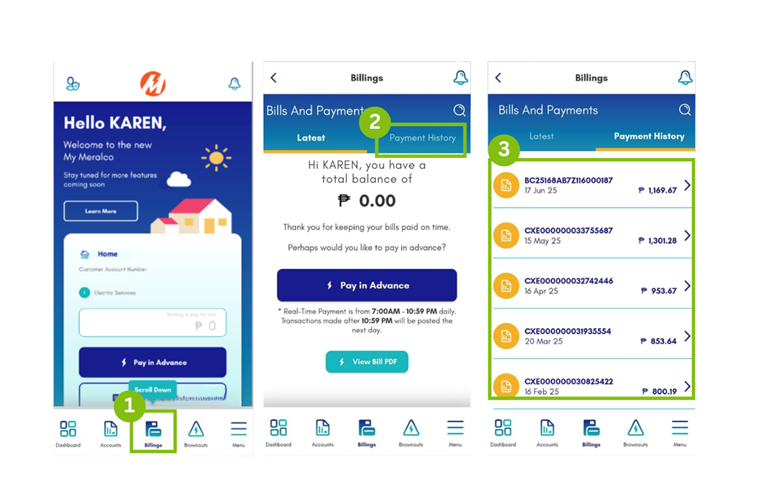
*Only payments made from June 26 onwards will have a PDF copy of the OR in the My Meralco app.
- Via email or SMS after payment posting
-
How can I enable/disable my payment confirmation notification?
- Via the My Meralco:
- From the dashboard, go to the Menu Suite.
- Tap Notification Settings.
- Tap the dropdown icon for Payment Confirmation and tick Email. You may also choose to tick SMS and Push Notifications depending on your preference.
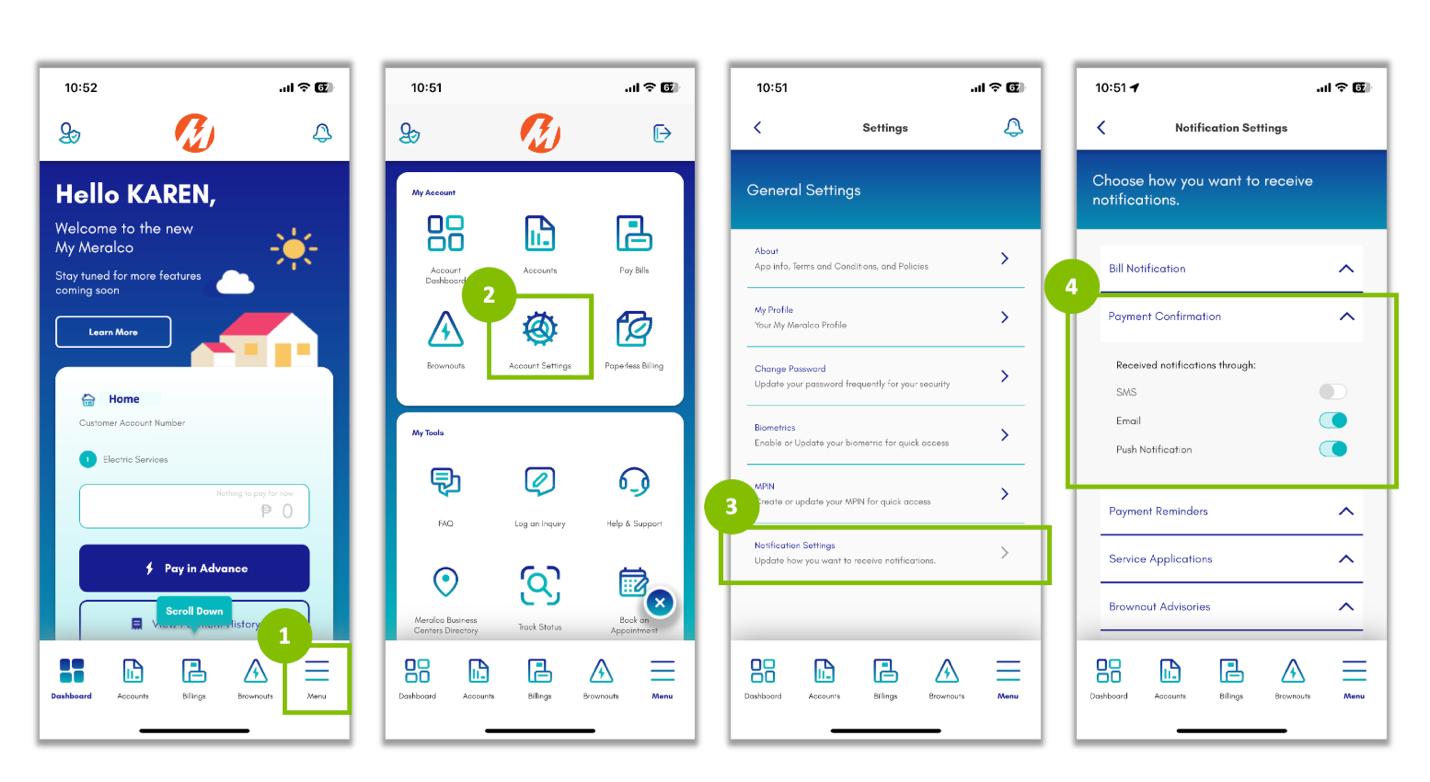
- Via the Customer Database webform:
- On the Privacy Policy page, click the “Proceed” button.
- Input your 10-digit Customer Account Number and Service ID Number, then click the “Next” Button.
- Input your First and Last Name, then click the “Next” button.
- Select the “Notification Enrollment Update”.
- Tick the boxes to choose your preferred notification:
- SMS
- Once done, tap “Save”. A dialog box will pop up to confirm; select “Yes” to save your changes.
- The Summary page will show the updates made. Click “Next”.
- Once the OTP has been verified, there will be a notification confirming that the contact information was successfully updated.
- Via the My Meralco:
-
Can I use the digitized Official Receipt (OR) for tax filing?
With the Ease of Paying Taxes (EOPT) law, Official Receipts are now considered supplementary documents for tax filing purposes and serve as proof of payment for Meralco customers. Meralco invoices or your electric bills serve as primary documents for sale of services and claiming of input tax.
-
Will I see my Official Receipt (OR) on the same day I pay in My Meralco?
The official Receipt will be issued within 2 business days upon confirmation of your payment.*
* Only payments made from June 26 onwards will have a PDF OR in the My Meralco app.
-
Will my Official Receipt (OR) be available in the My Meralco app if I made my payment through any other authorized payment partner?
Yes. If you’re an existing My Meralco app user, the digitized Official Receipt (OR) will be made available within two (2) to five (5) business days following the successful posting of your payment.*
* Only payments made from June 26 onwards will have a PDF OR in the My Meralco app
-
Meter Reading
How often is my meter read?
Once every month. You can check your bill for the actual schedule of your next meter reading. Here is an example:

Did this resolve your question?
Need further assistance?
Get help with your account, electric service, or an existing request in My Meralco.
Go to My Meralco Customer Service


