
Frequently Asked Questions
Safety and scam guidance
Find answers by topic
Choose a category to explore every related question and answer.
Oil-Driven Energy Crisis
-
A. Electricity Rates and Power Supply
Why did my electricity bill change this May?
Electricity rates in May may decrease due to ERC’s efforts in helping mitigate electricity costs, including:
- Increased refund rate for residential customers
- Suspension of the Green Energy Auction Allowance (GEA-All) collections until June 2026
- Partial implementation of the value-added tax (VAT) exemption for power generated using indigenous natural gas
- Lower transmission charges
However, if your bill increased, this may be due to higher electricity consumption, which typically rises during the dry season as more cooling appliances are used.
Monthly rates may change depending on demand, dollar exchange rates, and global fuel prices. The June 2026 electricity rate is not yet final.
-
What are Ancillary Services?
Ancillary Services are backup power sources kept on standby to keep the power system stable whenever supply or demand suddenly changes. For example, when a large solar plant's output decreases due to cloud cover, or when demand increases because of simultaneous air conditioner use, backup power steps in to stabilize the grid.
-
Why did the generation charge increase in May?
The generation charge increased from P8.3864 per kWh to P8.7942 in May mainly due to the following factors:
- Weaker peso, which raised the cost of dollar‑denominated power supply from suppliers
- Higher WESM prices
- Higher fuel costs
These factors pushed generation costs upward for the month. Final generation charges for June remain subject to adjustment.
-
Does Meralco earn from higher transmission and generation charges?
No. Meralco does not earn from transmission and generation charges. These are passthrough charges remitted directly to generation companies and NGCP. Meralco's distribution charge has remained unchanged since August 2022.
-
Why do electricity rates change every month?
Under the EPIRA law, electricity rates reflect the true cost of generating, transmitting, and distributing electricity. Generation charges change monthly depending on fuel prices, foreign exchange rates, supply conditions, and electricity spot market prices.
-
How does the global energy crisis affect electricity rates?
When global fuel prices increase, such as natural gas, the cost of generating electricity also rises. Natural gas accounts for about half of Meralco's supply mix, and generation companies include these fuel costs in the electricity price.
-
Does Meralco set electricity prices?
No. Electricity rates are regulated by the Energy Regulatory Commission (ERC). Only about 17.5% of the bill goes to Meralco, and the distribution charge has remained unchanged since August 2022.
-
What is Meralco doing to address rising electricity costs?
Meralco optimizes its energy mix and follows the Department of Energy's Competitive Selection Process to ensure least-cost power supply while strengthening its systems to maintain reliable service.
-
B. Summer Electricity Demand
Why do bills increase during summer?
- Higher temperatures increase the use of cooling appliances whose compressors work harder.
- More people stay home and use appliances simultaneously during school breaks.
- Power plant maintenance or outages can tighten supply and increase costs.
-
Can the power system handle higher summer demand?
Meralco has sufficient supply through its contracted generation companies. However, grid stability is managed by the NGCP, which may implement rotating load drops if necessary.
-
C. Understanding Your Electricity Bill
Why did my bill increase even if my usage stayed the same?
Total bills may increase even if consumption is the same because rates depend on generation costs, which are affected by fuel prices, market prices, and the peso-dollar exchange rate.
-
How will I know if the billing period and reading is correct?
To know if your billing period and reading are correct, we can check a few things for you:
- the number of days in the billing period
- the type of reading used (actual or estimated)
- and if there are any unusual spikes compared to your previous bills.
If we see that an estimated or late reading was used, we’ll guide you through validation and what the next steps are.
-
D. Managing Electricity Use
What can I do to manage my electricity bill?
Your bill depends on how much power your appliances use and how long you use them. To reduce your bill: use high-power appliances less often, limit usage hours with timers, monitor usage via the Meralco Appliance Calculator/app, and consider energy-efficient appliances or solar options.
-
What is Meralco doing to help customers?
Meralco sources power strategically to maintain cost-effective supply and provides efficiency tips, Lifeline and Senior Citizen discounts, KLoad, and tools like the Appliance Calculator.
-
E. Customer Options
Can I consider solar energy?
Yes. You may install solar panels and enroll in Net-Metering. Customers with up to 100 kW of solar capacity can export excess energy and receive bill credits.
-
Are prepaid electricity customers affected by rate changes?
Yes. Prepaid rates also change monthly based on electricity rates.
-
F. Customer Channels
Do I really need to go to the business center? Are there other channels we can use?
We encourage using digital options. You can use the My Meralco App for your usage history and inquiries.
You may also book your business center visits via Online Customer Appointment (OCA) or interact with our Virtual Customer Assistant (VCA).
-
What is OCA/VCA and how does this help me?
OCA and VCA are our digital service channels for us to support you better.
OCA lets you set a scheduled visit at the Business Center, while VCA provides online assistance. Depending on your concern, we’ll guide you to the right option.
-
Energy Crisis FAQs for Businesses
Why did my electricity bill increase this April?
Electricity bills this April may have increased primarily due to the weaker peso against the US dollar, influenced by ongoing global developments in the Middle East, which affected the cost of power generation.
The higher demand during the summer months continue to be a factor, as hotter temperatures drive increased use of cooling systems.These factors together have pushed electricity prices higher during this period.
-
Is the global fuel situation affecting electricity prices?
Yes. Succeeding electricity bills may be impacted by the following:
- The Middle East conflict affecting the peso-dollar exchange rate
- Higher power demand during hotter months
-
How will the global energy crisis drive Meralco’s rates?
Meralco buys from power plants that use fuel to generate electricity. When global fuel prices rise, the cost of generating electricity also increases. Power plants include their fuel costs in the electricity price they charge.
-
Does Meralco set the price of electricity?
No. Electricity rates are regulated by the Energy Regulatory Commission (ERC). As provided under the law, electricity rates in the Philippines reflect the true cost of generating, transmitting and distributing electricity and such rates are reviewed and approved by ERC.
-
Why do electricity rates change every month?
Some parts of the electricity bill, especially the generation charge, change every month depending on factors such as, the movement of fuel prices, peso-dollar exchange rate, electricity supply conditions, and electricity spot market prices.
-
Does Meralco earn from higher generation and transmission charges?
No, Meralco does not earn from higher generation and transmission charges. These are pass-thru charges remitted by Meralco to Generation companies and NGCP.
-
What is Meralco doing to address rising electricity costs?
To ensure that we charge the least cost possible to our customer, Meralco continues to optimize its energy mix, manages its exposure to volatile Wholesale Electricity Spot Market, and secures lower-cost replacement power whenever needed. At the same time, Meralco prepares its systems and operations to ensure reliable electricity and service as demand increases.
Additionally, Meralco offers energy efficiency and conservation tips to help you manage your electricity bill and lower operational costs.
For long-term cost management, businesses may also explore Meralco’s Customer Choice Programs through your Relationship Manager:
- Competitive Retail Electricity Market (CREM) – Allows qualified businesses to choose their Retail Electricity Supplier (RES) and negotiate competitive electricity rates.
- Retail Aggregation Program (RAP) – Enables businesses to combine their electricity demand to access competitive retail supply.
- Green Energy Option Program (GEOP) – Allows eligible customers to source renewable energy from their preferred supplier to support sustainability and manage long-term costs.
Businesses may also take advantage of other Meralco services to further manage electricity costs:
- Peak/Off-Peak (POP) – Offers time-of-use pricing where electricity is cheaper during off-peak hours. Businesses can shift energy-intensive operations to these periods to reduce electricity costs and improve operational efficiency.
- Net Metering (NM) – Allows businesses with solar installations to export excess electricity back to the grid in exchange for bill credits. This helps lower overall electricity expenses and maximize the value of renewable energy investments.
Connect with your Biz Partner Manager or Enterprise Relationship Manager to learn more about these programs.
-
Will there be an Interruptible Load Program (ILP) this summer that businesses will be asked to participate in?
There is a possibility that the ILP may be activated during the summer months if NGCP places the Luzon grid on Red Alert. In situations where available generation is low and electricity demand is high, the Department of Energy (DOE), Energy Regulatory Commission (ERC) and the National Grid Corporation of the Philippines (NGCP) may call for the implementation of the ILP to help maintain grid stability.
Participating businesses may be requested to reduce their demand from the grid. This helps free up electricity for other consumers and can prevent wider power interruptions during periods of supply shortage.
-
Will there be any changes to the ILP compensation computation given the increase in diesel prices due to global tensions?
The current ERC formula for ILP de-loading compensation already accounts for recent movements in diesel prices. This is because the calculation uses the prevailing diesel price as of the end of the previous calendar month in the city or municipality where the participant is located.
For example, for an April activation, diesel prices as of end-March 2026 will be used—ensuring that recent price increases are already reflected in the compensation.
-
For my business, what can I do to help manage my electricity bill?
Businesses can start by adopting proactive energy efficiency measures to help manage electricity consumption. Simple practices such as maintaining air conditioning units, optimizing lighting use, and staggering the start-up of heavy equipment can help reduce energy use and control costs. You can also consider flexible work arrangements, such as work-from-home setups, when possible, to help lower energy consumption in offices or facilities.
For long-term cost management, businesses may also explore the following Customer Choice Programs:
- Competitive Retail Electricity Market (CREM) – Allows qualified businesses to choose their Retail Electricity Supplier (RES) and negotiate competitive electricity rates to better manage energy costs.
- Retail Aggregation Program (RAP) – Enables multiple businesses to combine their electricity demand so they can access competitive retail supply even if they do not individually meet the required demand threshold.
- Green Energy Option Program (GEOP) – Allows eligible customers to source renewable energy from their preferred supplier, helping support sustainability goals while managing long-term energy costs.
Businesses may also take advantage of other Meralco services to further manage electricity costs
- Peak/Off-Peak (POP) – Offers time-of-use pricing where electricity is cheaper during off-peak hours. Businesses can shift energy-intensive operations to these periods to reduce electricity costs and improve operational efficiency.
- Net Metering (NM) – Allows businesses with solar installations to export excess electricity back to the grid in exchange for bill credits. This helps lower overall electricity expenses and maximize the value of renewable energy investments.
Connect with your Biz Partner Manager or Enterprise Relationship Manager to learn more about these programs.
-
Given the government’s announcement that we are under a state of National Energy Emergency, does Meralco foresee power outages?
The declaration of a National Energy Emergency is a proactive step by the government to ensure readiness and prevent potential supply issues. At this time, the DOE does not foresee widespread power outages. However, periods of tight supply may occur, such as due to simultaneous power plant and/or transmission outages.
The Department of Energy (DOE), together with industry stakeholders, is implementing measures to strengthen supply and maintain grid stability.
Regulatory FAQs
Lifeline Rate FAQs
-
What is the Lifeline Program?
The Lifeline Program refers to the subsidized rate given to the qualified marginalized electricity utility customers who are financially unable to pay their electricity bills at full cost (per Section 4 of Republic Act 9136 or the Electric Power Industry Reform Act of 2001 (EPIRA). The Lifeline Rate is a socialized pricing mechanism in the form of percentage discount levels that were set by the Energy Regulatory Commission (ERC).
-
Who is qualified for the Lifeline discount?
Customers who meet any of the following criteria are qualified for the lifeline discount:
- Beneficiaries of the "4Ps Act" (Pantawid Pamilyang Pilipino Program) under Republic Act No. 11310, or
- Customers considered to be living below the poverty threshold set by the Philippine Statistics Authority (PSA), certified by the Social Welfare and Development Office (SWDO).
-
What are the changes in the Lifeline Program?
The lifeline rate was amended to reflect ERC's regulatory direction to improve administrative efficiency, ensuring fair and sustainable subsidy, and reinforcing consumer-centric protections in the delivery of electricity services.
The following changes were implemented:
- For 4Ps beneficiaries whose name and address in the DSWD-certified 4Ps list exactly match the name and address in their Meralco account, enrollment to the lifeline rate discount will be automatic.
- 100% discount on customer bills for all qualified marginalized end-users with a monthly consumption of 50 kWh or less
- For MERALCO, the existing lifeline discount will still apply to qualified marginalized end-users consuming 51-100 kWh
- Implementation of a Uniform National Lifeline Subsidy Rate of PhP0.01/kWh beginning March 2026 to support the Lifeline Program for qualified customers, as promulgated by the Energy Regulatory Commission (ERC).
-
How much is the Lifeline discount for Meralco Customers?
Meralco lifeline customers with a monthly consumption of 100 kWh and below will receive a discount on their bill depending on their consumption bracket, as shown below:
Lifeline Discount kWh Consumption bracket Current Discount Discount starting April 2026 0–20 kWh 100% 100% 21–50 kWh 50% 51–70 kWh 35% 35% 71–100 kWh 20% 20% -
What if there are many 4Ps beneficiaries in our household?
Customers who meet any of the following criteria are qualified for the lifeline rate:
- Beneficiaries of the "4Ps Act" (Pantawid Pamilyang Pilipino Program) under Republic Act No. 11310, or
- Customers considered to be living below the poverty threshold set by the Philippine Statistics Authority (PSA)
-
How do I apply for a Lifeline discount?
- For 4Ps beneficiaries whose name and address in the DSWD-certified 4Ps list exactly match the name and address in their Meralco account, enrollment to the lifeline rate discount will be automatic.
- For 4Ps beneficiaries whose name and address in the 4Ps list do not exactly match the name and address in the Meralco account, submission of the following requirements at the nearest Meralco business center is required:
- Duly accomplished Lifeline Rate Application form
- Most recent Meralco bill*
- 4Ps ID**
- For customers who are not beneficiaries of 4Ps but are living below the poverty threshold as certified by the local SWDO, submission of the following requirements is required:
- Duly accomplished Lifeline Rate Application Form
- Most recent Meralco bill*
- A certification from the local SWDO issued within the last six (6) months showing that his or her family income is below the poverty threshold set by the Philippine Statistics Authority (PSA)and applicable at the time of his or her application
- Any valid government-issued ID reflecting the address of the registered customer and his or her signature, such as: Police Clearance, Postal ID, Professional Regulatory Commission License (PRC) ID, Senior Citizen ID, Social Security System (ID), Tax Identification (TIN) ID, Unified Multipurpose ID, Phil ID
*The barangay indicated in the Meralco bill must be the same as the one in DSWD's Certified List of 4Ps Beneficiaries
**If 4Ps ID is lost/unavailable, other government-issued IDs may be provided
-
Can I apply for a Lifeline discount through a representative?
Yes, application through a representative is allowed. The following requirements should be prepared and submitted:
- For 4Ps beneficiaries whose name and address in the 4Ps list do not exactly match the name and address in the Meralco account, submission of the following requirements at the nearest Meralco business center is required:
- Duly accomplished Lifeline Rate Application form
- Most recent Meralco bill*
- 4Ps ID**
- For customers who are not beneficiaries of 4Ps but are living below the poverty threshold as certified by the local SWDO, submission of the following requirements is required:
- Duly accomplished Lifeline Rate Application Form
- Most recent Meralco bill*
- A certification from the local SWDO issued within the last six (6) months showing that his or her family income is below the poverty threshold set by the Philippine Statistics Authority (PSA)and applicable at the time of his or her application
- Any valid government-issued ID reflecting the address of the registered customer and his or her signature, such as: Police Clearance, Postal ID, Professional Regulatory Commission License (PRC) ID, Senior Citizen ID, Social Security System (ID), Tax Identification (TIN) ID, Unified Multipurpose ID, Phil ID
*The barangay indicated in the Meralco bill must be the same as the one in DSWD's Certified List of 4Ps Beneficiaries
**If 4Ps ID is lost/unavailable, other government-issued IDs may be provided
- Representatives are also requested to bring the following:
- Signed Letter of Authorization, whether typewritten or handwritten, including the reason for the presentation
- Valid government-issued ID of both the representative and the represented, with signature
- For 4Ps beneficiaries whose name and address in the 4Ps list do not exactly match the name and address in the Meralco account, submission of the following requirements at the nearest Meralco business center is required:
-
What is the validity period for the Lifeline discount?
- For 4Ps Beneficiaries:
- The validity of Lifeline discount is based on the annual certified list of 4Ps beneficiaries provided by DSWD. A qualified customer is eligible to receive the Lifeline discount if he/she remains on the updated list.
- If delisted, the customer may opt to apply for a local SWDO certification if he/she is living below the poverty line and reapply for Lifeline discount. The grant will be discontinued no later than two billing cycles from Meralco's receipt of delisted 4Ps beneficiaries.
- For Non-4Ps Beneficiaries:
- The validity of Lifeline discount is three (3) years from the date of issuance of Certification by local SWDO.
- Meralco may conduct a validation to ensure that the customer remains eligible for the Lifeline discount.
- For 4Ps Beneficiaries:
-
Will I automatically receive the Lifeline discount after I apply?
The Lifeline discount will only be applied if the kWh consumption for the month is within the consumption threshold of 100kWh and below. If your consumption for the month is above 100kWh, your bill for that month will not receive a lifeline discount.
-
Where can I see the Lifeline discount on my Meralco bill?
You can find the lifeline discount at the back of the bill.

Current placement in the bill

Placement in the bill starting April 2026
-
If I am a lifeline customer, am I still required to pay the bill deposit?
Lifeline customers with 100% discount are not required to pay a deposit. Eligibility is based on the load schedule submitted during the application and in accordance with Republic Act No. 11552 and its implementing guidelines.
-
Who is entitled for the early refund of bill deposit?
Lifeline customers who received a 100% discount in the prior billing month will automatically receive a refund of their bill deposit beginning May 2026.
-
What if I fail to pay on time after I get my bill deposit refund?
If a Lifeline customer who received an automatic refund misses a payment or loses eligibility for the 100% discount, a new bill deposit will be charged starting the following month. The amount will be based on the customer's average monthly bill for the last 12 months and must be paid in full using any accepted payment method.
It will be collected in full and payment in any acceptable mode of payment.
-
If I start paying on time again, when do I get a refund?
Lifeline customers with 100% discount are eligible after six (6) months of on-time payment.
-
Is everyone required to update their bill deposit?
Lifeline customers with 100% discount are not required to update their deposit.
-
On Service Account Ownership and 4Ps
What will be the process if I transfer residence?
Customers who wish to transfer residence will need to secure a Certificate of Un-tagging that will be issued by any Meralco Business Center. This Certificate of Un-tagging will be required by the local SWDO in issuing a new Certificate. This is also applicable to 4Ps beneficiaries.
Once the customer secured the re-issued Certificate from the local SWDO reflecting the new address, he/she should go to the DU serving the new address to enroll for the lifeline rate.
-
How can I apply for a lifeline rate as a renter if our electric bill is under the landlord?
There will be an additional requirement on the application if the service is under a different name. The following should be submitted as proof of residence:
- Lease of contract
- Government issued ID or Barangay Certificate
-
How can I become a 4Ps beneficiary?
A customer can be a 4Ps beneficiary if he/she is eligible and applies for the 4Ps.
Selection of qualified households for the 4Ps Program is done through the National Household Targeting System for Poverty Reduction (NHTS-PR) aka Listahan[4]. Usually, the DSWD goes directly to qualified households, and asks to provide their personal information and submit documentary requirements to become 4Ps members.
To remain in the program, members must comply with conditions such as health checkups and school attendance for children depending on age and attendance at Family Development Sessions.
[4] NHTS-PR or Listahan is used to identify who and where the poor are in the country. Targeting is based on the estimated income of families compared to the poverty threshold per province. This estimated income is based on family composition, education, and access to basic services.
-
I am the 4Ps beneficiary applying for lifeline rate but our electric bill is named under a different family member. Am I eligible for a lifeline rate?
Yes, as long as you comply with all the eligibility requirements and your application has been validated by Meralco.
-
On Lifeline Rate and other Applications in Meralco
Can I apply for the senior citizen discount together with Lifeline Rate?
Yes. A customer may apply for both Lifeline Rate and Senior Citizen discount simultaneously provided requirements for both were submitted.
-
I am already enjoying Senior Citizen discount but I am also a qualified marginalized end-user. Can I also avail of the lifeline rate?
Yes, you can apply for the lifeline rate.
-
Can I apply for an Installment Payment Agreement (IPA) even though I'm a recipient of the Lifeline Rate?
Yes. A customer may still apply for an Installment Payment Agreement even though you are a recipient of Lifeline Rate.
-
I am about to apply for a new electric service, and I don't have any service contract with Meralco. Can I apply for lifeline rate along with it?
Yes, you may apply for the Lifeline Rate together with the application for a new electric service.
Senior Citizen Discount
Here's a special treat for all our beloved senior citizens! Get a 5% discount on certain components of the bill as long as your consumption does not exceed 100kWh. To avail of this, apply online and upload the following:
- Filipino Senior citizen ID
- Recent Meralco bill under the senior citizen’s name
- (a) Barangay certificate or,
(b) Notarized affidavit of two (2) disinterested persons who have known the senior citizen for at least one (1) year
Click here to apply now.
To find the nearest Business Center near you, click on the button below
Update on ERC Moratorium
Below are answers to common questions from residential customers about the October 13, 2026 ERC advisory on the further extension of consumer protection measures.
-
What is the latest ERC moratorium about?
On October 13, 2026, the Energy Regulatory Commission (ERC) extended the suspension of electricity disconnection for residential customers consuming 200 kWh or less in November or December 2026. Customers consuming more than 200 kWh will enjoy an extended due date for their May to October 2026 bills. New payment schedule may be found below:
New payment schedule for residential customers Billing period Residential customer
200 kWh or lessResidential customer
more than 200 kWhMay to July 2026 Full payment by November 26, 2026 Full payment by November 26, 2026 August to October 2026 Disconnection suspended only if May to July 2026 is paid by November 26, 2026. Full payment by December 26, 2026 November 2026 Full payment by due date December 2026 -
Who is covered by the suspension of disconnection?
Residential customers consuming 200 kWh or less in November or December 2026 are covered. For customers who consume more than 200 kWh, payment for their bills from May to October 2026 have also been extended. See payment schedule found in Q1.
-
Are residential customers consuming more than 200 kWh covered by the suspension?
No. For November and December 2026, if your consumption exceeds 200 kWh, please continue paying your current bills on or before their due dates to continuously enjoy your service.
However, for older bills, please note the following:
- May to July bills: Pay on or before November 26, 2026
- August to October bills: Pay on or before December 26, 2026.
-
How can I check if my electricity consumption is 200 kWh or less?
Please refer to the upper left portion of the front page of your bill to see your Actual Consumption:

-
Is the suspension automatic, or do I need to apply?
Yes. The disconnection suspension is automatic if you consume 200 kWh or less in November or December 2026 and pay your unpaid May to July 2026 bills and any installments due on or before November 26, 2026.
-
I have unpaid May to July 2026 bills. When should I pay them?
Please settle your unpaid May to July 2026 bills and any installments due on or before November 26, 2026.
Paying by this date is also required to qualify for the extended disconnection suspension if your November or December consumption is 200 kWh or less.
-
What happens if I cannot pay my May to July 2026 bills by November 26?
If you do not pay your unpaid May to July 2026 bills and any installments due by November 26, 2026, you will not qualify for the disconnection suspension, even if your November or December consumption is 200 kWh or less.
Your electricity service may be disconnected after November 26 for unpaid May to July bills. You will receive a written notice before disconnection.
-
I have unpaid August to October 2026 bills. Will my electricity be disconnected?
Not if you qualify for the disconnection suspension. To qualify, your November or December consumption must be 200 kWh or less, and you must pay your unpaid May to July 2026 bills and any installments due on or before November 26, 2026.
-
I consume more than 200 kWh per month. When should I pay my unpaid bills?
The ERC has set the following payment deadlines for unpaid bills:
Payment deadlines for unpaid bills Billing period Payment deadline May–July 2026 November 26, 2026 August–October 2026 December 26, 2026 November–December 2026 Regular bill due date -
Are unpaid bills from April 2026 and earlier covered by the moratorium?
No. Unpaid bills from April 2026 and earlier are not covered by the disconnection moratorium. Please settle them immediately to avoid disconnection.
-
Can I pay my November and December 2026 bills in installments?
Yes. If your monthly consumption is 200 kWh or less, you may pay your November and December 2026 bills in installments.
For more information, please call our hotline at (02) 16211 or visit the nearest Meralco Business Center.
-
Can I still pay my November and December bills in full?
Yes. If you're able to pay your November and December bills in full, the ERC encourages you to do so.
-
Will the installment arrangement automatically appear on my bill?
Yes. For approved installment payment requests, the installments will be reflected in your bills.
-
Will I be charged interest or additional fees if I pay in installments?
No interest or additional fees are charged when availing installment arrangements.
-
I already have an installment payment arrangement. What happens to my existing arrangement?
Your existing installment arrangement will not be affected. Kindly continue paying your installments by their due date to avoid automatic termination of the arrangement.
-
If I make a partial payment, which unpaid bill will my payment be applied to?
Your payment will be applied to your oldest bill first.
-
Can my electricity still be disconnected during the moratorium?
Yes. The suspension applies only to qualified customers and the billing periods covered by the October 13, 2026 ERC Advisory. If you do not meet the payment requirements, your electricity service may still be disconnected. A written notice will be provided before disconnection.
-
I received a disconnection notice even though I consume 200 kWh or less. What should I do?
You may still receive a Disconnection Notice for bill months not covered by the disconnection suspension. Please settle the bills reflected in your notice to avoid disconnection.
-
What happens if my consumption is 200 kWh or less in November but exceeds 200 kWh in December?
If your November consumption is 200 kWh or less and you pay your unpaid May to July bills by November 26, you will qualify for the disconnection suspension.
However, if your December consumption exceeds 200 kWh, the suspension will end. You must pay your unpaid bills by the applicable deadlines to avoid disconnection.
Early Refund of Bill Deposit FAQs
-
What is the Early Refund of Bill Deposit (ERBD)?
Starting May 2026, the bill deposit along with the corresponding interest shall be automatically refunded through credit to monthly bills for the following customers:
- Lifeline customers with 100% discount
- Residential customers who have consistently paid their bills on or before the due date for the past two (2) years
-
Who is eligible for an Early Refund of Bill Deposit (ERBD)?
The following customers are eligible for an Early Refund of Bill Deposit (ERBD):
- Lifeline customers with 100% discount
- Residential customers who have consistently paid their bills on or before the due date for the past two (2) years
-
How can I claim my Early Refund of Bill Deposit (ERBD)?
Starting February 21, 2026, qualified residential customers are no longer required to submit any document to claim the refund. We shall automatically credit your deposit, including interest earned to your bill.
This is in compliance with the recent Amendments to the Magna Carta for Residential Electricity Consumers, published by ERC on February 6, 2026.
-
What if I fail to pay my bill on time? / What if I am no longer eligible for 100% Lifeline discount?
Under the Energy Regulatory Commission’s rules, if you fail to pay your monthly bills on time or becomes ineligible for 100% Lifeline discount, after getting an Early Refund of Bill Deposit (ERBD), the bill deposit will be reimposed. You will also lose the right to refund the bill deposit prior to the termination of your service.
-
What happens to my bill deposit if I start paying my bills on time again or become eligible for the 100% Lifeline discount?
Customers may again qualify for an early refund of their bill deposit once they meet the following criteria:
- Lifeline customers who regain their 100% discount may receive the early refund of their bill deposit after six (6) months.
- Residential customers who consistently pay their bills on or before the due date may receive the early refund of their bill deposit after two (2) years.
-
What is the impact of the recently promulgated Amendments to the Magna Carta for Residential Electricity Consumers (MCREC) on bill deposit?
The Amendment updates the criteria and refund method for residential customers eligible for Early Refund of Bill Deposit:
1.The requirement has been reduced from three (3) consecutive years to two (2) consecutive years of consistent payment on or before the due date.
2. Documents are no longer required to claim the refund. We shall automatically credit your deposit (including interest earned) to your monthly bills.
-
How will I know if I received the refund?
You will be notified through a bill ad and you will find the details of your bill deposit refund under the Applied Credits section at the back of your bill.
Customers who are entitled for an early refund of bill deposit will now be notified via bill ad.
- Customers with 100% Lifeline Discount

- Customers who pay their bill on or before their due date for the past two (2) years

- Customers with 100% Lifeline discount and paid their bills on or before the due date for the past two (2) years.

- Customers with 100% Lifeline Discount
-
Will an eligible customer be receiving the Bill Deposit Refund in cash or in check?
The refund will automatically be credited to their bill.
-
I am a Contestable Customer or GEOP End-user and has availed of Customer Choice Programs (Competitive Retail Electricity Market (CREM) / Retail Competition and Open Access (RCOA), Green Energy Option Program (GEOP), or Retail Aggregation Program (RAP)), am I eligible for ERBD?
Please contact your retail electricity supplier for details.
Bill Deposit Reimposition
-
What is Bill Deposit Reimposition?
Bill Deposit Reimposition is the charging of a new bill deposit to customers who were previously refunded, but later failed to meet the applicable eligibility conditions, such as:
- Failing to pay their bills on or before the due date,
- Having unpaid bills, or
- No longer qualifying for the 100% Lifeline Discount.
-
Why was a bill deposit charged again to my account?
A bill deposit may be reimposed if you:
- Previously received a bill deposit refund due to timely payment and subsequently missed a bill's due date; or
- Previously qualified for a 100% Lifeline Discount hence was refunded but did not sustain the 100% lifeline discount; or
- Previously identified to potentially attain 100% lifeline discount during service application hence was granted bill deposit exemption but later did not attain 100%
-
When will the bill deposit be reimposed?
The reimposed bill deposit shall generally be charged in the next billing period after your account has been identified as subject to reimposition. Eligibility assessment is performed monthly starting October 2026. This is in compliance with the updated Magna Carta for Electricity Consumers.
-
How is the reimposed bill deposit amount calculated?
The reimposed bill deposit shall be equivalent to your average monthly bill for the past twelve (12) months.
-
How will I know if a bill deposit was reimposed?
You will be notified through your billing invoice via a bill message and/or bill ad, which will indicate that a bill deposit has been reimposed and the reason for the charge.
- For customers who were previously refunded due to 100% Lifeline Discount but later became unqualified for the 100% LDE:


- For customers who were previously refunded due to 2 years of on-time payment but later had a late payment:


- For customers who were previously refunded due to 100% Lifeline Discount but later became unqualified for the 100% LDE:
-
Can a customer who previously qualified for a 100% Lifeline Discount still be subject to bill deposit reimposition?
Yes. Customers whose bill deposits were exempted or refunded due to their eligibility for the 100% Lifeline Discount may be subject to reimposition if they no longer qualify for the 100% Lifeline Discount. A customer is considered eligible for the 100% Lifeline Discount if monthly consumption is within the applicable threshold (currently 0-50 kWh).
-
If my bill deposit was refunded because I paid on time for two years, can it still be reimposed?
Yes. A customer who received an Early Refund of Bill Deposit (ERBD) may be charged a new bill deposit upon failing to pay your bill in full on or before the due date after the refund.
-
Can the reimposed bill deposit be collected in installments?
Yes. To help customers pay the reimposed bill deposit, Meralco is offering flexible payment options, including a 6-month installment arrangement.
-
What happens if I do not pay the reimposed bill deposit?
Non-payment of a reimposed bill deposit is a ground for service disconnection in accordance with applicable regulations.
To make payments more manageable, customers may pay their reimposed Bill Deposit through a 6-month installment arrangement instead of paying the full amount at once.
-
What if I become subject to Bill Deposit Reimposition during my service anniversary month?
If you become subject to Bill Deposit Reimposition during your service anniversary month, your account will undergo the Annual Update of Bill Deposit (AUBD) instead. The deficit in your bill deposit (compared to your average monthly bill in the past 12 months) will be collected in 12 equal monthly installments.
-
How can a reimposed bill deposit be refunded again in the future?
The bill deposit may be refunded again if the customer subsequently satisfies the refund eligibility criteria:
For customers reimposed due to loss of 100% Lifeline Discount eligibility, the deposit may be refunded upon attaining six (6) consecutive months of 100% Lifeline Discount (0-50 kWh consumption) or two (2) consecutive years of timely payment, whichever comes first.
For customers reimposed after an Early Refund of Bill Deposit (ERBD), the deposit may be refunded upon attaining another two (2) consecutive years of timely payment.
-
Will all customers without a bill deposit automatically be reimposed?
No. Services with zero bill deposit remain excluded from processing unless they meet the reimposition criteria.
-
If I regain my 100% Lifeline Discount status, will the reimposed deposit automatically be refunded?
Yes, customers with reimposed deposits due to 100% Lifeline Discount ineligibility may qualify for automatic refund once they attain six (6) consecutive months of 100% Lifeline Discount.
-
What customer actions can trigger bill deposit reimposition?
The most common triggers are:
- Late payment after a prior deposit refund; and/or
- Losing eligibility for the 100% Lifeline Discount after a prior exemption or refund.
-
Will I be disconnected if I did not pay the bill deposit?
Yes, non-payment of a reimposed bill deposit is a ground for service disconnection in accordance with applicable regulations.
If under moratorium, applicable rules will be followed.
-
My overdue bill was last June/July/August/September 2026, why am I being reimposed only now?
System enhancements were completed only in September 2026 and reimposed bill deposit will appear in October bills at the earliest. Customers refunded back in May to Sept are checked for any late payment after the refund, and reimposed.
Annual Update of Bill Deposit FAQs
-
Why did I receive a letter on the collection of additional or/refund of excess bill deposit? / What is the bill ad in my bill about?
In April 2020, the Energy Regulatory Commissions (ERC) ordered the suspension of the Annual Update of Bill Deposit (AUBD). In an Advisory dated June 13, 2023, the ERC ordered the resumption of the AUBD. The letter/bill ad you received is a result of Meralco’s compliance to said Order based on your contract anniversary.
-
What is the Bill Deposit?
The Bill Deposit is an amount required from customers of distribution utilities as a guarantee for payment of electric bills. This is updated annually and is equivalent to your average monthly bill for the past twelve (12) months and earns interest at a rate prescribed by ERC. The bill deposit will be returned to the customer upon termination of account or when the customer meets the good credit standing requirement under the Distribution Services and Open Access Rules (DSOAR).
-
What is Annual Update of Bill Deposit (AUBD)?
The AUBD program enables us to determine if the bill deposit is enough to cover the customer’s average monthly bills, making adjustments if necessary.
The AUBD takes place during the customer’s contract anniversary month.
-
Who are required to pay a bill deposit?
A bill deposit will be required from the following:
- a. New customers applying for electric service;
- b. Existing customers applying for transfer of service;
- c. Existing customers applying for an increase in load/ capacity;
- d. Existing customers with disconnected services applying for a reconnection, and who were previously not subjected to bill deposit;
- e. Existing customers whose actual average monthly consumption for the past twelve (12) months increased by more than 10% of the initial or existing bill deposit;
- f. Existing customers who have previously availed of the early refund of bill deposit due to good credit rating and who later default in payment of their monthly bill/s;
- g. Existing customers who have requested to change their rate classification (Ex: From resi to GSA / GSB / GP; GSA to GSB; GSB to GP and vice versa)
-
How will you know if an updated bill deposit will be collected or refunded?
We will inform the customer about the collection of additional required deposit or refund of excess deposit through the AUBD letter. You will also see the monthly installments of the additional required deposit or excess deposit in the Applied Credits / Other Charges (it will be labeled as Differential Bill Deposit) section on page 2 of the electric bill.
Please see sample bill below:
(For Additional Bill Deposit)

(For Bill Deposit Refund)

-
How do you determine if a bill deposit is sufficient?
The sufficiency of the bill deposit is determined by comparing a customer's existing bill deposit, including accumulated interest, with the average monthly bills for the past twelve (12) months.
- If the bill deposit is greater than the average bill by more than 10%, the excess bill deposit will be refunded to the customer through his bill/s
- If the bill deposit is less than the average bill by more than 10%, additional bill deposit equivalent to the insufficient amount will be collected from the customer
- If the difference falls within 10%, there will be no refund nor collection of bill deposit from the customer.
To illustrate:
i. REFUND (Bill deposit + Interest is greater than Ave. Monthly Bill by more than 10%)
Bill Deposit and Interest P 1,500.00 Less: Average Monthly Bill (SEP 2019 - AUG 2020) P 1,000.00 Difference P 500.00 (33.3%) Refund P 500.00 ii. COLLECTION (Bill deposit + Interest is less than Ave. Monthly Bill by more than 10%)
Total Bill Deposit and Interest P 800.00 Less: Average Monthly Bill (SEP 2019 - AUG 2020) P 1,000.00 Difference P 200.00 (25.0%) Collection P 200.00 * P 39.58 - monthly installment payment for twelve (12) months
iii. EXEMPTED FROM AUBD (Difference of Bill deposit + Interest and Ave. Monthly bill for past 12 months is within 10%)
Total Bill Deposit and Interest P 1,050.00 Average Monthly Bill (SEP 2019 - AUG 2020) P 1,000.00 Difference P 50.00 (-4.8%) No Refund / Collection -
I am qualified for a Bill Deposit refund. How can I get my refund?
Your bill deposit refund will be credited to your current month’s bill under the Applied Credit section.
Should you be able to pay your monthly bills on or before the due date for (3) consecutive years, you may refund your bill deposit in full in any of the Meralco Business Centers. A notification will be sent once you have qualified.
-
Can I pay the additional bill deposit amount in installment?
Yes. The additional amount required shall be collected in 12 monthly installments. It will be reflected as an additional item under Bill Computation Summary section and Other Charges in the back page of your bill the next month after you receive the letter/bill ad.
Meter Deposit Refund
-
What is a meter deposit?
It is an amount previously required from customers during application for a new service connection to guarantee against loss or damage of the electrical meter installed. The deposit was equivalent to one-half of the cost of the electric meter and its accessories. This is different from the Service or Bill Deposit which is paid as part of a customer’s application for service to guarantee payment of bills, and is equivalent to one month billing based on the customer’s electrical load.
The collection of Meter Deposits began in 1987, following Order 85-121 and Resolution 95-21 of the then Board of Energy (BOE) and then Energy Regulatory Board (ERB), respectively, now Energy Regulatory Commission (ERC).
This is different from the service or bill deposit, which is the amount required from customers, as part of their application for service, to guarantee payment of bills. The said deposit is equivalent to the customer’s estimated billing for one (1) month. -
Is Meralco still collecting the meter deposit?
Meralco stopped collecting meter deposits from residential customers in July 2004 with the advent of the Magna Carta for Residential Electricity Consumers. Since April 2006, Meralco stopped requiring meter deposits from non-residential customers as well after the promulgation of the Distribution Services and Open Access Rules (DSOAR).
-
Why is Meralco returning the customer’s meter deposit?
On June 4, 2008, the Energy Regulatory Commission (ERC) released the Rules on MDR for all DUs in the Philippines which became effective on July 5. An Amendment was released in 2016. Under these guidelines, the MDR should begin within six months after its effectivity which means no later than January 2009.
Meralco is operating under the guidelines and rules set forth by the Electric Power Industry Reform Act (EPIRA), a law that became effective on June 26, 2001. The law, which paves the way for the restructuring and deregulation of the power industry, balances the interest of both Distribution Utilities and the consuming public. -
How much is the refund?
The MDR consists of the principal amount paid by the customer, plus interest earned. Computation of the interest varies depending on the type of customer and the date when the meter deposit was paid by the customer to the DU.
-
Who are eligible/covered by the Meter Deposit Refund (MDR)?
Only terminated accounts of customers who paid for a meter deposit from 1987 to July 2004 for residential customers, and from 1987 to April 2006 for non-residential customers, are covered by this phase of Meter Deposit Refund.
This is because existing and active service contracts were already covered starting November 2008 after ERC Resolution No. 8 Series of 2008 or the “Rules to Govern the Refund of Meter Deposits to Residential and Non-Residential Customers” took effect. This was followed by MERALCO’s automatic crediting or offsetting of the remaining unclaimed MDR, including all accrued interests, to the corresponding existing and active service contracts for which it was posted, in May 2014, pursuant to ERC’s letter dated January 20, 2004. As such, all remaining unclaimed MDR as of now are only for terminated services. -
Up to when can eligible customers claim their refund?
As per ERC Resolution No. 12, Series of 2016, or the Amended Rules to Govern the Refund of Meter Deposits to Residential and Non-Residential Consumers, eligible customers are given until December 31, 2017 to claim their MDR. Thereafter, all unclaimed Meter Deposits, including accrued interest, shall become the subject of an escheat proceeding. The State, through the Office of the Solicitor General (OSG), shall initiate escheat proceedings in the Regional Trial Court (RTC) where the bank is located, and thereafter, declare the unclaimed Meter Deposit, after due notice and hearing, escheated in favor of the State.
-
How can customers apply for it?
If the claimant is:
- A Residential Customer or a General Service customer, go to the nearest MERALCO Business Center.
- A Small Commercial, Industrial or General Power customer, go to the nearest Business Center or Corporate Business Group-Technical Support Office.
Please click here for the list of office locations or call hotline at 16211
-
Will an eligible customer be receiving his/her Meter Deposit Refund in cash or in check?
Eligible Customers will be receiving the refund in cash, if the refund amount is less or equal to PhP5,000.00, and via check payment, if the refund amount is greater than PhP5,000.00.
-
Is MDR taxable?
Yes. As per BIR Revenue Regulation No. 2-2009, MD Interest is subject 10% CWT.
-
Which services are taxable?
Services with refund schedule starting from May 2010 onwards, which can be any of the following:
- Residential and General Service Customers - if contract is active, consumption in June 2008 exceeds 200 kWh; OR if contract is terminated as of June 2008, consumption in the service's last month's complete billing exceeds 200 kWh
- Non-Residential Services - all (regardless of kWh consumption in June 2008 or in the service's last month's complete billing)
- Residential and General Service Customers - if contract is active, consumption in June 2008 exceeds 200 kWh; OR if contract is terminated as of June 2008, consumption in the service's last month's complete billing exceeds 200 kWh
-
What should eligible MERALCO customers do to claim MDR and where can it be claimed?
In claiming their meter deposits and interest, customers should have the following documents:
I. If you are:
- A residential customer or a general service customer, you may proceed to the nearest MERALCO Business Center
- A small commercial, industrial or general power customer, you may visit the nearest Business Center, or Corporate Business Group-Technical Support Office
II. Fill out Meter Deposit Refund Application Form. The Refund Application Form can be downloaded below and is also available at the Business Center.MDR Application Form to eligible customers
III. In claiming your MDR, you need to submit the following documents:
- Original copy of Meter Deposit Receipt
- Accomplished Meter Deposit Refund Application Form
- Identification Documents:
a. For Individual Claimants: One (1) Valid Primary ID with photo and signature or Two (2) Valid Secondary IDs with photo and signature. Photocopies of the IDs are needed as well.
The acceptable Primary IDs are as follows: Driver’s License, Passport, PRC License, SSS ID, GSIS ID, TIN ID, Philhealth ID, Senior Citizen ID, Postal ID, Original NBI Clearance (Computerized Print-out), Police Clearance (Computerized Print-out), New Comelec Voter’s ID (Scanned and Printed on Comelec’s Security Paper), Unified Multi-Purpose ID (UMID), Integrated Bar of the Philippines (IBP) ID.
The acceptable Secondary IDs are as follows: Company ID with photo and signature, POEA-issued Record Book, School ID with photo and signature, Barangay Certificate with picture, signature and dry seal, Credit Card (with photo and signature)b. For non-individual claimants, you will need to submit proof of entitlement to said refund. For further details and a more detailed list of additional identification documents, please get in touch with the nearest Business Center, or Corporate Business Group-Technical Support Office.
- Tax Identification Documents: Taxpayer’s Identification Number (TIN) ID with photo and signature for individual claimants; and Bureau of Internal Revenue (BIR) Certificate of Registration for non-individual claimants.
- If the claimant is not the Registered Customer, he/she should bring a Special Power of Attorney from the Registered Customer authorizing the claimant to claim the MDR, together with a valid ID of both the Registered Customer and the claimant.
IV. Receive MDR as follows:
- Cash (if less or equal to P5,000)
- Check (if greater than P5,000)
-
If the account holder (registered customer) is already deceased, who can claim the refund
The refund may be claimed by the legal heir/s or successor/s-in-interest of the deceased-account holder, subject to compliance with the requirements under the MDR Rules, in ERC Resolution No. 08, Series of 2008.
-
What if the account has already been transferred?
The amount of meter deposit may still be refunded by the Registered Customer, as the rightful owner/claimant of the meter deposit, subject to compliance with the requirements under the MDR Rules.
-
What if an eligible customer lost his/her original Official Meter Deposit receipt or the Original Contract for Electric Service?
In addition to the previously mentioned documentary requirements above, claimants who cannot produce and submit the original receipts, must present the following:
a. Original copy of a Declaration of Loss, if the refund amount is P5,000.00 or less; or
b. Notarized Affidavit of Loss, if the refund amount is more than P5,000.00;
If the refund amount is P100,000.00 or more, the claimant must present an original copy of the Affidavit of Publication of the fact of loss, in addition to the other documentary requirements previously mentioned. -
What will happen with the unclaimed Meter Deposit Refund by December 31, 2017?
After the December 31, 2017 deadline, all unclaimed meter deposits including accrued interest shall be subjected to escheat proceedings initiated by the Office of the Solicitor General, where said amount, after due notice and hearing, will be escheated in favor of the state.
ICERA Refund
Learn more about the ICERA Refund
The Incremental Currency Exchange Rate Adjustment (ICERA) refund is an ERC-approved adjustment mechanism that allows the National Power Corporation (NPC) to more accurately reflect costs affected by foreign exchange rate fluctuations.
It can be found at the back of your Meralco Bill under Generation and Government taxes.
Learn more about your Meralco bill here.
Eligibility
Those who are currently active AND were already customers of Meralco between July 2009 an April 2010 are eligible of the ICERA refund.
Computation and Implementation
The refund rate is approximately 0.4 centavos per kWh, plus associated taxes, as coordinated with state-owned Power Sector Assets and Liabilities Management Corp (PSALM).
In accordance with the ERC’s Order, the implementation is for a period of 60 months, starting February 2018.
The ICERA Refund can be found at the back of your bill under “Billing Details”
To know more about your bill, click on the button below
Actual Weighted Average Tariff (AWAT)
-
Why is there a refund? Has Meralco been charging me in excess?
For the period July 2022 to December 2024, the Actual Weighted Average Tariff (AWAT) exceeded the Approved Final Distribution Rate. To maintain rates at the approved level, the ERC directed that the difference between the AWAT and the Approved Final Distribution Rate be refunded.
Based on the ERC Order issued in March 2025, the refund commenced with the April 2025 billing and was initially scheduled to run for 36 months, or until the full amount is refunded. Subsequently, to mitigate the impact of anticipated power price increases on consumers, the ERC revised the refund period and rates, with updated terms taking effect in May 2026.
-
Why did the refund rate increase starting May 2026?
In April 2026, the ERC directed Meralco to shorten the remaining refund period from the original implementation timeline to approximately 12 months.
Because the remaining refund amount will now be refunded over a shorter period, customers will see higher refund rates reflected in their bills starting May 2026.
-
How can you assure me that Meralco isn’t overcharging me given that Meralco has been giving multiple refunds?
Meralco only charges rates that are duly approved by the ERC. Rate true-up mechanisms are incorporated under the ERC Rules such that any petition for a rate adjustment would have to be filed by the DU and reviewed/approved by the ERC.
-
When will the refund start and end?
The refund started in April 2025.
Following the ERC Decision received in April 2026, the remaining refund amount will now be refunded over a shorter period of 12 months (May 2026 to April 2027), or until the ERC-approved AWAT Refund amount is fully refunded.
-
Who are qualified for the refund?
All customers with active accounts and kWh consumption are qualified to receive the refund.
-
How much refund will I get?
The refund is computed based on your monthly kWh consumption and applicable customer class refund rate.
Sample computation for a residential customer:
Total kWh consumption for the month: 200kWh
AWAT Refund rate: Php0.4278/kWh
Total AWAT refund: Php85.56
-
Where do I see the refund in my bill?
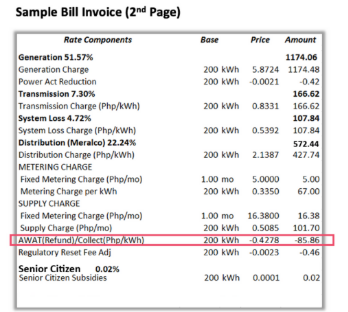
It can be found at the back of the bill, labeled AWAT (Refund)/Collect, under Rate Components.
-
Does everyone still get a refund, regardless of kWh consumption and payment status?
The refund will be reflected on the bill of all customers with active accounts and kWh consumption. Those with terminated accounts are not eligible.
-
I have a terminated account, but my account was active during the period covered by the refund, how will I get refunded?
Customers with terminated accounts are not eligible for the refund. The refund, which started on April 2025, is applied only to active customers. The accelerated refund implementation beginning May 2026, will also be applied only to active customers at that time.
-
I have a newly energized account/I have an account that will be energized soon. Will I also get the refund?
All customers with active accounts are eligible to receive the AWAT refund. The refund was first implemented in April 2025, while the accelerated refund implementation begins in May 2026 and will continue until the full refund amount has been completed.
-
How many more refunds can I expect for the year or years to come?
The implementation of any refund will be done in accordance with any directive made by the ERC.
-
How can you assure me that I am being properly refunded?
The refund is based on your kWh consumption per month, and the computation is reflected on your bill.
-
Will the customers under Customer Choice Programs (CREM, GEOP, RAP) receive this refund too?
Yes. All customers, whether captive or contestable, will receive the refund.
-
Instead of credit to bill, can I collect the refund one-time in cash?
The refund may not be claimed in cash. Per ERC Order, the refund will be reflected as a separate line item in the customers’ bill for the prescribed period.
Supreme Court Refund
Please click here to view the Notice on the extension of the SC Refund Implementation
Know More About FIT-All
-
What is FIT-All charge?
The Feed-In-Tariff Allowance (FIT-All) is a uniform charge (in PhP per kWh) imposed on all electricity end-users to support the development of renewable energy sources in the country. The FIT-All collected by Distribution Utilities (DUs), such as Meralco, is remitted in full to the National Transmission Corporation (TransCo), the government-owned and controlled corporation designated as FIT-All fund administrator. Since FIT-All is a pass-through charge, DUs do not earn from this charge.
The FIT-All can be found in this section of the bill:

-
Why am I charged for this?
In line with the Feed-in-Tariff (FiT) Rules, electricity consumers who are supplied with electricity through the distribution or transmission network shall share in the cost of the FITs in part through a uniform charge (in PhP per kWh), referred to as the FIT-All, and applied to all billed kWh.
The FIT-All charge is set annually by the ERC based on the petition by TransCo, which is tasked with the settlement of the FiTs of the Eligible Renewable Energy Plants.
The FIT-All charge has been applied to all electricity end-users starting with the February 2015 bills.
-
Who are billed with FIT-All charge?
The FIT-All charge will be reflected in the bill of ALL customers – residential, commercial and industrial.
-
How much is the FIT-All charge included in my bill?
Beginning the November 2025 billing month, customers are charged with the ERC-approved FIT-All rate of PhP0.2073/kWh.
For residential customers consuming 200 kWh, this is equivalent to PhP41.46.
-
Why is there an increase in the FIT-All charges in November 2025?
The PhP0.0884 per kWh increase in the FIT-All charge is in accordance with the Energy Regulatory Commission’s (ERC) directive to collecting agents nationwide to implement a new FIT-All rate.
Green Energy Auction Allowance (GEA-All) FAQs
-
What is GEA-All charge?
In compliance with ERC Resolution No. 06, Series of 2025, the Green Energy Auction Allowance (GEA-All), a fixed charge amounting to PhP0.0371/kWh, was included in the electricity bill of all customers starting with the January 2026 billing. GEA-All is being used to fund renewable energy projects like solar, wind, and hydro in the Philippines. It supports the Green Energy Auction Program (GEAP), a government program where renewable energy projects are selected through competitive bidding to ensure the lowest possible cost for customers. The GEA-All rate is subject to change upon approval of the ERC.
This is a pass-through charge collected by Distribution Utilities, such as Meralco, Retail Electricity Suppliers (RES), and National Grid Corporation of the Philippines (NGCP) to be remitted to the National Transmission Corporation (TransCo). Meralco does not earn from this charge.
-
Who are being charged with GEA-All?
All captive customers are charged with GEA-All.
-
How much is the charge for GEA-All?
Customers are being charged the ERC-approved GEA-All rate of 3.71 centavos per kWh.
-
Where can I find GEA-All in my bill?
GEA-All charge appears as a separate line item on Meralco bills, both on the front under bill summary, and at the back under rate components.
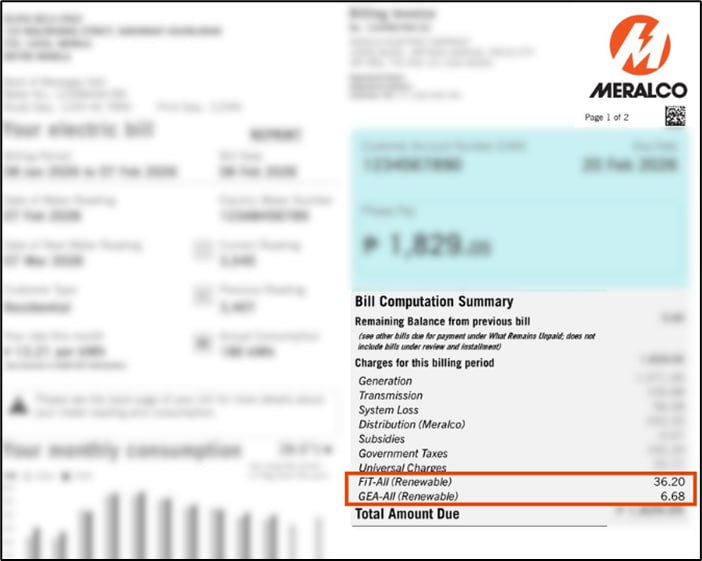
Front of the bill
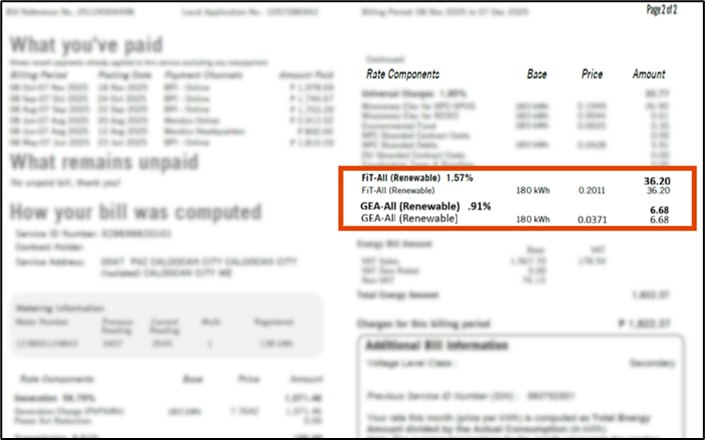
Back of the bill
-
Why was the collection of GEA-All temporarily suspended?
The Energy Regulatory Commission (ERC) has extended the temporary suspension of the collection of the Green Energy Auction Allowance (GEA-All) to cover the September to December 2026 billing periods, following its initial suspension for the May to August 2026 billing periods, to help ease the financial burden on electricity consumers amid rising inflation and global economic pressures.
-
Will the suspension affect the renewable energy projects being funded?
The ERC clarified that this temporary suspension does not affect the continued implementation of the government's renewable energy programs under the Green Energy Auction Program (GEAP).
-
Will customers receive a refund for previously collected GEA-All charges?
No refund will be provided for previously collected GEA-All charges. The temporary suspension, which was initially implemented for the May to August 2026 billing periods, has been extended to also cover the September to December 2026 billing periods.
-
Will GEA-All be automatically removed from the bill during the temporary suspension?
Yes, the GEA-All charge will be set to zero for the May to December 2026 bills, resulting in a reduction of PhP 0.0371 per kWh in the bill.
Front of Bill

Back of Bill

-
Will the collection of GEA-All charge resume after December 2026?
The resumption of the collection of the GEA-All charge after December 2026 will depend on the directive of the ERC.
-
I am already being charged the FiT-All for the government’s renewable energy projects. Why am I also being charged the GEA-All?
The Feed-In Tariff Allowance (FIT-All) and the Green Energy Auction Allowance (GEA-All) both support the government’s renewable energy programs, but they serve different purposes and apply to different incentive mechanisms.
FIT-All is a charge collected to support older renewable energy projects under the Feed-in Tariff (FIT) System. FIT is a government program that guarantees fixed payments to eligible renewable energy developers for many years, with rates set by the government.
GEA-All, on the other hand, supports new renewable energy projects under the Green Energy Auction Program (GEAP). While GEAP has the same objective of promoting renewable energy development in the Philippines, it uses a competitive bidding or auction process where renewable energy developers compete to offer the lowest prices, helping keep costs more affordable for consumers.
ERC Advisory for Typhoons Tino and Uwan
(Document dated 10 November 2025, supplementing the Advisory issued on 06 November 2025)
-
Who are eligible for the suspension of disconnection for unpaid bills?
All Meralco customers with unpaid service bills dated November 4 to December 31, 2025, are eligible for the suspension of disconnection. To check if your bill is covered, look for the Bill Date in the upper left section of your bill.
-
Are all bills covered by the suspension of disconnection?
Unpaid service bills dated November 4 to December 31, 2025 are covered by the suspension of disconnection. To check if your bill is covered, look for the Bill Date in the upper left section of your bill.
-
Which bills and scenarios are not covered by the suspension of disconnection?
The following bills are excluded from the suspension of disconnection:
- Bills dated November 3, 2025 or earlier, or January 1, 2026 or later
- Bills related to service irregularity
- Disconnection due to non-compliance to required meter relocation
- Prepaid services
-
I want to avail of installment payment. Why was I not allowed?
Installment payment of up to 2 months only applies to unpaid service bills dated November 4 to December 31, 2025, for customers with a monthly consumption of up to 100 kWh. If your consumption is more than 100 kWh, or if your bill date is not within the period covered, you may not be allowed to avail of installment payment. To check if your bill is covered, look for the Bill Date and your total kWh consumption in the upper left section of your bill.
-
How do I know if I am eligible to avail of up to 2 months installment payment?
You may request for this for unpaid service bills with a monthly consumption of up to 100 kWh and dated November 4 to December 31, 2025. To check if your bill is covered, look for the Bill Date and your total kWh consumption in the upper left section of your bill.
-
My November bill is 100 kWh or below, but my December bill is above 100 kWh (or vice versa). Can I avail for both bills?
Installment payment for up to 2 months applies only to unpaid service bills with a monthly consumption of up to 100 kWh and dated November 4 to December 31, 2025. Bills with consumption exceeding 100 kWh or those with bill date that is not within the period covered, may not be allowed to avail of installment payment.
-
What are the requirements to avail of installment payment for 2 months?
These are the requirements for installment payment.
Requirements Requestor Registered customer Non-registered customer 1. Request letter ✔ 2. Valid ID of Registered Customer ✔ ✔ 3. Authorization Letter and Valid ID of Representative, if applicable ✔ ✔ 4. Proof of ownership or occupancy ✔ -
Where can I request for installment payment for 2 months?
Customers may request via:
• Email: customercare@meralco.com.ph
• Facebook Messenger
• 24/7 hotline: (02) 16211
• Any Meralco Business Center
-
Can businesses avail of installment payment for 2 months?
Business customers with a monthly consumption of up to 100 kWh for unpaid service bills dated November 4 to December 31, 2025 can avail of up to 2 months installment payment.
-
I already have an existing IPA. Can I still request another for my Nov/Dec 2025 bill?
Customers with unpaid service bills dated November 4 to December 31, 2025, with a monthly consumption of up to 100 kWh may still request for installment payment on top of an existing one. We will create another agreement once you have completed the requirements.
-
What happens when I miss a payment? What if I pay in advance?
If you fail to pay within the agreed-upon due date, your installment payment agreement will be cancelled. If you pay in advance, thank you, we appreciate prompt payments.
-
Will you charge interest for installment payment?
We don’t charge interest for installment payment.
-
I availed of 2 months installment payment. Where can I pay?
You may pay through any Meralco Business Center or through our authorized payment partners with real-time payment posting before the installment due date. You may find the complete list of authorized partners with real-time payment posting: Accredited payment partners
-
Until when can I request for installment payment?
You may request for installment payment until December 31, 2025 or the due date of your December 2025 bill, whichever is later. Requests after this date may no longer be accommodated.
-
When will you resume disconnections?
For bills dated November 4 to December 31, 2025, we will start issuing a 48-hour disconnection notice by January 18, 2026, or the date when your January 2026 bill issued becomes due.
June Delayed Bills FAQs
-
I have not yet received my Meralco bill for June. Why is my June bill not reflected in my Meralco Online Account? Where is my bill?
Rates should have increased due to higher transmission and FIT-All charges, and generation costs due to the tight supply in Luzon. But Meralco worked with its suppliers to defer a portion of generation costs. ERC also directed distribution utilities to divide WESM charges into 4 equal parts to be billed starting June to September.
These adjustments resulted in the delayed delivery of our June 2024 bills. Rest assured, your due date for the month will be adjusted to provide enough time for payment.
-
Will you adjust my due date given this delay?
Yes. The due date for the June 2024 bill will be adjusted to follow our standard due dates per month, which is 9 days after your bill date (see Bill Date under ‘Your Electric Bill’ section on the front page of your Meralco bill)
-
How much is the rate adjustment and how will this affect my bill?
Rates should have increased due to higher transmission and FIT-All charges, and generation costs due to the tight supply in Luzon. But Meralco worked with its suppliers to defer a portion of generation costs. ERC also directed distribution utilities to divide WESM charges into 4 equal parts to be billed starting June to September.
Rates for June:
Household Consumption Rate per kWh in June Rate Decrease vs May Possible decrease in bill 200 kWh P9.45/kWh P1.9623/kWh Php392 400 kWh P10.07/kWh P1.9623/kWh Php795 800 kWh P10.63/kWh P1.9623/kWh Php1,570 -
How will the deferment of the rate adjustments affect my bill for the next three months?
The deferred generation costs and rate will be distributed over your bills in four months starting June to September. Please expect your next bills to reflect the deferred rate on top of the rates charged for the said months.
-
I am enrolled in auto-payment, will there also be a delay in the charging of the Meralco bill to my credit card/bank account?
Yes, your auto-payment will be charged upon generation of your bill. We apologize for this delay as we worked with our suppliers and ERC to defer a portion of generation costs for the next months. Rest assured, your due date for the month will be adjusted to provide enough time for payment.
-
When will the delayed bill be delivered?
The first batch of June billings are set to be delivered on June 15. Kindly expect your June bills to be delivered in the next two weeks.
-
Where do I find the deferred rates in my bills?
The deferred rate will already be applied together with your rate for July, August, and September.
Ancillary Service Charge FAQ
-
What is the Ancillary Service Charge?
The Ancillary Service Charge is the cost of Ancillary Services (AS) which are services necessary to support the transmission of capacity and energy from resources to loads, while maintaining reliable operation of the transmission system.
-
Why are customers charged an Ancillary Service Charge? Does this go to Meralco?
Customers are billed Ancillary Service Charge to cover the cost of ancillary services procured by the National Grid Corporation of the Philippines (NGCP). This is a pass-through charge that is paid to NGCP by distribution utilities (DUs), and collected from its customers, in accordance with ERC rules. Meralco only acts as collecting agent of the Ancillary Service Charge for NGCP.
-
What changes can I expect in my bill regarding the Ancillary Service Charge? Where can I find this in my bill?
Previously, the cost of Ancillary Services forms part of the Transmission Charge. Beginning August 2026, it will be shown as a separate line-item as “Ancillary Service Charge” in compliance to the ERC resolution, separate from the Transmission Charge which will cover the other transmission costs of NGCP (e.g. costs associated for conveying electricity from power plants to Meralco).
Back of Bill

-
Will the separation of the Ancillary Service Charge from the Transmission Charge impact my bill?
No. Presenting the Ancillary Service Charge as a separate line item will not, by itself, increase your total electricity bill. It is not a new or additional charge, but a representation of an existing transmission-related cost previously included under the Transmission Charge.
-
Will the Ancillary Service Charge change every month?
Yes, the Ancillary Service Charge will be adjusted every month to reflect the monthly ancillary service costs from National Grid Corporation of the Philippines (NGCP), in accordance with the ERC Resolution.
-
How will this change affect how I read my bill?
With the separation of Ancillary Service Charge, you can now see which portion of your bill will go to generation facilities who provided Ancillary Services, as procured by the NGCP.
-
Will this change take effect? Is it permanent?
Yes, the separation of Ancillary Service Charge will be in effect unless directed by ERC otherwise.
-
Who determines the Ancillary Service Charge?
The monthly Ancillary Service Charge is determined by the Distribution Utilities, such as Meralco, in accordance with the formula in the ERC Resolution, based on the costs for the ancillary services procured by the NGCP, whether through Ancillary Service Procurement Agreements (ASPAs) or from the Reserve Market.
-
Can I reduce the Ancillary Service Charge in my bill?
The Ancillary Service Charge rate is applied to your consumption. So, the Ancillary Service Charge amount in the electricity bill may be reduced if the consumption is reduced.
Bills and Payments
-
What is Meralco CAN?
Meralco CAN is your Customer Account Number. It is the 10-digit permanent number that does not expire nor change every month! Use your Meralco CAN to pay through any of Meralco’s authorized payment partners
Some friendly reminders when settling your Meralco bill:
a. Transact using the correct Meralco bill you want to pay
b. Pay the exact amount to be paid stated on your bill
c. Settle your bill on or before its due date to avoid any inconvenience -
Where can I find my Meralco CAN?
Your Meralco CAN is found at the top right portion of your Meralco paper bill, right above the Account summary table. You can also check the PDF copy of your bill in My Meralco and the My Meralco App.
Please note that to pay using your Meralco CAN, you will need all 10 digits.
Updated as of July 2026
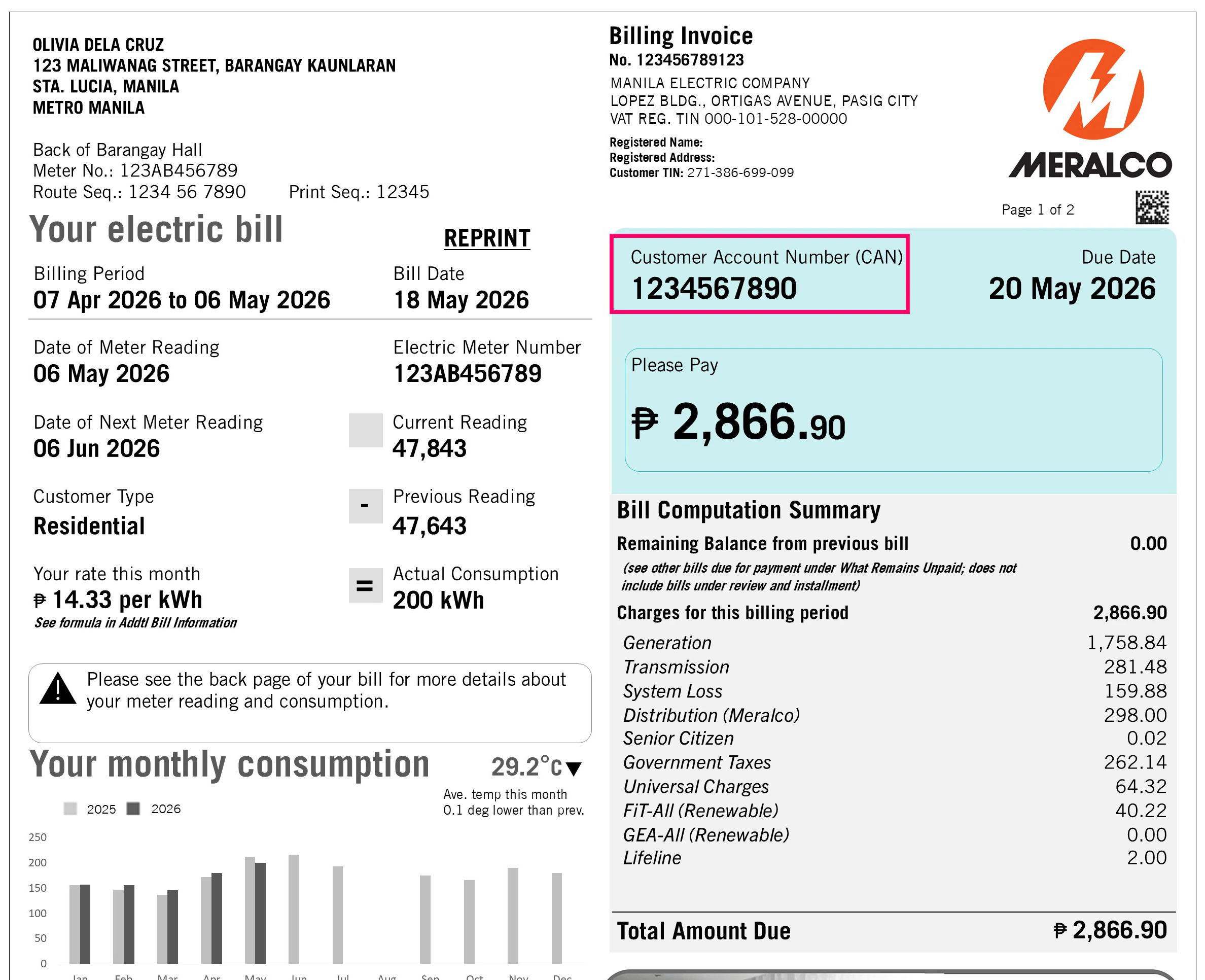
-
Where can I use my CAN?
Starting December 1, 2020, just use this Customer Account Number (CAN) to pay thru all Meralco authorized payment partners which can be found here: Payment Channels | Meralco
-
Are Bayad Center Partners included in this transition?
As of October 8, 2020, you can use your Meralco CAN when paying via Bayad Centers over-the-counter. Bayad Center partners such as GCash, Payamaya, coins.ph, and corporate partners such as SM are still transitioning to using CAN and will be available soon.
Please remember to settle the full amount of your bill on or before it’s due date.
-
Do I need CAN to pay via My Meralco?
With My Meralco you can pay your bills without having to key in your Meralco CAN. You only need your CAN when paying through Meralco’s authorized payment partners.
-
Can I scan the barcode next to my Meralco CAN on the Meralco bill to pay online?
Yes you CAN! For your convenience, simple SCAN the CAN barcode when paying with our partner apps!
-
Can I pay any amount using CAN?
Via Bayad Centers, you may pay any of the following amounts:
a. Total Amount Due
b. Current Amount Due (in the Summary for Customer Account Number Table)
c. Balance from Previous billing
d. Total Current Amount (in the Service info table)
Via bank partners, you may pay any of the following amounts:
a. Total Amount Due
b. Total Current Amount (in the Service info table)
We highly advise you to settle the full amount on your bills to avoid any inconveniences.
-
Can I make advance payments using CAN?
Yes, you can make an advance payment using your Meralco CAN as long as you do not have any remaining balances from previous bills. Kindly note that any advance payment will be credited to your next bill.
-
Can I make excess payments using CAN?
Yes, the excess amount that you pay will be credited to your next bill or any remaining balance from a previous bill.
-
Can I make partial payments using CAN?
Yes you CAN! But we highly encourage you to pay the full amount of your bill to avoid any inconveniences or forgotten dues 😊
-
Can I pay my overdue bills using CAN?
You can pay your overdue bills using CAN via Bayad Centers partners as long as your service is not yet disconnected. We highly encourage you to pay the full amount of your bill on or before its due date to avoid any inconveniences.
-
Can I pay my bills over the counter without bringing my bill?
You can pay your bills as long as you know your full amount and your 10-digit Meralco CAN. Kindly make sure that you settle your full amount on of before your due date to avoid any inconveniences. Always bring your Meralco bill with you when you pay over-the-counter to make sure you don’t miss a payment!
-
Can I pay for my disconnected service with CAN?
For disconnected services, kindly proceed to the nearest Meralco Business Center to settle your service for reconnection.
-
I have several services under my Meralco CAN. How can I determine which service gets paid or not?
The fastest way to monitor your payments in all Meralco payment channels is through your payment history in My Meralco. Kindly use our browser version of My Meralco to check all payments made for all the services registered under your account.
-
I have services registered under my Meralco CAN. I paid my bill for service A, but my payment was allocated to service B? Why? What can I do to correct this?
Your Service B may have had an amount that was pending for payment on an earlier due date. To re-allocate your payment, contact any of Meralco’s customer care channels or go to your nearest Meralco business center.
a. Call 24/7 hotline (02) 16211
b. Call 24/7 hotline 16210 (for businesses)
c. Email customercare@meralco.com.ph -
Do I use the Meralco CAN for reporting outages or filing reports?
Meralco CAN is currently used for payments only. For outages, please use your Service ID Number.
-
What are the advantages of enrolling to Auto-Payment Arrangement (APA)?
Auto-Payment Arrangement is a convenient payment method that ensures you never miss a bill. Your bank settles payments for you - whether charge your bill to your credit card or debit from your bank account.
-
When will my credit card/debit card be charged if I choose to enroll to APA?
APA payments are settled by APA agents by the bill's due date.
-
How can I unenroll from APA?
You can unenroll from APA via My Meralco.
Step 1. In the dashboard of My Meralco, look for Accounts or Account Details
Step 2. Select Account to be unenrolled and click Unenroll from APA button.
Step 3. Complete the fields and click on "Submit"
Alternatively, you can also unenroll APA directly through your banks, any Meralco Business Center or through customercare@meralco.com.phSubmit the following documents to our e-mail customercare@meralco.com.ph or any Meralco Business Center:
- Request letter to Unenroll your Account
- Please indicate your Service ID Number.
- For e-mail submission, Subject line will be Request to Unenroll from Auto Payment Arrangement
- Scanned copy of cardholder’s valid ID
-
When will my APA application take effect?
Your APA enrollment will be effective once Meralco receives confirmation from your chosen APA agent/bank that your request has been processed. You will receive an e-mail once your APA enrollment has been processed and approved.
-
Why can't I enroll in APA?
Please go to any Meralco Business Center or call the Meralco hotline (02) 16211 or 16210 (for Business) for assistance.
-
What is Online Billing?
Online Billing is a free service of Meralco wherein you may view a summary of your electric and non-electric bills online. In addition, you may also view the electronic copy of your electric bills invoiced within the past 13 months.
-
What are the benefits of Online Billing?
Here are the benefits of enrolling to Online Billing:
- Notification Sending. You will receive an email notification for your monthly electric bill once it is already available for viewing online.
- Accessibility and Convenience. You will have faster access to your billing information. You may also view current and past electric bills anytime, anywhere, in one convenient location. Instances of lost, misplaced, or damaged bills are also avoided.
- Ease of Payment. You may easily pay electric bills online. A link to the online payment facility is available in the bill delivery notification.
- Consumption Monitoring. You will be able to view your monthly kWh consumption for the current month and the past 12 months. You will also see your average monthly kWh consumption for the same period.
-
How can I avail your Online Billing Service?
Here are the steps on how you can conveniently view your bills online:
Create an account in My Meralco.
Enroll your electric service/s in your My Meralco Account.
-
I cannot view the electronic (pdf) copy of my bill. What could be the reason for this?
You can view an electronic copy (PDF copy) of your electric bills starting with the next billing following the enrollment of your Service to your My Meralco Account.
For your non-electric bills (e.g., disconnection notice, reconnection fee, etc.), only a summary of the bill details will be viewable online.
Note:
Bills will be viewable in your My Meralco Account for 13 months after invoicing.
-
I enrolled in your Online Billing service. Will I still receive a paper copy of my bills?
Yes, you will still receive your paper bills. If you wish to update your bill delivery option by going paperless, you may subscribe to Meralco’s Paperless Billing service.
-
Will I get notified if my payment transaction was successful or not?
Yes, you will be notified in several ways.
For successful transactions, you will get an onscreen thank you message to confirm your payment transaction. This screen will display, among others, the payment reference number of your transaction. In addition, a payment confirmation notification will be sent to your nominated e-mail address. Lastly, you can also check on My Meralco's payment history to check if your payment has been reflected (only for My Meralco payments).
Likewise, failed transactions caused by system or internet connection errors will have prompts or error messages. You will not receive any e-mail from Meralco if your online payment transaction fails.
-
How do I pay via My Meralco?
Use your My Meralco account to pay. The current payment steps are:
You may pay your bill either through the dashboard you will find upon logging in by simply choosing the “Pay Now” button or through the “Billings” tab.
If paying through the “Billings” tab:
- Go to the Billings tab and tick the checkbox next to the unpaid bill you wish to pay.
- Review the bill amount before confirming payment.
- Click on the "Pay and Apply Changes" and/or "Pay Now" button.
- Proceed to the Payment Summary Page and click "Pay Now" again.
- You will be redirected to the BAYAD payment page. Review and confirm BAYAD's Privacy Notice by clicking "Proceed."
- Enter all your payment details.
- Confirm your payment.
- Upon successful payment, BAYAD will display a "Payment Successful" screen.
- My Meralco will show the payment details screen.
- You will receive a confirmation of the transaction via SMS/email.
-
What payment methods can I use to pay my bills in My Meralco?
You can use any of the following cards powered by Mastercard, VISA, or JCB:
1. Credit card
2. Debit card
3. Prepaid Card
-
Where can I view my payment transaction?
All payments, using My Meralco or other channels, are viewable in the payment history page of your My Meralco account. To visit the payment history page, please login to your My Meralco account, click on Bills & Payments, then Payment History.
Note: Only payments made after portal account creation will be displayed in the Payment History page. -
Can I do partial payment?
Yes. Partial payments are allowed for settlement of single bills, however, non-payment of full amount on or before bill’s due date shall subject the service to disconnection.
-
Can I do overpayment?
Yes. Overpayments are allowed if all bills of your Meralco account are selected for payment. Excess payment will automatically be allocated to your account's next bill.
-
Can I schedule payments?
This feature is not yet available but is part of the additional functions we are developing.
-
Can I pay in advance?
Yes. You can do advance payment at either account level or service level. Advance payments are allowed if your account/service has no outstanding bills.
If the account level advance payment facility is not available, ensure that all services under your account are enrolled in the My Meralco to enable feature.
-
Will I receive an OR (Official Receipt) after my online payment?
No. You can request for the OR of your online payment transaction at any Meralco Business Center by just presenting your payment confirmation e-mail.
-
Can I request for payment reversal?
Please go to any Meralco Business Center or call the Meralco hotline (02) 16211 or 16210 (for Business) for assistance.
-
I accidentally paid the wrong Meralco bill, can I still cancel my payment?
Please go to any Meralco Business Center or call the Meralco hotline (02) 16211 or 16210 (for Business) for assistance.
-
How many bills can I pay in a single transaction?
For customers with a My Meralco account, there is no limit to the number of bills you can settle in a single transaction. You can pay for several bills, as long as the service you wish to pay for is registered in your My Meralco account.
-
Are there additional charges if I pay through My Meralco ?
It essentially depends on the payment method/card you use. Some methods incur convenience fees. This will go directly to our payment partner and will be added on top of the total amount selected for payment.
-
Is online payment via My Meralco secure?
Yes, our payment partner, PAYMAYA, is PCI-DSS (Payment Card Industry Data Security Standard) compliant.
-
Can I make a recurring payment on a monthly basis?
For monthly recurring payments, we recommend that you enroll in our partner banks' Auto-Payment Arrangement. For more information, please refer to APA FAQs.
-
Why can't I pay my bill online?
Some bills or items reflected on your bill summary cannot be paid. This can be due to any of the following reasons, your bill/service:
- is under complaint
- has a TRO (Temporary Restraining Order)
- is under IPA (Installment Payment Agreement)
- has a service irregularity
Please go to any Meralco Business Center or call the Meralco hotline (02) 16211 or 16210 (for Business) for assistance.
-
Can I pay other bills using My Meralco?
No. This facility is only for Meralco Accounts.
-
How long does it take my online payment to go through?
For payments made between 7AM to 11PM, your payment will be posted immediately to our system. For payments made during holidays or between 11PM to 7AM of the following day, your payment will be posted to our system morning of the following day.
-
I made a payment in one of your Business Centers third party agents (e.g. Bayad Center). Why isn't it showing up in my Portal?
Your payment in our Business Center/third party agents (e.g. Bayad Center) will be reflected in the portal 2 days after the date of transaction.
-
When can I expect the reactivation of my terminated service?
To be reactivated, you will need to re-apply and submit required documents after payment of all dues. Please go to the nearest Meralco Business Center for assistance.
-
When can I expect the reconnection of my disconnected service?
We’ll reconnect your service within 24 hours from the time your payment is posted.
For payments made on holidays and weekends, reconnection services will be for immediate scheduling the next business day.
Reconnection fees will be reflected on your next bill.
For further assistance, please call us at our 24/7 hotline at (02) 16211 or business hotline at 16210. -
I transacted an online payment and I received a payment confirmation message, why is my bill not updated to PAID and why can't I see my payment in the payment history page?
It's possible that your bill intended for payment is already tagged as paid in our system. For cases like this, your payment will then be applied to your account's next bill.
For payments made, other than through My Meralco (i.e. bank and over-the-counter third party payments) please expect the update within 36 hours.
-
I transacted an advance payment, why can't I see this payment in the payment history page?
Our system keeps a record of all your payments, including advance payments, which are treated as credits. Once your new bill is generated, your advance payment will be applied and reflected on your payment history page.
-
I did an overpayment, but why is it that I do not see my excess payment in the payment history page?
Our system keeps a record of all your payments, including overpayments, which are treated as credits. Once your new bill is generated, your overpayment, will be applied and reflected on your payment history page.
-
The status of my payment is "Pending Payment Posting", what does this mean?
It means that your payment is not yet received by our system but is already successfully processed by our payment partner, please wait for morning of the next day or contact Meralco please call us at our 24/7 hotline at (02) 16211 or business hotline at 16210 for further assistance.
-
There are transactions listed in my Payment History page that I didn't make, where are these from?
It may be the case that your service is also enrolled to another person's portal account and that person made a payment. This may happen for landlord and lessee arrangements, family members in the same household or business accounts. Payments for a service are visible to portal accounts to which this service is enrolled to.
Please report or visit your Meralco Business Center, for unauthorized enrollments of your Service IDs by other portal users or if there is a need to update records.
-
Will my credit cards be saved for future transactions?
No. Credit card information, as well as other payment method credentials, will not be stored by Meralco and shall only be passed to the Payment Gateway for authentication and processing.
-
Will my payment credentials be shared with anyone?
No. Credit card information, as well as other payment method credentials, will not be stored by Meralco and shall only be passed to the Payment Gateway for authentication and processing. You may also refer to the privacy policies of Meralco here (Meralco Privacy Statement).
-
What is Paperless Billing?
Paperless Billing is a free service of Meralco wherein you may opt to receive your monthly electric bills electronically instead of paper bills, subject to ERC’s Rules on Electronic Billing and Communications for Electricity Consumers.
-
What are the benefits of Paperless Billing?
Meralco Paperless Billing service aims to provide you with the following benefits:
- Accessibility and Convenience. You will have faster access to your billing information since electronic bills. You may also view current and past electric bills anytime, anywhere, in one convenient location. Instances of lost, misplaced, or damaged bills are also avoided.
- Ease of Payment. You may easily pay electric bills online. A link to the online payment facility is available in the Paperless Bill delivery notification.
- Reduction of clutter and paper waste. Bills sent via email or made available through the My Meralco minimize unwanted or unnecessary physical clutter.
- Environment-Friendly. You will be able to contribute in preserving the environment by saving trees and reducing carbon footprint from paper production and consumption.
-
How do I subscribe to Paperless Billing?
- Via My Meralco’s Paperless Billing Subscription Facility
- Log in to your My Meralco Account.
- Go to Accounts > List of Accounts.
- Select the Account Number you wish to subscribe to Paperless Billing.
- Click the Subscribe to Paperless Billing button.
- Read and agree to the Paperless Billing Terms & Conditions and Privacy Policy.
- Click Next.
- Input your secondary email address, if any.
- Click Submit to confirm your subscription request.
- You’ll receive an email confirming the status of your Paperless Billing subscription request within a day.
- Via My Meralco’s Start a Service Facility
(Note: This option applies only to applications for a Residential service. For business, you may submit your request through your My Meralco Account. You may also contact your Relationship Manager for further assistance.)
- Log in to your My Meralco Account.
- Input necessary application details.
- In the Value-Added Services page, select ‘Yes’ for ‘Would you like to enroll to paperless billing?’.
- Complete your online application for electric service.
- You’ll receive an email acknowledging receipt of your application for electric service and subscription request for Paperless Billing.
- You’ll receive an email confirming the status of your Paperless Billing subscription request once your application for electric service has been completed.
- Login to your My Meralco Account and update your secondary email address, if any, under Profile Management.
-
I cannot see my Account Number in My Merlalco's Paperless Billing Subscription page. How do I proceed with my subcription request?
A. For Account Holders:
If you are the Account Holder but you cannot see your Account Number in the Paperless Billing subscription facility, then there is a difference between your names as reflected in your Account record and your My Meralco Account.Please email the following documents to customercare@meralco.com.ph or submit them to the nearest business center.
a. Due to minor syntax difference
Example:
Account Holder name: Maria Rose A. Cruz
My Meralco Account name: Ma. Rose A. Cruz- No document will be required if the difference in the Account Holder name and My Meralco user’s name is due to minor syntax difference. For further assistance, please call us at our 24/7 hotline at (02) 16211 or business hotline at 16210, or email us at customercare@meralco.com.ph.
b. Due to change in marital status
Example:
Account Holder name: Maria Rose A. Cruz
My Meralco Account name: Ma. Rose C. Santos
- One (1) government-issued ID showing both the maiden and married surnames (e.g., ‘Maria Rose Cruz Santos’) of the Applicant; OR
- One (1) government-issued ID showing the maiden surname (e.g., ‘Maria Rose A. Cruz’) AND one (1) government-issued ID showing the married surname (e.g., ‘Maria Rose C. Santos’) of the Applicant; OR
- Marriage Certificate
c. Due to other cases
Example:
Name in either record is a nickname, name in either record is an abbreviation
- One (1) government-issued ID OR two (2) secondary IDs of the Applicant
Additional supporting documents may be required on cases not listed above, subject to Meralco’s evaluation of the case.
B. For Actual Users:
If you are not the Account Holder (i.e., an end-user / actual user of the electric service), please submit the required documents as shown below to customercare@meralco.com.ph or to the nearest business center.For further assistance, please call us at our 24/7 hotline at (02) 16211 or business hotline at 16210, or email us at customercare@meralco.com.ph.
a. The Meralco Account is under the Name of an Individual Person
Example: Residential services, businesses (i.e., sole proprietorships) where the registered customer is named after an individual- Authorization Letter OR Special Power of Attorney (SPA) from the Registered Customer, AND
- One (1) government-issued ID or two (2) secondary IDs of the Registered Customer, if available
If the registered customer is already deceased or if his/her whereabouts is unknown to the Applicant, the latter is required to submit any of the following:
- Document proving that the Applicant has the legal authority to occupy the premises covered by the service contract of the Meralco Account, e.g., Deed of Sale, Contract of Lease; OR
- Other document proving that the Applicant occupies the premises covered by the service of the Meralco Account: (a) government-issued ID of the Applicant, (b) utility bill for two (2) months (e.g., Meralco bill, water bill, etc.), OR (c) Barangay Certificate.
b. The Meralco Account is under the Name of a Condominium Developer or Association
Example: Residential or non-residential condominium units under the name of the condominium developer/association- Notarized Secretary’s Certificate appointing/authorizing the Applicant to subscribe the Meralco Account to Paperless Billing; OR
- Authorization Letter issued by the condominium’s Administration Office/Association, AND one (1) government-issued ID OR two (2) secondary IDs of the person who issued the Authorization Letter; OR
- Document proving that the Applicant has the legal authority to occupy the premises covered by the service contract of the Meralco Account, e.g., Deed of Sale, Contract of Lease; OR
- Other document proving that the Applicant occupies the premises covered by the service of the Meralco Account: (a) government-issued ID of the Applicant, (b) utility bill for two (2) months (e.g., Meralco bill, water bill, etc.), OR (c) Barangay Certificate
Note:
Notarized Secretary’s Certificate, if submitted during application for service or My Meralco account creation, should indicate that the Applicant has the authority to subscribe the Meralco Account to Paperless Billing. Else, another Notarized Secretary’s Certificate indicating that the same will be required.
c. The Meralco Account is under the Name of a Business or Organizationi. For Sole Proprietorships and Partnerships:
If the Applicant is the sole proprietor or one the managing partners:- One (1) government-issued ID or two (2) secondary IDs of the Applicant
If the Applicant is NOT the sole proprietor or one the managing partners,- Authorization Letter issued by the sole proprietor or one the managing partners, AND
- One (1) government-issued ID or two (2) secondary IDs of the sole proprietor or one the managing partners
ii. For Corporations, Government Owned and Controlled Corporations (GOCCs) with Charter, Cooperatives, Non-Governmental Organizations (NGOs), Foundations, Religious Organizations:
- Notarized Secretary’s Certificate appointing/authorizing the Applicant to subscribe the Meralco Account to Paperless Billing
Note:
Notarized Secretary’s Certificate, if submitted during application for service or My Meralco account creation, should indicate that the Applicant has the authority to subscribe the Meralco Account to Paperless Billing. Else, another Notarized Secretary’s Certificate indicating that the same will be required. -
When will my monthly electronic bill be available?
Your monthly electronic bills will be posted in your My Meralco Account within a day after the meter reading date, unless the bill was subjected to further internal validation by Meralco. You will also be notified via email once your bill has been posted in your My Meralco Account.
-
How can I view my electronic bills?
There are two ways to view your electronic bills.
- Via email notification. Click the link to your electric bill in the bill notification sent to your registered email address.
- Via My Meralco. Log in to your My Meralco Account and access the View Bills facility.
-
I haven't received an email regarding my electronic bill yet. What may be the cause of this?
In case of delivery failure to your email address, we’ll send your bill notification to your nominated secondary email address, if any. To ensure that you will always receive the bill notifications we’ll send to your email address, please ensure that:
- Your email's inbox is not full.
- Your email address is active.
- cxe@meralco.com.ph is in your email’s contacts list so our emails will not be treated as a spam.
In case you have not received an email notification within five (5) days, you may also login to your My Meralco Account to check if the electronic bill is already posted. If it is not yet posted, your bill may have been subjected to further review by Meralco.
-
Can I revert back to receiving paper bills?
To have a printed copy of your bills, you have the option to download and/or print a copy of your bills from your My Meralco Account. Should you opt to update how you receive your electric bills, you may request for the updating of your bill delivery option through your My Meralco Account six months after the effective date of your Paperless Billing subscription.
-
My subscription to Paperless Billing has not yet exceeded six months, but I am no longer authorized to received the electronic copy of bills. How can I update my bill delivery option?
If the effectivity of your Paperless Billing subscription has not been over six (6) months and you will no longer be authorized to receive the electronic copy bills (e.g. due to change of residence), you may submit a written request specifying your reason, and one (1) government-issued ID or two (2) secondary IDs.
For further assistance, please call us at our 24/7 hotline at (02) 16211 or business hotline at 16210, or email us at customercare@meralco.com.ph.
-
Online Payments
I paid via My Meralco, but I am not the account/contract holder, will I get a payment confirmation email?
Yes. You will receive a payment confirmation email in your registered email address. If the account/contract holder has a My Meralco account, he/she will also receive the same email.
-
I paid through online banking/other OTC channels (like Bayad Center), will I also get a payment confirmation email from Meralco?
Receiving payment confirmation notifications from Meralco is an exclusive feature for My Meralco users who paid via the My Meralco Website/ App.
If you would like to receive payment confirmation notifications, please create a My Meralco account here.
-
Can My Meralco's Payment History store all my payments?
Your My Meralco account can store and present up to 13 months’ worth of payments in the Payment History page. If you need to track your payments beyond the 13-month period, please call our 24/7 hotline (02) 16211.
-
I paid through My Meralco app, how long should I wait for my payment confirmation email?
If you paid between 7AM to 11PM (Phil Standard Time) via My Meralco app, you should get a payment confirmation immediately after your transaction.
If you did not get an email by the above schedule, first check your SPAM folders. If you don’t find any there, please call us at our 24/7 hotline at (02) 16211 for assistance.
-
Can I also view my payment transactions in the My Meralco?
Yes you can, you may check all payments made per bill on the Bills and Payments page
-
Why is the payment history page of my My Meralco account blank?
You may have created your My Meralco Account after making your payment. The payment history page is designed to show all payments transacted after the creation of your online account. In addition, to ensure that all your payments will be shown in the payment history page, please make sure to register all your Meralco SINs/Account Numbers in your online account. If your My Meralco account is not newly created and you still experience this, you can call our 24/7 hotline at (02) 16211.
-
Does the convenience fee go to Meralco?
Meralco does not profit from convenience fees. The convenience fee is collected by Meralco's respective payment partners such e-wallets (GCash, Maya) and banks and card networks and are simply processed by Meralco and Bayad.
Customers paying through the My Meralco website/app using the Bayad e-wallet as a payment method are not subject to any convenience fees since Bayad has waived this fee as the payment processor for My Meralco
-
Can I top-up and load for my kload/pres account via My Meralco?
This feature is not yet available on My Meralco, but you may load through any of our other loading channels.
-
If I have multiple services/bills under an account and I pay in advance, how is my payment allocated?
The advance payment feature of My Meralco, will allow you to select the Account or the specific (SIN) Service ID Number to pay
Please note that if you select to pay an Account Number and you have multiple bills/services under your account, the advance payment will automatically be allocated to your first generated bill regardless of SIN.
-
I just checked, payment was credited/debited from my card/bank but my payment failed. What should I do?
Please call us at our hotline (02) 16211 so we can assist you.
-
I accidentally paid twice, can I request for a refund?
Your second successful transaction will either be posted to other unpaid bills under your account or will be considered as prepayment in case you do not have any unpaid balances at the period of the transaction. For your convenience, you may choose to allow Meralco to subtract the excess payment from your next bill. In case you would like to pursue a refund, please go to any Meralco Business Center or call the Meralco hotline (02) 16211 for assistance. Please note that refunds may take a few days to process.
-
Why is there a convenience fee?
A “Convenience Fee” enables Meralco and its partners to operationalize and maintain a secure, reliable payment facility that customers can access anytime, anywhere.
-
What are my other payment options?
You may view the full list of payment options here.
-
Can I also get payment confirmations via SMS?
No. Currently, payment confirmations are only sent via email.
-
What is the security code?
This is commonly known as the CVV or CVC. It is a 3-4 digit number printed at the back of your card (usually in the signature field). This is an anti-fraud feature to help verify that you are in possession of the card being used for payment.
-
I can’t proceed with my payment. Why is the “Next” button not working?
Please check that all required fields are filled out correctly:
1. Payment option (type of card)
2. Card number
3. Card’s expiry date – 2-digit month (MM) and 4-digit year (YYYY)
4. Security code/CVV or CVC
-
What does near-real time payment posting mean?
This means that your payments will be transacted by Meralco at the time of payment, provided you pay between 7:00AM-11:00PM. If you pay between 11:01PM - 6:59AM the following day, the payment will be credited at 7AM the following day.
-
I made a payment in one of your Business Centers /Third party agents (e.g. Bayad Center, Banks). Will I also get a payment confirmation via email?
No. Receiving payment confirmation notifications is an exclusive feature for My Meralco/My Meralco App users who paid via My Meralco/My Meralco App.
-
Why are the reference numbers on my Meralco Online’s Payment History incomplete?
Only payments made through the My Meralco/My Meralco App will have a reference number. For payments made through other channels, kindly refer to the reference number or receipts provided to you.
-
Auto Payment Arrangement
Can I enroll to APA via My Meralco?
You will need to coordinate with your preferred bank(s) to enroll in an Auto-Payment Arrangement.
-
What is APA (Auto-Payment Arrangement) ?
Auto-Payment Arrangement is a scheduled payment method arranged with your banks. Choose between Automatic Debit or Automatic Credit Arrangements.
1. For Auto Debit - Allow your bank to debit the bill amount from your account on the due date and send the payment to Meralco.
2. For Auto Credit - Auto charge your electric bill to your credit card.
-
Digitized Official Receipt
How can I receive a digitized copy of my Official Receipt (OR)?
You can receive your digitized OR through any of the following convenient options:
- Via email or SMS after payment posting
To enable this feature:
- Download and sign up to My Meralco app and provide us with your contact information:
- Update your contact information with Meralco to ensure timely delivery of notifications
- Via the My Meralco app
- Sign up and log in to the My Meralco app
- Access your digitized OR through the Billings menu*
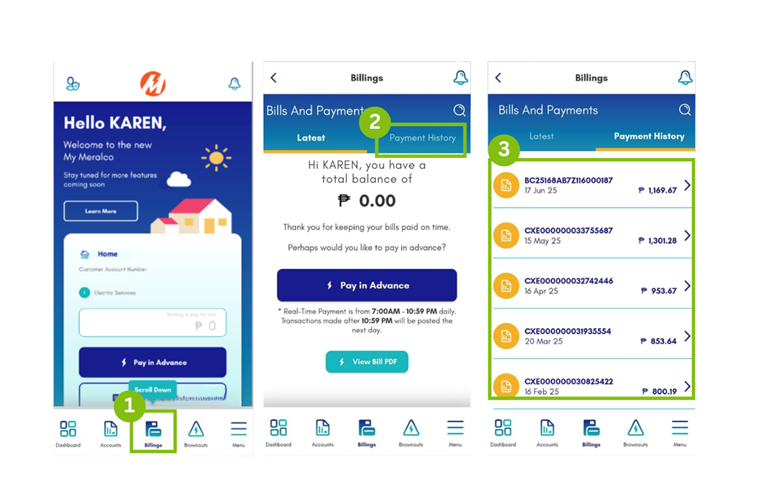
*Only payments made from June 26 onwards will have a PDF copy of the OR in the My Meralco app.
- Via email or SMS after payment posting
-
How can I enable/disable my payment confirmation notification?
- Via the My Meralco:
- From the dashboard, go to the Menu Suite.
- Tap Notification Settings.
- Tap the dropdown icon for Payment Confirmation and tick Email. You may also choose to tick SMS and Push Notifications depending on your preference.
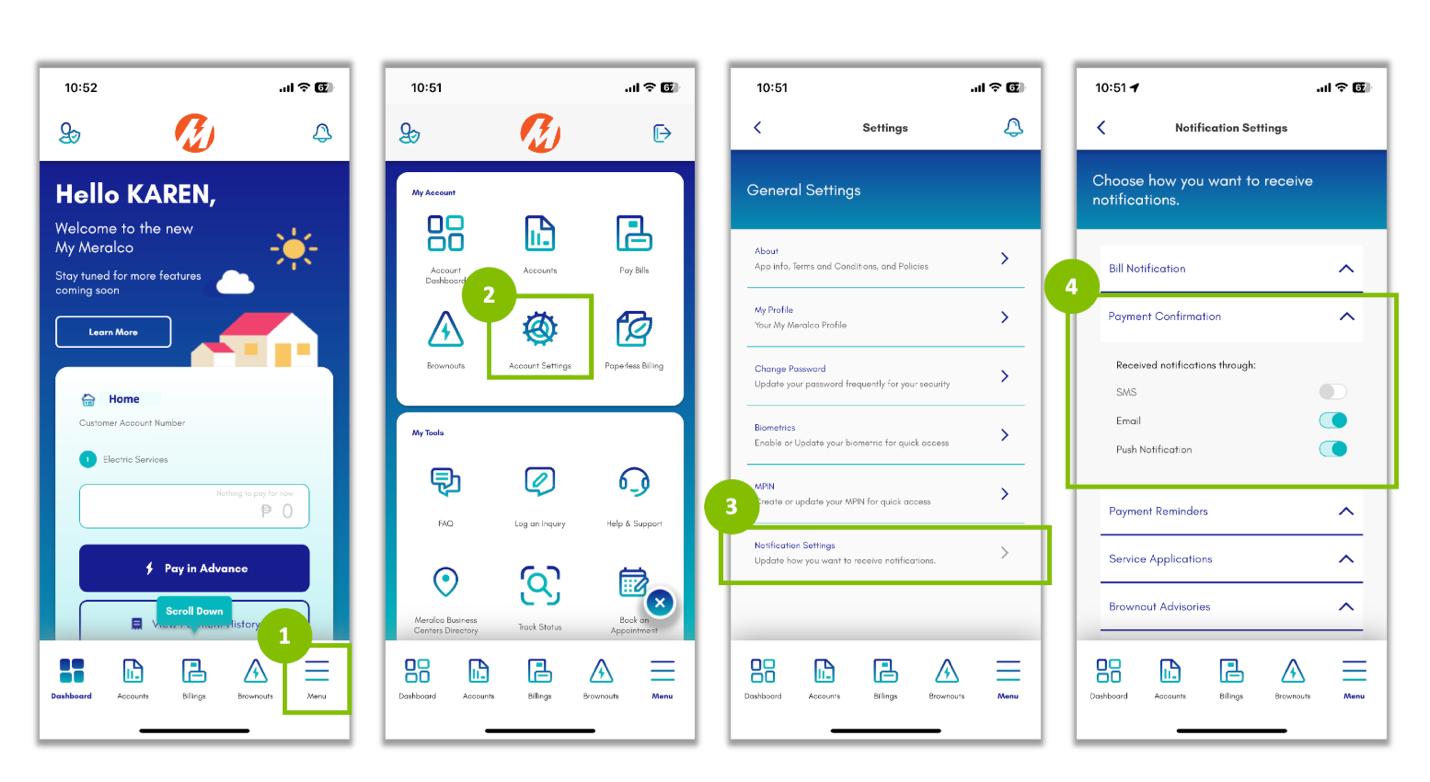
- Via the Customer Database webform:
- On the Privacy Policy page, click the “Proceed” button.
- Input your 10-digit Customer Account Number and Service ID Number, then click the “Next” Button.
- Input your First and Last Name, then click the “Next” button.
- Select the “Notification Enrollment Update”.
- Tick the boxes to choose your preferred notification:
- SMS
- Once done, tap “Save”. A dialog box will pop up to confirm; select “Yes” to save your changes.
- The Summary page will show the updates made. Click “Next”.
- Once the OTP has been verified, there will be a notification confirming that the contact information was successfully updated.
- Via the My Meralco:
-
Can I use the digitized Official Receipt (OR) for tax filing?
With the Ease of Paying Taxes (EOPT) law, Official Receipts are now considered supplementary documents for tax filing purposes and serve as proof of payment for Meralco customers. Meralco invoices or your electric bills serve as primary documents for sale of services and claiming of input tax.
-
Will I see my Official Receipt (OR) on the same day I pay in My Meralco?
The official Receipt will be issued within 2 business days upon confirmation of your payment.*
* Only payments made from June 26 onwards will have a PDF OR in the My Meralco app.
-
Will my Official Receipt (OR) be available in the My Meralco app if I made my payment through any other authorized payment partner?
Yes. If you’re an existing My Meralco app user, the digitized Official Receipt (OR) will be made available within two (2) to five (5) business days following the successful posting of your payment.*
* Only payments made from June 26 onwards will have a PDF OR in the My Meralco app
-
Meter Reading
How often is my meter read?
Once every month. You can check your bill for the actual schedule of your next meter reading. Here is an example:

Start or Modify Service
-
What are the differences between overhead and underground installation of facilities?
Meralco facilities, such as transformers, banks, and wires, can be installed either overhead or underground. Overhead facilities are installed on poles and are owned by Meralco. On the other hand, underground facilities are installed inside conduits which are owned and prepared by the customer with the approval of Meralco.
Overhead is more cost-effective and is easier to access and maintain. Underground installations are concealed from public view and addresses aesthetic concerns. Some areas, however, (ASEANA, BGC, etc.) only allow underground installations.
Customers may also want to insist on underground installations. In these specific instances, customers are charged with the difference in cost versus the cheapest scheme.
-
Is it possible to have 220V and 110V enabled in my premises?
Unlike in the US which uses 110V for standard appliances, the standard voltage level for residential use in the Philippines is 230V according to the PEC. If you have appliances with 110V, an external transformer or Auto-Voltage Regulator (AVR) is required to be used to match Meralco's nominal voltage. Use of appropriate transformer devices would also ensure your safety and proper functioning of your device.
-
What is the standard voltage in the Meralco franchise?
Meralco only offers the following voltage levels:
- Secondary Voltage Levels: 230V, 460V, 400/230V
- Primary Voltage Levels: 13.2kV and 34.5kV
For residential services, the standard nominal voltage is 230V in accordance to the provisions in the Philippine Electrical Code (PEC)
-
Why is it important to apply for a permanent service once construction has been completed?
A permanent service will be beneficial to the customer once construction has been completed, because the facilities and corresponding power requirement will be matched with the day-to-day loads of the residential or business customer. It will also ensure that the customer is billed according to the appropriate service rate and kilowatt demand.
-
When is it necessary to apply for a temporary electric service?
Temporary Service is provided to customers who will use the electricity during the construction phase of their residential or business premises. Typical loads are welding machines, power tools, and similar construction devices. A corresponding Installation and Removal (IR) Cost is required to be settled and is based on the facilities that will be installed and eventually retired.
-
How can I request installation of a sub-meter?
Meralco allows use of sub meters as long as it is installed at any point on the loadside wire typically after the Meralco meter. However, maintenance and billing of the sub-meter is not covered by the customer's contract with Meralco.
Meralco personnel are not allowed to install sub-meters. Customers are in charge of the purchase and installation of the sub-meters. The customer however may seek assistance from an electrical experts Certified by Meralco (CBM) for the proper installation of a sub-meter.
-
Service Rate Classifications
Service Rate Classifications:
Service Rate is a way for Meralco to classify its customers and is used to properly bill your monthly consumption based on the approved rate schedule.
The different rate classification across the following customer types are as follows:
For Residential:
Residential – used for a single dwelling unit with at least 1 toilet & bath and a kitchen facility for the primary purpose of residence.
For Business:
General Service (GS) – commercial and industrial customers with a connected load of less than 40kw for general power, heating, and/or lighting.
- General Service A (GS-A) – any business premise whose contracted capacity does not exceed 5kw (e.g. bakery, salon, car wash, etc.)
- General Service B (GS-B) – any business premise whose contracted capacity is between 5kw and 39kw (e.g. restaurant, small commercial spaces, convenience stores, etc.)
General Power (GP) – commercial and industrial customers with a connected load above 40kw
You may click on the following link for a detailed discussion on bill components.
-
How long does it take for Meralco to energize a new electric service?
Meralco ensures that applications for electric service are energized professionally, safely, and on time as agreed with the customer through the Agreed Target Energization Date form.
There are however several factors that affect energization timelines:
- Service Application Type and Design Complexity
In general, Ordinary Service Applications (OSA) or applications which only require the installation of service drop or meter are easier to complete than Project-Covered Applications (PCA) or applications which require to undergo a design process and installation of additional Meralco facilities, such as poles and transformers.
You may click this link for a discussion on service application types.
- Meralco Time and Customer Time
For safety, Meralco will only energize the application for electric service upon the customer’s completion of the necessary documentary and technical requirements. Based on the condition of the application, the customers may be required to submit additional documents, such as technical permits and right-of-way.
You may click this link for a full list of documentary and technical requirements.
-
Service Application Types
Service Application General Categories:
There are 2 basic categories of service application, regardless if the request is sales or after-sales:
- Ordinary Service Application (OSA) – existing Meralco facilities are sufficient to address the customer power requirements. This only involves the installation of a service drop and meter after the customer has completed both documentary and technical requirements.
- Project-Covered Application (PCA) – involves the installation of additional Meralco facilities, such as poles, transformers, and lines, to provide the customer power requirements. This involves a design of facilities process, which both Meralco and customer should agree before starting with the construction.
The customer is not required to determine this category upon application. This will be Meralco’s responsibility following field inspection and will be presented to the customers as one of the findings.
Service Application Types according to Request:
- New Connection – for newly constructed houses, establishments, and commercial spaces.
- Modification of Service – for requests to update the current technical capacity and/or contractual agreements with Meralco, such as upgrading or downgrading of power capacity, relocation or remodel of facilities, and updates in contract holder details
- Re-Activation – for energization of an inactive service with an already terminated contract for electric service, which may be the result of customer termination request or meter removal due to arrears. Note that this is different from “reconnection” which involves an inactive service but still with an active contract with Meralco
- Termination – for requests to permanently disconnect the electric service, primarily due to move-out
You may click the link to go to the service application pages.
-
How do I apply for a residential electric service?
You may apply for a new electric service for residential use through the following Meralco channels:
- Online service application requirements and steps
- Call Center Hotline 16211
- Business Centers (Click here for a list of the offices.)
How do I apply for a residential electric service?
Applying for a new electric service is fast, easy, and convenient with the following steps:
- Submit the following requirements:
- Accomplished Application Form (see service application requirements and steps)
- 1 Valid ID (Click here for a list of accepted IDs.)
*For Representatives: Authorization Letter & Additional IDs are required.
- Electrical Plan or Electrical Load Requirement
- Occupancy Documents (e.g. TCT, Click here for a list of occupancy documents.)
- Schedule for an on-site inspection. Meralco will conduct an on-site inspection of the availability of facilities and condition of the customer premises being applied for.
- Begin construction of your service entrance. Customer will acquire the meter socket from the nearest Meralco business center to be used in the installation of the service entrance. A duly-licensed electrician, contractor, or an electrical expert Certified by Meralco (CBM) is expected to construct the service entrance for a safe, technical-compliant, and hassle-free installation.
- Sign electric service contract, pay bill deposit, and submit Certificate of Final Electrical Inspection (CFEI) at the nearest Meralco business center.
- Electric Service Contract is signed by the customer.
- Bill Deposit is computed based on the electrical plan or electrical load requirement (Click here for the bill deposit amount table.)
- Certificate of Final Electrical Inspection (CFEI) is acquired at the City’s Building Administrator’s Office or City Engineering’s Office.
- Service energization. Meralco will perform a final inspection before installation of meter. It is required that the customer or a representative is available on-site during service energization.
Also, to ease your application for a new electric service for residential purposes, you may avail the services of electrical experts Certified by Meralco (CBM). You may visit www.amc.org.ph for more information.
-
Where do I apply for a residential electric service?
You may apply for a new electric service for residential use through the following Meralco channels:
- Online service application requirements and steps
- Call Center Hotline 16211
- Business Centers (Click here for a list of the offices.)
-
How do I apply for a business electric service?
Meralco ensures that the application of new electric service for business is fulfilled with professional quality, according to safety standards, and on-schedule with the following steps:
1.Submit the following requirements:
- Request Letter for Service or Accomplished Application Form (see service application requirements and steps)
- 1 Valid ID (for single proprietorship, click here for a list of accepted IDs), DTI Certificate (for non-corporations) or SEC Certificate (for corporations)
*For Representatives: Authorization Letter & Additional IDs are required.
- Tax Identifications Documents (e.g. BIR Certificate of Registration Form 2303, or click here for the complete list of accepted taxation documents)
- Electrical Plan or Electrical Load Requirement
- Occupancy Documents (e.g. Lease Agreement, or click here for a list of accepted occupancy documents.)
- Schedule for an on-site inspection. Meralco will conduct an on-site inspection on the availability of facilities and perform an assessment of the additional installation the business may require.
- Review and acceptance of contract. Meralco will present the contract for electric service, which details the following: a.) technical specifications, b.) commercial arrangements, and c.) costs for the installation of additional facilities, if applicable.
- Begin construction of service entrance and submit the Certificate of Final Electrical Inspection (CFEI). A duly-licensed electrician, contractor, or an electrical expert Certified by Meralco (CBM) is expected to be commissioned by the customer for a safe, technical-compliant, and hassle-free installation. Depending on the arrangement with the customers, these third-party service providers would also acquire the Certificate of Final Electrical Inspection (CFEI) from the City’s Building Administrator’s Office or City Engineering’s Office.
- Payment of service application charges and bill deposit. Service application charges includes the cash advance should there be additional facilities to be installed required by the business. Bill deposit is computed based on the electrical plan or electrical load requirement (click here for the bill deposit amount table). Both fees will be settled at any Meralco business centers.
- Construction of additional lines and facilities. This is an optional step for business that require the installation of additional facilities based on the electrical load requirement. Additional lines and facilities may include lineside wires, transformers, and poles.
- Service energization. Meralco will perform a final inspection before installation of meter and energization of facilities. It is required that the customer or a representative is available on-site during service energization.
Also, for a safe, technical-compliant, and hassle-free application for a new electric service for business purposes, you may avail the services of electrical experts Certified by Meralco (CBM). You may visit www.amc.org.ph for more information.
-
Where do I apply for a business electric service?
You may apply for a new electric service for business through the following Meralco channels:
- Online service application requirements and steps
- Call Center Hotline 16210
- Business Centers (Click here for a list of the offices.)
- Relationship Managers* (Click here to select and contact your Relationship Manager.)
*Relationship Managers are assigned for Corporate Partner accounts.
-
How do I apply for a protective line cover?
The list of requirements for a protective line cover are as follows:
- Valid identification documents
- Contact person with proper contact details
- Location of the primary lines where rubber hose will be installed
- Sketch of the location or pictures
- Purpose of rental
- Settlement of rental fee
Applications for protective line covers are processed in any of the Meralco business centers.
-
What are Protective Line Covers?
Protective Line Covers or "Rubber Hoses" provide protection to customers’ personnel working in potentially hazardous proximity to Meralco’s high-voltage (34.5kV, 13.8kV, 13.2kV, and 6.24KW) power lines. These rubber hoses are rented and installed upon the request of the customer.
-
When do I need to apply for a 3-phase service?
Residential Services:
A typical residential household would not need a 3-phase service. However, some houses with special equipment with 3-phase ratings will require a 3-phase service. Typical 3-phase equipment are as follows: swimming pool pumps, large centralized air-conditioning units, commercial-grade chillers, and elevators. The equipment will not function without the appropriate phase requirement.
We advise you to consult your electrical contractor or electrical experts Certified by Meralco (CBM) to have a proper discussion of this technical requirement.
Business Services:
Businesses with large machines may require 3-phase service. Examples of which are manufacturing equipment, elevators, and large air-conditioning or heating machines. To ensure safe and proper operation of your machines, we advise you to consult your electrical contractor or electrical experts Certified by Meralco (CBM) to have a comprehensive discussion of this technical requirement.
Is there a cost difference between 1-phase and 3-phase services?
Monthly electricity rates do not differ between single-phase and 3-phase services. However, costs to install will vary, depending on the size of the loads.
-
What is a multi-metering per floor setup?
Developers may opt for a multi-metering per floor setup if the building is at least 30 floors or with at least 300 units. This scheme involves multiple locations of the Meralco meters or meter centers for a certain building or residential premises. The meter centers for this installation may be located in each floor, serving the units in that level. Customers would consider this setup as more cost-effective because of cable length considerations compared to having all meters in a single location.
-
When is it necessary to apply for a multi-metering setup?
A multi-metering setup is usually applied by large buildings with multiple individual units, such as condominiums, apartments, or commercial establishments, for commercial and residential purposes. This can also be availed by small apartments usually for lease, as long as separation guidelines can be met.
An advantage of the multi-metering setup is that each unit can manage their own electric service, including availment of special programs such as Peak Off-Peak and prepaid services, and tax declaration for commercial purposes. However, customers must need to factor that the multi-metering center will form part of their civil works.
The multi-metering setup assumes a single location for all the Meralco meters, which serve the individual units of a residential, business, or mixed-use premises. The multi-metering center may be located at the ground floor, basement, or on each floor of the building.
-
List of Accepted IDs:
(in alphabetical order)
- Commission on Elections (COMELEC) Voter’s ID
- Driver’s License
- Firearm’s License ID
- Government Service and Insurance System (GSIS) ID
- Integrated Bar of the Philippines (IBP) ID
- National Bureau of Investigation (NBI) Clearance
- Old version of GSIS, PhilHealth, SSS, TIN, or Voter’s ID
- Philippine Health Insurance (PhilHealth) ID
- Philippine Passport
- Police Clearance
- Postal ID
- Professional Regulatory Commission License (PRC) ID
- Senior Citizen ID
- Social Security System (SSS) ID
- Tax Identification Number (TIN) ID
- Unified Multipurpose ID
- Any other Philippine (either local or national) or foreign government-issued ID with picture and signature
-
What is the difference between an Applied Load (AL) and Contracted Capacity (CC)?
Applied Load (AL) is the load in kilowatts (kW) computed from your submitted electrical plans. Contracted Capacity is the maximum power requirement of the customer at any given time and is computed by multiplying the Applied Load by the Demand Factor based on the nature of your business. This is also used as the basis for the installation of the appropriate Meralco facilities.
-
How is GMBD computed?
GMBD is computed by taking 70% of your Contracted Capacity (for GSB, 5kw is the minimum GMBD while for GP, 40kw is the minimum GMBD). For General Power customers, you can modify your contract and GMBD once a year while for General Service-B customers, you can apply for modification of contract once a month. You may click on the link for a discussion on customer classes.
GMBD is used to compute for the Demand and Distribution Charges*when the actual kilowatt demand is lower than the guaranteed minimum as specified in the service contract. If the customer has reached the guaranteed minimum, the demand and distribution charges are based on the actual kilowatt demand registration. Hence, business customers who have zero (0) kwh consumption are also billed with GMBD charges.
*You may refer to the monthly published rates for computation details.
-
What is GMBD?
The Guaranteed Minimum Billing Demand (GMBD) is the minimum demand in kilowatts (kW) for business customers with contracted capacity of 5kW and above.
It covers the development, operations and maintenance of the distribution system of Meralco from high-voltage transmission grids to commercial and industrial accounts. The GMBD of the customer is based on his load requirement and should be right-sized during contracting. This is in compliance with ERC rules.
-
How can I apply for a streetlight?
The application for streetlights has the same process and documentary requirements as any service application for electric service. The only difference is the requirement for a council resolution (that the application has a budget) which is specific for flat streetlights for LGUs.
You may visit any of Meralco’s business centers for a streetlight application.
-
What are metered streetlights?
Metered streetlights are customer-owned lighting fixtures for the illumination of streets, whether for public use or for the purpose of private subdivisions and villages. It is labelled as “metered”, because Meralco charges are based on the actual consumption of the streetlights. There are no special rates for metered streetlights.
-
What are flat streetlights?
Flat streetlights are Meralco-owned lighting fixtures used for the illumination of streets, whether for public use or for the purpose of private subdivisions and villages. It is labelled as “flat”, because Meralco charges a fixed consumption for each streetlight based on the type of lighting fixture installed. Flat streetlights are usually applied by local government units (LGU), homeowner associations, and land developers.
-
What are the fees that I need to settle for a new electric service?
The following are the fees for a new residential and business electric service:
A. Bill Deposit
The bill deposit is an amount required from all customers of all distribution utilities as a guarantee for the payment of electric bills. It may be likened to the advance deposit made by a tenant for the rental of residence or office space. The bill deposit amount corresponds to an estimated average 1-month bill, which is computed based on the electric load requirement submitted during service application.
The following table summarizes the bill deposit amounts for residential and small commercial use:
Applied Load (AL) Bracket Residential Use Business Use AL <= 1.00KW Php 810.00 Php 1,360.00 1.00KW < AL <= 1.50KW Php 1,220.00 Php 2,110.00 1.00KW < AL <= 1.50KW Php 1,220.00 Php 2,110.00 1.50KW < AL <= 2.00KW Php 1,620.00 Php 2,910.00 2.00KW < AL <= 3.00KW Php 2,510.00 Php 4,610.00 3.00KW < AL <= 4.00KW Php 3,450.00 Php 6,140.00 4.00KW < AL <= 5.00KW Php 4,580.00 Php 7,670.00 * Applications with more than 5KW of applied load need to be computed and formalized by a Meralco representative.
Please note that the bill deposit amount may be adjusted yearly to reflect the close average monthly bill of the customer. The adjustment mechanism is covered by Meralco’s Annual Update of Bill Deposit (AUBD) program.
Lastly, the bill deposit earns an interest of 0.25% as approved by the Energy Regulatory Commission (ERC). It may also be refunded after the completion of a request for service termination.
You may click here to know more about bill deposits & interests, AUBD program, and bill deposit refunds.
B. Cash Advance (as Required)
Cash Advance Fee is based on the additional Meralco facilities that are required to be installed to energize the premises. This includes the cost of primary power lines, poles, transformers, and other accessories that support the installation. The fee will be computed based on the customer’s required facilities following Meralco’s inspection and initial design of the electric service installation. Meralco officially provides the computation through a Cash Advance letter to the customer.
Similar to bill deposit, the cash advance fee is refundable.
You may click here to know more about Cash Advance Refunds.
C. Installation & Removal (IR) Costs (for Temporary Connections, as Required)
Installation & Removal (IR) Costs, which are unique to temporary connections, are based on the temporary facilities that are required to be installed and eventually removed upon energization of a permanent service. This includes the partial cost of poles, primary power lines, transformers, and other accessories that will be installed, as well as the cost of retirement of these facilities. Meralco officially provides the computation through an Installation & Removal (IR) Cost letter to the customer.
Unlike bill deposit and cash advance, the IR cost is non-refundable.
-
What are the advantages of availing trusted electricians and contractors?
Meralco suggests to its customers the involvement of trusted electricians and contractors, such as electrical experts Certified by Meralco (CBM), in the completion of its technical requirements for a safe, reliable, and convenient service application process.
Trusted electricians and contractors engage in continuous training for professional service delivery to its customers. The CBMs alone, engage in several programs facilitated by Meralco to aid the needs of our customers. These include technical training programs, alignment of technical standards, and customer service.
How is Meralco affiliated with trusted electricians & contractors, including CBMs?
Though Meralco organizes training and accreditation program of contractors, the CBMs are in no way legally connected with Meralco. Meralco remains as a third-party entity between the agreements of the contractor and the availing customer. Meralco however presents to the customers both supplier and service package options for competitive and best-price offerings.
To know more about or avail of services by CBMs, you may visit www.amc.org.ph
-
What is the difference between lineside and loadside wires?
Simply put, an application for electric service for an ordinary household may look at only 2 categories of wires that must be installed to connect his premises with Meralco facilities.
Lineside wires may be considered as the upstream component and pertain to the overhead wires from the Meralco poles, to the drip loop, to the connections terminating at the customer’s meter socket. Meralco is in charge of these installations as part of the service application process.
Loadside wires may be called as the downstream component and comprise of the wires connecting the meter socket to the circuit breaker to the wire installation inside the customer’s premises; and are considered as customer’s property. During the service application process, customers are required to complete the installation of loadside wires as part of the technical requirements. Customers would acquire the services of trusted electricians and contractors, such as CBMs in the completion of this technical requirement.
-
What is the “Electrical Experts Certified by Meralco” (CBM) Program?
Meralco supports you, our customers, in completing the service application process through the Electrical Experts Certified by Meralco (CBM) Program. Since Meralco is restricted by regulation to facilitate wire installation inside your premises or loadside wires, it created an avenue where customers can reach out and tap select reliable and dependable suppliers. Customers can tap CBMs, which are composed of energy service providers, contractors, developers, and designers with the aim of easing out the technical requirements before Meralco energizes your premises.
-
Service Application
How do I get a copy of the contract after signing? Can I request a printed copy?
Once you submit your signed contract through My Meralco, you will receive a real-time email confirmation that includes a PDF copy of the signed document. This will serve as your official copy. If you prefer a hard copy, you may simply print the file.
-
Can someone else sign the contract for me? What is the process?
Yes. An authorized representative may sign the contract on your behalf, as long as the required supporting documents are submitted.
Submit the following if another person will sign the Agreement for the Sale of Electrical Energy (ASEE) for you:
- Special Power of Attorney
- Notarized Letter of Instruction
Once the documents are verified, a new email notification be sent to the authorized representative via Adobe Sign so they can proceed with the signing of the contract.
-
How and where do I contact Meralco if I encounter problems during the signing of the digital contract?
For immediate assistance, you may reach us via FB Messenger, email us at customercare@meralco.com.ph, or call our 24/7 hotline at (02) 16211.
-
I did not receive an email notification from Adobe Sign. What should I do?
For immediate assistance, you may reach us via FB Messenger, email us at customercare@meralco.com.ph, or call our 24/7 hotline at (02) 16211.
-
Can I cancel or modify my digital contract after signing it?
Once signed, the contract cannot be modified online. If you need to have it modified:
You may reach us via FB Messenger, email us at customercare@meralco.com.ph, or call our 24/7 hotline at (02) 16211.
-
Can I cancel or modify my application online?
No, you may not cancel or modify your application online. If you need to do this, you may reach us via FB Messenger, email customercare@meralco.com.ph, or call our 24/7 hotline (02) 16211.
-
Will I receive a notification if I fail to submit required documents?
Yes, you will receive notifications reminding you to complete your application.
-
How can I apply for electric service online?
If you have a My Meralco account: Log in to your account via the app or through https://mymeralco.com.ph/
If you don’t have a My Meralco account yet: We encourage you to sign-up to enjoy the full benefits of My Meralco. But if you can’t sign-up yet, you may access the site as a guest through this link: https://mymeralco.com.ph/
Via Web
Existing My Meralco User Guest User - Go to https://mymeralco.com.ph/ and log in to your account
- From the navigation bar, click "Accounts"
- Click “Apply for New Electric Service”
- Go to https://mymeralco.com.ph/
- Click “Continue as Guest”
- From the navigation bar, click “And more”
- Click “Request a Service”
- Click “Apply for New Electric Service”
Via My Meralco App
Existing My Meralco User Guest User - Open the app and log in to your account
- Click Menu
- Click “Request a Service”
- Click “Apply for New Electric Service”
- Open the app
- Click “Continue as Guest”
- Click “Add more”
- Click “Request a Service”
- Click “Apply for New Electric Service”
-
What valid proof of identification is accepted for the application?
Primary Secondary - COMELEC Voter’s ID
- Firearm’s License
- GSIS ID
- IBP (Integrated Bar of the Philippines) ID
- NBI Clearance
- Other government-issued ID
- Pag-ibig ID
- Passport
- Philippine Passport
- PRC ID
- PRC License
- Senior Citizen ID
- SSS ID
- TIN Card
- UMID (Unified Multi-Purpose ID)
- Barangay Certificate with Picture, Signature and Dry Seal
- Credit Card with Photo & Signature (secondary ID)
- POEA Artist Record Book
- Police Clearance
- Special / General Power of Attorney (SPA / GPA)
- Company ID
-
Since the Certificate of Final Electrical Inspection (CFEI) is a sealed document, can it be submitted online?
For LGUs that have a partnership with Meralco and are already implementing the Electronic CFEI project, your CFEI will be submitted online by the LGU directly to Meralco.
If your LGU issues a printed or manually generated CFEI, you must first have this sealed before you submit it to a Meralco Business Center.
-
How does digital contract signing work?
You may now sign and submit the contract for electric service without the need to commute or line-up in our Business Centers. A digital copy of the contract can be accessed via the My Meralco app upon approval of service entrance. A notification will be sent via email and SMS.
For Contract for Electric
Service (Orange Form): sign
and submit directly via the My Meralco app
* For accounts with an applied load of less than 40 kWFor the Agreement for the Sale of Electric
Energy* (Long Form Contract): sign via Adobe
Sign
* For accounts with an applied load of 40 kW and above- A digital contract will be presented to you in the My Meralco app during your application
- Please review the document and confirm your agreement by checking the acknowledgment box and submitting it. This will serve as your digital signature.
You will receive a link to your contract via email, which you can review and sign digitally through Adobe Sign. Follow these steps:
- Check your inbox for an email from Meralco with the subject: MERALCO: Contract Finalized (Step 5 of 5).
- Click the link in the email to access your contract in the My Meralco app or website. Then go to Track Status, select your application, and open the list of documents to view your contract.
- Find the section where your signature is required. You can sign in two ways:
- Option 1: Draw your signature using your mouse or touchscreen.
- Option 2: Upload an image of your handwritten signature.
- After adding your signature, click the Apply button to submit. Meralco will validate your digitally-signed contract within one (1) business day to confirm that the digital signature matches the identification documents submitted.
Brownouts and Incidents
-
What is an outage?
An outage is widely known in the Philippines as ‘outage’. It is caused by several factors such as maintenance activities, emergency conditions and upgrade of equipment and facilities.
-
What causes an outage?
The cause of an outage depends on whether it is a: (1) Planned Outage and (2) Unplanned Outage.
A Planned Outage happens to allow Meralco to conduct maintenance activities, upgrade line and/or substation equipment and facilities, relocate facilities as necessitated by government projects (e.g., road widening), or construct and extend facilities to serve additional customers. If you’re going to be affected by this type of outage, Meralco will advise you at least 72 hours before the actual time of service interruption.
An Unplanned Outage is usually a result of emergency conditions that lead to electric service shut off. It may be caused by factors that are beyond Meralco’s control, such as generation deficiency, adverse weather conditions and foreign objects hitting or coming into contact with power lines and equipment. Failure of line hardware, components and devices directly connected to power lines also cause this type of power outage. If you are affected by this type of outage, you can view and monitor the status via the outage map. If there is no available outage information in the map, you may file a report through the outage reporting form.
-
What is an outage map and what is the benefit of using it?
An outage map is a map that shows both current and future outages in Meralco’s franchise area. The map was created so that Meralco customers can view outages that may affect their service or address. Customers can additionally see the status of the outage and the *estimated time of restoration in the information box provided in the map.
If the outage you are experiencing is already reflected in the outage map, it means that Meralco is already aware of the outage and is working to resolve it. If the outage you are experiencing is not yet reflected in the map, you can file a report through the outage reporting form.
*subject to availability
-
How do I use the outage map?
- Via My Meralco
- Log in to My Meralco.
- Click on “Outages & Incidents”
- Select “View/Report Outages”
- Specify if you want to view outages by Service ID Number or Address by clicking on the appropriate radio button under ‘Search Outages by:’
Note: Suggest to click on “Legend” dropdown to know what the icons on the map symbolize - Click on the outage icon on the map to view the details of the outage (if any) that may affect your service or address
- Optional: Click on “Future Outages” to see planned outages that may affect your service or address in the near-future
- Optional: Click on “Report an Outage” to report outages affecting your service or address that are not yet reflected in the map
- Optional: Click on “Summary of Reports” to track the status of reports you have filed through My Meralco
- Via My Meralco App
- Log in to My Meralco App
- Tap the menu icon found on the upper left-hand corner of the Overview page.
- Click on “Outages & Incidents”
- Select “View/Report Outages”
- Specify if you want to view outages by Service ID Number or Address by clicking on the appropriate radio button under ‘Search Outages by:’
Note: Suggest to click on “Legend” dropdown to know what the icons on the map symbolize - Click on the outage icon on the map to view the details of the outage (if any) that may affect your service or address
- Optional: Click on “Future Outages” to see planned outages that may affect your service or address in the near-future
- Optional: Click on “Report an Outage” to report outages affecting your service or address that are not yet reflected in the map
- Optional: Click on “Summary of Reports” to track the status of reports you have filed through My Meralco App
- Via My Meralco (as a Guest User)
- Open My Meralco’s outage service.
- If prompted, select “Continue as Guest”.
- View the outage map. Select “Legend” for the map icons.
- Via My Meralco
-
How do I report an outage?
You can report an outage by filling out and submitting an online form, which is available on My Meralco or My Meralco App. Simply log in to your account and go to the Outages & Incidents section. You can also report an outage as a guest through My Meralco’s outage service. For a step-by-step guide, please refer to the instructions below.
- Via My Meralco
- Log in to My Meralco.
- Click on “Outages & Incidents”
- Select “View/Report Outages”
- Check if the outage you would like to report is reflected in the map. If not, you have the option to report it.
- Click on “Report an Outage” located inside the information box. The information box is displayed by default.
- Select your concern type either No Power – My house/building, No Power – Whole street/block
- Select the appropriate answer to the question that will appear based on your concern type
- Optional: Upload up to 5 photos of your concern. Each file must be in PDF, PNG, JPG or BMP format and must not exceed 5MB.
- Specify the location of your outage by:
- Selecting an enrolled Service ID Number (if you only have one, this field will be pre-populated)
- Entering an unenrolled Service ID Number
- Entering an address
- Provide landmarks or directions to help us find your location faster OR
- Pin the location of your reported concern on the map
- Enter the details of the contact person for your report. Fields are pre-populated with your registered details, but these can be edited.
- Specify how you want to receive notifications related to your report by selecting either the “Email” and/or “SMS” button.
- Click the “Submit” button
- You will be directed to a confirmation page, acknowledging receipt of your report. You will also receive an acknowledgment via SMS and/or email, depending on your preferred channel.
- Via My Meralco App
- Log in to My Meralco App
- Tap the menu icon found on the upper left-hand corner of the Overview page.
- Click on “Outages & Incidents”
- Select “View/Report Outages”
- Check if the outage you would like to report is reflected in the map. If not, you have the option to report it.
- Click on “Report an Outage” located inside the information box.
- Select your concern type either No Power – My house/building, No Power – Whole street/block
- Select the appropriate answer to the question that will appear based on your concern type
- Optional: Upload up to 5 photos of your concern. Each file must be in PDF, PNG, JPG or BMP format and must not exceed 5MB.
- Specify the location of your outage by:
- Selecting an enrolled Service ID Number (if you only have one, this field will be pre-populated)
- Entering an unenrolled Service ID Number
- Entering an address
- Provide landmarks or directions to help us find your location faster OR
- Pin the location of your reported concern on the map
- Enter the details of the contact person for your report. Fields are pre-populated with your registered details, but these can be edited.
- Specify how you want to receive notifications related to your report by selecting either the “Email” and/or “SMS” button.
- Click the “Submit” button.
- You will be directed to a confirmation page, acknowledging receipt of your report. You will also receive an acknowledgment via SMS and/or email, depending on your preferred channel.
- Via My Meralco (as a Guest User)
- Open My Meralco’s outage service.
- If prompted, select “Continue as Guest”.
- Select the report control on the map.
- Follow the instructions on the reporting form.
- Via My Meralco
-
How do I track the status of my report?
You can track the status of your report by logging in to My Meralco or My Meralco App and going to the Outages & Incidents section.
For a step-by-step guide, please refer to the instructions below.
- Via My Meralco
- Log in to My Meralco.
- Click on “Outages & Incidents”
- Select “Summary of Reports”
- Via My Meralco App
- Log in to My Meralco App
- Tap the menu icon found on the upper left-hand corner of the Overview page.
- Click on “Outages & Incidents”
- Select “Summary of Reports”
- Tap the arrow next to a report for a more detailed view.
- Via My Meralco (as a Guest User)
- Open Track Status in My Meralco.
- Enter your reference number and last name.
- Select “Continue”.
- Via My Meralco
-
How does Meralco restore power?
We have a structured approach in restoring power. Depending on their extent or severity, outages are monitored and managed either by our System Control team or Sector Operations team. As soon as outages are detected, we dispatch crews to investigate the cause. Crews arriving on-site will assess the damage and necessary repair, then have the power restored.
-
How accurate is the Estimated Time of Restoration (ETR) that Meralco provides?
Based on historical data, we measured the approximate time it takes to restore the power of customers affected by an outage. The approximate time is dependent on the extent and severity of the outage. This historical data was used to provide the ETR for a known outage.
It is important to note though that estimates may change from time to time during the restoration process, depending on the number of work orders assigned to crews or the severity of the outage, based on the crew’s assessment of the damage. Nevertheless, we exert all effort to ensure that power is restored on or before the given ETR.
-
How fast will my electricity be restored upon submitting my report?
The Estimated Time of Restoration (ETR) is provided through SMS and/or email to customers affected by an outage, depending on the severity and extent of outage. Estimates may change from time to time during the restoration process depending on the number of work orders assigned to crews or the severity of the outage, based on the crew’s assessment of the damage. Nevertheless, we exert all effort to ensure that power is restored on or before the given ETR.
-
How can I receive outage advisories?
Once you register on My Meralco, you will receive outage advisories on power interruptions affecting your enrolled service/s. These will be sent via SMS by default, but you can log in to your account to easily change or select your notification preferences.
For a step-by-step guide, please refer to the instructions below.
- Via My Meralco
- Log in to My Meralco.
- Click on the arrow next to your name on the upper right-hand corner.
- Select “My Profile”.
- Click on the “Notification Settings” tab.
- Tick the “Email” and/or “SMS” box for Outage Advisories.
- Click the “Save” button.
- Via My Meralco App
- Log in to My Meralco App
- Tap the menu icon found on the upper left-hand corner of the Overview page.
- Tap "Settings".
- Scroll down to "Preferred Communication Channels".
- Tap the plus sign (+) beside “Outage Advisories”.
- Tap the toggle buttons for Email, SMS, and Push Notification to enable or disable Outage Advisories.
- Tap the "Save Preferences" button.
- Via My Meralco
-
What are incidents?
Incidents that you can report via Meralco website, My Meralco or the My Meralco App can be categorized into:
- Streetlight Concerns – you can report this type of incident when you observe that the streetlight has no power, the light is flickering, the bulb or fixture is broken or the light is always on (even during daytime). Note though, that Meralco is only allowed to fix certain types of streetlights. Read the streetlight concern section to know more about this.
- Safety Concerns – you can report this type of incident when you observe that problems on Meralco facilities such as the pole, wire, transformer, etc. Read the safety concern section to know more about this.
-
How do I report streetlight concern or safety concern?
You can report an incident by filling out and submitting an online form, which is available on My Meralco or My Meralco App. Simply log in to your account and go to the Outages & Incidents section. Alternatively, you can visit our website at My Meralco and access the online report form as a guest. For a step-by-step guide, please refer to the instructions below.
- Via My Meralco
- Log in to My Meralco.
- Click on “Outages & Incidents”
- Select “Report Streetlight and Safety Concerns”
- Select your concern type either “Streetlight Concern” or “Safety Concern”
- Select the appropriate answers to the questions that will appear based on your concern type
- Optional: Upload up to 5 photos of your concern. Each file must be in PDF, PNG, JPG or BMP format and must not exceed 5MB.
- Specify the location of your concern by:
- Entering an address
- Entering a pole number (only for streetlight concerns)
- Provide landmarks or directions to help us find your location faster OR
- Pin the location of your reported concern on the map
- Enter the details of the contact person for your report. Fields are pre-populated with your registered details, but these can be edited.
- Specify how you want to receive notifications related to your report by selecting either the “Email” and/or “SMS” button.
- Click the “Submit” button
- You will be directed to a confirmation page, acknowledging receipt of your report. You will also receive an acknowledgment via SMS and/or email, depending on your preferred channel.
- Via My Meralco App
- Log in to My Meralco App
- Tap the menu icon found on the upper left-hand corner of the Overview page.
- Click on “Outages & Incidents”
- Select “Report Streetlight and Safety Concerns”
- Select your concern type either “Streetlight Concern” or “Safety Concern”
- Select the appropriate answers to the questions that will appear based on your concern type
- Optional: Upload up to 5 photos of your concern. Each file must be in PDF, PNG, JPG or BMP format and must not exceed 5MB.
- Specify the location of your concern by:
- Entering an address
- Entering a pole number (only for streetlight concerns)
- Provide landmarks or directions to help us find your location faster OR
- Pin the location of your reported concern on the map
- Enter the details of the contact person for your report. Fields are pre-populated with your registered details, but these can be edited.
- Specify how you want to receive notifications related to your report by selecting either the “Email” and/or “SMS” button.
- Click the “Submit” button.
- You will be directed to a confirmation page, acknowledging receipt of your report. You will also receive an acknowledgment via SMS and/or email, depending on your preferred channel.
- Via My Meralco (as a guest user)
- Open My Meralco.
- Choose “Continue as Guest,” then open “And more” and “Brownout & Incidents.”
- Select “Report Streetlight and Safety Concerns” under “I want to:”
- Select your concern type either “Streetlight Concern” or “Safety Concern”
- Select the appropriate answers to the questions that will appear based on your concern type
- Optional: Upload up to 5 photos of your concern. Each file must be in PDF, PNG, JPG or BMP format and must not exceed 5MB.
- Specify the location of your concern by:
- Entering an address
- Entering a pole number (only for streetlight concerns)
- Provide landmarks or directions to help us find your location faster OR
- Pin the location of your reported concern on the map
- Enter the details of the contact person for your report.
- Specify how you want to receive notifications related to your report by selecting either the “Email” and/or “SMS” radio button.
- Read and agree to the My Meralco Terms & Conditions and Privacy Policy by ticking the box.
- Click the “Submit” button.
- You will be directed to a confirmation page, acknowledging receipt of your report. You will also receive an acknowledgment via SMS and/or email, depending on your preferred channel.
- Via My Meralco
-
Which types of streetlights are covered by Meralco?
Streetlights that are covered by Meralco are commonly installed on Meralco poles. These are owned, operated, and maintained by Meralco.
Other streetlights are owned, operated, and maintained by the barangay, city, municipality, government, homeowners’ association, or estate developer/manager. Thus, these streetlights are not covered by Meralco, and the repair and maintenance of these streetlights is the responsibility of these groups.
-
Why are not all streetlights covered by Meralco?
Since Meralco does not own, operate and maintain metered streetlights, the repair and maintenance for these is the responsibility of either the barangay, city, municipality, government, homeowners’ association (HOA), or estate developer/manager who owns them.
-
How will I know if the streetlight I would like to report is covered by Meralco?
Streetlights that are attached to Meralco poles are generally covered by Meralco. You can differentiate a Meralco pole through its prominent Meralco sticker and the pole tag attached to it.
If there is such a dedicated pole that does not have these stickers, it is probably owned by your barangay or city/municipal government.
-
What are the types of safety concerns?
There are several types of safety concerns, but the more commonly reported ones are as follows:
- Pole is broken – this type of safety concern should be reported when you see that the *Meralco pole is either damaged or is dangerously leaning
- Pole has fallen - this type of safety concern should be reported when you see that the *Meralco pole is lying on the ground
- Wire is sparking – this type of safety concern should be reported when you see that the Meralco wire is producing flashes of light accompanied by a sharp cracking noise
- Wire has fallen – this type of safety concern should be reported when you see that the Meralco wire is lying on the ground
- Wire is loose, damaged, or detached – this type of safety concern should be reported when you see that there are either damages to the wire or the wire is disconnected from the Meralco pole
- Something blew up – this type of safety concern should be reported when you hear or witness an explosion near a Meralco facility (e.g. wires or equipment attached to the Meralco pole) which may result in an outage
- Pole obstructing - this type of safety concern should be reported when you see a Meralco pole lying on the ground, blocking the road
- Wire obstructing - this type of safety concern should be reported when you see that Meralco wire is lying on the ground, blocking the road
*Meralco pole – can be differentiated from other poles by its pole number and the Meralco logo
Products and Services
-
Why can’t I un-enroll my service from my My Meralco account?
It’s either because you are tagged as payor or subscribed to paperless billing.
My Meralco users who are subscribed to paperless billing or are identified as payor cannot unenroll service unless they unsubscribe to paperless billing first. If you wish to un-enroll from My Meralco even if you are still subscribed to paperless billing, you may call our 24/7 hotline at 16211 or business hotline at 16210. The same request can also be sent through the Contact Us page at the Meralco website. My Meralco accounts with no enrolled services will be deactivated after 30 days.
Users who subscribed to paperless billing or are tagged as payor are not allowed to unenroll services from their My Meralco account. You must unsubscribe to the Paperless Billing first before removing the service from your My Meralco account or you may call our 24/7 hotline at 16211 or business hotline at 16210 for assistance. You may also reach us at our Help and contact channels
Please note that My Meralco accounts with no enrolled services will be deactivated after 30 days.
-
What if I accidentally un-enrolled a service from my My Meralco account?
Just follow the steps on how to add or enroll a service again.
Kindly refer to steps on how to add-enroll a service if you accidentally un-enrolled a service from your My Meralco account.
If you accidentally un-enrolled a service from your My Meralco account, refer to the steps on how to add-enroll a service.
-
How can I change my password?
To avoid expiration of password, here’s how you can change it anytime.
For additional data security, My Meralco passwords must be changed every six months. To change your password via the Meralco website, click on the avatar next to your name at the upper-right hand corner and tap “My Profile” or click “Update Profile” on the home page. At the profile page, click “Change Password” and type in your current and new passwords. Click “Save” to confirm the change.
If you will change your password using the My Meralco app, press the menu icon at the upper-left hand part of the home page and then click “Settings.” Tap “Change Password” to enter your current and new password and then click “Save” to finalize the changes.
All passwords must meet the conditions specified to better safeguard your account.
You can change your password anytime. You will also be required to change your password every 6 months.
A. Via the Web (mymeralco.com.ph)
- Tap the avatar beside your name on the upper-right hand corner and select “My Profile” or you may click the “Update Profile” tile found in the overview page.
- Once you are in the profile page, click the “Change Password” tab. Provide your current password and the new password.
- Click the “Save” button.
B. Via the My Meralco App
- Tap the menu icon found on the upper-left hand corner of the overview page.
- Tap “Settings.”
- Tap “Change Password.”
- Enter your current password and your new password. Make sure your password meets the specified criteria.
- Tap “Save” on the upper-right hand corner. A prompt will appear once your password has been successfully changed.
-
How can I reset my password?
Here’s how you can change your password if you can’t remember the previous one.
You will need to reset your password every six months or whenever you had five consecutive unsuccessful log-in attempts. To do so, click on “Forgot Password” on the log-in page and enter the email address associated to your My Meralco account. Then, click on “Send Confirmation Email.”
After a short while, you will receive a message containing a link to password reset. Click on that link to be redirected to the Reset Password page of My Meralco. Type and confirm your new password on the specified fields and ensure that they meet the password requirements. Click on “Set Password” and you will be automatically logged in after a successful password reset.
Please note that 5 failed log-in attempts will prevent you from accessing your My Meralco account. A password reset is necessary.
You may reset your password as follows:
- In the log-in page, click on “Forgot Password?.”
- Enter the email address which you used to create your My Meralco account.
- Click the “Send Confirmation Email” button. An email with the link to reset your password will be sent.
- Click the link in the email. You will be redirected to the My Meralco Reset Password page.
- Enter your new password and confirm new password. Make sure your password meets the specified criteria.
- Click the “Set Password” button. You will automatically be logged in once your password has been successfully reset.
Please note that after every six (6) months your password will expire.
-
How can I link my My Meralco account with my Facebook account?
Get easy access to My Meralco through your social media account.
To link your Facebook account via the Meralco website, tap the avatar beside your name on the upper-right hand portion and click “My Profile” or click “Update Profile” in the home page. Click on “Link to Facebook” at the profile page and the Log in to Facebook prompt will appear. Click on “Link Account” button to complete the process.
If you will link to Facebook via the My Meralco app, tap the menu icon at the upper-right hand corner of the overview page then click “Settings.” Next, press “My Profile” before tapping the “Link to Facebook” button. After logging in to Facebook, tap the “Link Account” button to connect Facebook with your Meralco account.
A. Via the Web (mymeralco.com.ph)
- Tap the avatar beside your name on the upper-right hand corner and select “My Profile” or you may click the “Update Profile” tile found in the overview page.
- Once you are in the profile page, click the “Link to Facebook” button.
- Log in to Facebook.
- Tap “Link Account” button.
B. Via the My Meralco App
- Tap the menu icon found on the upper-right hand corner of the overview page.
- Tap “Settings.”
- Tap “My Profile.”
- Tap the “Link to Facebook” button at the bottom of the page.
- Log in to Facebook.
- Tap “Link Account” button.
-
How can I un-link my My Meralco account from my Facebook or Google account?
Here’s how to remove social media connections from our My Meralco account.
To unlink your Facebook account from My Meralco, follow the steps found here. To disconnect your Google account, click here. However, transmitted data from previous transactions can still be accessed. To completely unlink your social media accounts from My Meralco, you may contact our 24/7 hotline at 16211 for residential customers or 16210 for business customers. You can also send a request via email to customercare@meralco.com.ph.
Upon request of unlinking your social media accounts to My Meralco, you must provide a valid ID and the reason for un-linking from the My Meralco account. You must also submit important details like name, email address and primary mobile number.
- For Facebook, follow the steps found in this link: https://www.facebook.com/help/204306713029340/
- For Google, follow the steps found in this link: https://support.google.com/accounts/answer/112802?hl=en&ref_topic=7188760
To completely un-link your My Meralco from your social media accounts, please call our 24/7 hotline 16211 for residential customers or our business hotline 16210, or email us at customercare@meralco.com.ph.
The following should be provided:
- Valid ID (click here for the list of accepted IDs)
- Reason forum-linking for un-linking of My Meralco account
- Details associated to your My Meralco account, including name, primary mobile no., and email address
-
Where can I see all the services registered under my My Meralco account?
See the registered services under My Meralco through the Meralco website or mobile app.
To view the enrolled services to your My Meralco account using Meralco.com.ph, click on “Accounts” at the menu bar and then select “Manage Accounts.” The same page can also be accessed through the “View Account Details” option in the overview page. In the following page, choose the accounts or Service ID Numbers enrolled under your account that you would like to view from the dropdown field then click “Submit.”
If you are viewing using the My Meralco App, you can tap the menu icon at the upper left hand corner before pressing “Switch Service” or tap “Settings” then “Select Add/Switch Service.” This will launch a page showing the services subscribed to your My Meralco account. The one with an orange icon is the default service. Make sure that you select the correct service when transacting with Meralco via the mobile app.
To view the services currently enrolled in your My Meralco account:
A. Via the Web (mymeralco.com.ph)
- Click “Accounts” on the menu bar and select “Manage Accounts” or click the “View Account Details” tile in the overview page.
- You may choose to view all Accounts/Service ID Numbers (SINs) enrolled under your account or just choose a specific Account/SIN you wish to view from the dropdown field.
- Click “Submit.”.
B. Via the My Meralco App
- Tap the menu icon on the upper-left hand corner of the overview page.
- Tap “Switch Service.”
OR
- Tap the menu icon on the upper-left hand corner of the overview page.
- Tap “Settings.”
- Tap “Select Add/Switch Service.”
It will launch a page with the service/s subscribed to your My Meralco account. The service with the orange icon is the default service. The details are reflected in the overview page and other pages of the app. When transacting with Meralco using the app, make sure to set the specific service you would like to transact for.
-
How can I add another residential service to my My Meralco account?
You can add as many residential services as you want but business services are not allowed.
If you wish to add a residential service using the Meralco website, click on “Accounts” on the menu bar then select “Enroll a Service.” Provide the information required in the fields marked with an asterisk (*) and then click “Submit” to complete the process.
If you will use the My Meralco App, look for “Switch Service” after tapping the menu icon at the upper-left corner of the main page. Then, tap “Add” on the Add/Switch Service page and fill in the required information marked with an asterisk. Click “Add” to finish adding the record. The Add/Switch Service page can also be accessed through the Settings option under the main menu icon.
A maximum of two My Meralco accounts are allowed per Service ID number.
If you created your My Meralco account using a residential service, there is no limit to the number of residential services that you can add to this account. However, adding of business services is not allowed.
Here are the steps in adding residential service/s:
A. Via the Web (mymeralco.com.ph)
- Click “Accounts” on the menu bar and select “Enroll a Service.”
- Provide all the required information, which are marked with an asterisk (*).
- Click the “Submit” button.
B. Via the My Meralco App
- Tap the menu icon on the upper-left hand corner of the overview page.
- Tap “Switch Service.”
- Tap “Add” on the upper-right hand corner of the Add/Switch Service page.
- Provide all the required information, which are marked with an asterisk (*).
- Tap “Add” on the upper-right hand corner.
OR
- Tap the menu icon on the upper-left hand corner of the overview page.
- Tap “Settings.”
- Tap “Add/Switch Service.”
- Tap “Add” on the upper-right hand corner of the Add/Switch Service page.
- Provide all the required information, which are marked with an asterisk (*).
- Tap “Add” on the upper-right hand corner.
Please note that you are only allowed to have two (2) My Meralco accounts per Service ID number
-
How can I add another residential service to my My Meralco account?
Though the process is the same, addition of residential services is not allowed.
Adding additional business services to your My Meralco account is just the same as adding residential services. If you wish to add a business service using the Meralco website, click on “Accounts” on the menu bar then select “Enroll a Service.” Provide the information required in the fields marked with an asterisk (*) and then click “Submit.”
If you will use the My Meralco App, look for “Switch Service” after tapping the menu icon at the upper-left corner of the main page. Then, tap “Add” on the Add/Switch Service page and fill in the required information marked with an asterisk. Click “Add” to finish adding the record. The Add/Switch Service page can also be accessed through the Settings option under the main menu icon.
A Biz Partner Manager will contact you after submitting the details.
Meanwhile, corporate customers must contact a Relationship Manager to request the addition of more business services. However, they are not allowed to add residential services to their My Meralco account.
Adding additional business service has the same process with a Residential account. The steps are as follows:
A. Via the Web (mymeralco.com.ph)
- Click “Accounts” on the menu bar and select “Enroll a Service.”
- Provide all the required information, which are marked with an asterisk (*).
- Click the “Submit” button.
B. Via the My Meralco App
- Tap the menu icon on the upper-left hand corner of the overview page.
- Tap “Switch Service.”
- Tap “Add” on the upper-right hand corner of the Add/Switch Service page.
- Provide all the required information, which are marked with an asterisk (*).
- Tap “Add” on the upper-right hand corner.
OR
- Tap the menu icon on the upper-left hand corner of the overview page.
- Tap “Settings.”
- Tap “Add/Switch Service.”
- Tap “Add” on the upper-right hand corner of the Add/Switch Service page.
- Provide all the required information, which are marked with an asterisk (*).
- Tap “Add” on the upper-right hand corner.
Please note that after submission, your Biz Partner Manager will get in touch with you.
Account registration and enrollment of additional services are disabled for Corporate customers. You may get in touch with your Relationship Manager to request to add additional business services to your account. There is no limit to the number of business services which can be added to this account. However, adding of residential services is not allowed.
-
How can I un-enroll or delete a service from my My Meralco account?
You can reduce the service via Meralco.com.ph or the My Meralco App
To reduce services via the Meralco website, click “Accounts” on the Menu Bar or “View Account Details in the overview page. From there, select from the dropdown menu the Service ID Number (SIN) that you want to delete and click “Submit.” From the table showing the connected ID numbers in orange font, click the one you wish to delete from your account. Doing so will launch another page that shows its details. Click “Un-Enroll Electric Service” and a prompt signifying that the numbers has been removed will appear.
If you will use the My Meralco app, tap “Switch Service” after pressing the menu icon at the upper left corner of the main page. Then, tap on the service that you want to un-enroll and its icon will turn orange. Go back to the overview page and the details of the service for un-enrollment should be shown here. Tap the tile containing the Service ID Number and icon to access the Accounts page. From here, scroll to the bottom and click “Un-Enroll” service. You can also access the Accounts page by tapping “Accounts” inside the menu button at the upper-left corner.
A. Via the Web (mymeralco.com.ph)
- Click “Accounts” on the menu bar and select “Manage Accounts” or click the “View Account Details” tile in the overview page.
- Select the Service ID Number (SIN) you wish to delete from your account from the dropdown list. Click the “Submit” button.
- It will launch a table that shows the Service ID Number (SIN) in orange font. Click on the SIN you wish to delete from your account.
- It will launch another page with all the details of that service. Click the “Un-Enroll Electric Service” button found at the upper-right hand side of the page.
- A prompt will appear once the service has been successfully removed.
B. Via the My Meralco App
- Tap the menu icon on the upper-left hand corner of the overview page.
- Tap “Switch Service.”
- Tap the service which you want to un-enroll. The icon of this service will turn orange upon selection.
- Go to the overview page. The details of the service you want to un-enroll should be the one shown here.
- Tap the tile on the left that contains the Service ID Number (SIN) and icon. You will be directed to the accounts page.
- Scroll to the bottom and tap the “Un-Enroll Service” button.
OR
- Tap the menu icon on the upper-left hand corner of the overview page.
- Tap “Switch Service.”
- Tap the service that you want to un-enroll. The icon of this service will turn orange upon selection.
- Tap the menu button on the upper-left hand corner of the overview page.
- Tap “Accounts.”
- Scroll to the bottom and tap the “Un-Enroll Service” button.
-
May I request to change the name I used when I created my My Meralco account?
Yes. You may do so by calling the Meralco hotline or through the Meralco website.
We can assist you in changing the name associated to your My Meralco account when you call our 24/7 hotline at 16211 for residential customers and 16210 for business customers. You can also send the same request through the Contact Us page at the Meralco website.
You may call our 24/7 hotline at 16211 or business hotline at 16210 for assistance. You may also reach us at our Help and contact channels
-
How can I de-activate my My Meralco account?
You can only deactivate an account through the Meralco website.
De-activating a My Meralco account can only be done through Meralco.com.ph. To do so, log-in to the website and click the user icon at the upper right side of the page. Then, click on “My Profile” and then click on “De-Activate My Meralco Account” to the right of the profile page. After specifying the reason for de-activation on the appropriate field, click “Submit” and wait for the email certifying a successful de-activation. De-activation is not allowed if you are subscribed to paperless billing.
Account de-activation can only be done via browser. You can’t de-activate your My Meralco account via the My Meralco App.
- Log in to My Meralco at www.meralco.com.ph. Click on the user icon on the upper-right hand corner of the page.
- Click “My Profile.”
- Click on “De-Activate My Meralco Account” on the right side of the page. Specify the reason for de-activating your account.
- Click “Submit.” An email will be sent to you upon successful de-activation.
If you are subscribed to paperless billing you will not be able to deactivate your My Meralco account. You have to unsubscribe first to be able to deactivate.
-
Where can I view my past and present transactions with Meralco?
Look for Activity Tracker in the Meralco website or mobile app.
You can view your transaction history via Meralco.com.ph by clicking “View Activity Tracker” on the overview page. A list of each transaction will be shown, and you may click the reference number to see more details.
When using the My Meralco App, you can access the Activity Tracker after tapping the menu icon on the upper-left corner of the main page. To view more details for each transaction, tap the arrow beside each record.
To view your transaction history:
Via browser Via My Meralco app 1. Click the “View Activity Tracker” tile in the overview page. 1. Tap the menu icon on the upper left-hand corner of the Overview page. 2. You may click the reference number of each transaction to view more details. 2. Tap “Activity Tracker.” 3. Tap the arrow beside each of the transactions listed to view more details. -
Where can I view my historical transactions with Meralco?
Look for Activity Tracker in the Meralco website or My Meralco app.
You can view your transaction history via Meralco.com.ph by clicking “View Activity Tracker” on the overview page. A list of each transaction will be shown and you may click the reference number to see more details.
When using the My Meralco App, you can access the Activity Tracker after tapping the menu icon on the upper-left corner of the main page. To view more details for each transaction, tap the arrow beside each record.
A. Via the Web (mymeralco.com.ph)
- Click the “View Activity Tracker” tile in the overview page.
- You may click the reference number of each transaction to view more details.
B. Via the My Meralco App
- Tap the menu icon on the upper-left hand corner of the overview page.
- Tap “Activity Tracker.”
- Tap the arrow beside each of the transactions listed to view more details.
-
What are the functionalities of My Meralco which are available via browser, but are not in the My Meralco App
These My Meralco transactions are available through Meralco.com.ph only.
You can conduct partial or advanced payments when you access My Meralco via our official website. Viewing of payment history and a conglomerate dashboard for corporate customers are also allowed. The same platform also permits subscription to Automatic Payment Arrangement and Service Application. All of the transactions mentioned above are not available in the My Meralco App.
- Advance Payment
- Partial Payment
- Viewing of Payment History
- Conglomerate Dashboard of Corporate Customers
- Subscription to Automatic Payment Arrangement (link out to mobile browser only)
- Service Application (link out to mobile browser only)
-
I used to have the Meralco Virtual Engine (MoVE) app. Where can I access these old functionalities?
These features are still accessible through the new My Meralco App.
Meralco Virtual Engine (MoVE) app users can still access useful features such as the Orange Tag, Appliance Calculator, Bright Ideas, and Business Center Directory in the landing page of the new My Meralco App.
The functionalities of Meralco’s MoVE app can still be accessed in the new My Meralco App. Just launch the app and in the landing page, you will see these functionalities:
- Appliance Calculator
- Bright Ideas
- Orange Tag
- Business Center Directory
-
How can I report issues or bugs on the My Meralco App?
Look for the “Report a Bug” button inside the app’s About page.
To report bugs using the My Meralco App, tap the menu icon on the upper-left part of the overview page and then press on “Settings.” At the Settings page, tap “About” and then tap “Report a Bug” at the bottom part of the succeeding page. Type in the details regarding the issue or bug and click “Send.”
However, My Meralco App is only available for Residential and Business customers and not for Corporate or Conglomerate ones.
- Tap the menu icon on the upper-left hand corner of the overview page.
- Tap “Settings.”
- Tap “About.”
- Tap the “Report a Bug” button at the bottom of the page.
- Enter the details of your concern and tap “Send.”
My Meralco is only available for Residential and Business customers only. This is not available to conglomerate customers.
-
What are the features of My Meralco?
Transact and communicate with Meralco anytime, anywhere
Regardless of time and day, My Meralco allows you to view and pay your bills as well as report power outage in your area. Aside from being updated on restoration time, you may also sign up for advanced email and SMS alerts for planned outages due to scheduled maintenance.
You may also request for products such as Prepaid Service, Net-Metering, and Peak/Off-Peak through My Meralco. Same goes for services like service downgrade or upgrade, facility relocation or remodel, and electric service contract changes.
If you would like to apply for electric service for your home or property, My Meralco is also the place to go. Because we value your feedback, concerns and inquiries can be coursed here, and responses are sent either via email or through real-time response from a Meralco agent.
My Meralco lets you access the Meralco Virtual Engine (MoVE) online app which features a directory of Meralco Business Centers and Bayad Centers as well as the Appliance Calculator and Orange Tag for computing operating costs of every appliance. Meralco MoVE also gives energy efficiency tips and provides updates on new technologies through the Bright Ideas section.
As we continue to develop My Meralco, you will be able to view power outages and track your electric consumption on a daily or weekly basis in the future.
You may use our My Meralco account and app guide for registration steps and My Meralco app downloads. The same app is also available through the Apple App Store for iOS device users and Google Play for Android.
My Meralco gives you 24/7 access to Meralco services.
With My Meralco, you can do the following:
- View & Pay Bills. Access your bill and pay anytime, anywhere.
- Report an Outage. Inform Meralco when there is an outage in your area and get updates on the time of restoration. You may also enable SMS & email alerts, so you can be notified of planned outages (due to scheduled maintenance) in advance.
- Products and Services Requests. Avail of Meralco energy programs, such as Peak/Off-Peak (POP), Prepaid Service (KLoad), and Net-Metering. You may also request for service and account updates, such as service upgrade/downgrade, facility remodel/relocation, and changes in the electric service contract.
- Inquire or Give Feedback. Send us your inquiries or concerns and we will give you feedback via email. You may also get real time feedback via chat with a Meralco agent.
- Apply for Electric Service. Need electric service for your newly purchased home or additional property? Accomplish the form and submit your requirements online.
Plus, you can access all the functionalities you love from Meralco’s pioneer online app, the Meralco Virtual Engine (MoVE).
- Appliance Calculator & Orange Tag help you compute the operating cost of your appliances.
- Directory shows you the nearest Meralco Business Center and Bayad Center outlets.
- Bright Ideas gives you energy efficiency tips, updates on ongoing appliance promos, and information on new technologies.
Soon, you can also:
- View your power outage in a map.
- Monitor your daily or weekly electric consumption.
For registration steps, see our My Meralco account and app guide or download the My Meralco App*.
* Supports the latest iOS and Android operating systems. Download via the App Store (Apple) or Google Play (Android).
-
How can I edit the nickname assigned to my service?
Be it on the website or the app, Meralco makes it easy to edit your associated nickname.
If you will change your service nickname via the Meralco website, click “Accounts” on the menu bar then select “Manage Accounts.” You can also access the same page by clicking “View Account Details” in the home page. Then, select the Service ID Number corresponding to the nickname you want to edit and click “Submit” Next, click the pencil icon next to the SIN on the info table that will appear and input your desired nickname. Click on “Save” to confirm the change.
If you will be editing using the My Meralco App, tap on the menu icon at the upper-left hand part of the home page and select “Accounts.” Tap “Edit” on the upper-left hand section of the succeeding page and then type in your desired nickname. Press “Save” to confirm changes and a prompt will appear once the revisions have been saved.
A. Via the Web (mymeralco.com.ph)
- Click “Accounts” on the menu bar and select “Manage Accounts” or click the “View Account Details” tile in the overview page.
- Select the Service ID Number (SIN) with the nickname you want you want to edit. Click the “Submit” button.
- It will launch a table that shows the Service ID Number (SIN) you selected. Click the pencil icon beside the SIN to edit or assign a nickname.
- Click the “Save” button.
B. Via the My Meralco App
- Tap the menu icon on the upper-left hand corner of the overview page.
- Tap “Accounts.”
- Tap “Edit” on the upper-right hand corner. Enter or change the nickname.
- Tap “Save.” A prompt will appear once changes have been successfully saved.
-
How can I edit the icon assigned to my service on the My Meralco App?
Select from a number of icons available at the “Accounts” section of the app.
You can edit the icon associated to your service by tapping the menu icon on the upper-left hand portion of the app’s overview page. From there, tap “Accounts” and then tap “Edit” on the upper right part. Tap “Edit” under the icon to view the available options. Choose an icon to confirm the change.
- Tap the menu icon on the upper-left hand corner of the overview page.
- Tap “Accounts.”
- Tap “Edit” on the upper-right hand corner.
- Tap “Edit” under the icon.
- Choose an icon.
-
How can I modify my notification settings?
Select the type of reminders you want to receive from Meralco in a few easy steps.
If you will modify via the Meralco website, tap the avatar beside your name on the upper-right hand portion and click “My Profile.” You can also access the profile page by tapping “Update Profile” at the overview page. At the profile page, click on “Notifications” to land on the page wherein you can modify the settings. Click “Save” when you are done selecting your notifications.
If you are updating via the My Meralco App, tap the menu icon at the upper left-hand portion of the main page to access “Settings.” Tap on that option and then scroll down to choose “Preferred Communication Channels.” You can expand the available options per notification type by pressing the plus (+) sign and select the type of notifications you want to receive. Take note that SMS notifications for payment reminders are not allowed. Once you are done selecting the notifications, tap “Save Preferences” to confirm changes.
A. Via the Web (mymeralco.com.ph)
- Tap the avatar beside your name on the upper-right hand corner and select “My Profile” or you may click the “Update Profile” tile found in the overview page.
- Once you are in the profile page, click the “Notifications” tab and modify your notification settings.
- Click the “Save” button.
B. Via the My Meralco App
- Tap the menu icon found on the upper-left hand corner of the overview page.
- Tap “Settings.”
- Scroll down to “Preferred Communication Channels.”
- Tap the plus sign (+) to show the available channels per notification type. Note that SMS notifications can’t be enabled for Payment Reminders.
- Tap the toggle button to enable or disable notification channels.
- Tap the “Save Preferences” button to save your changes.
-
How can I modify my personal information in my My Meralco account?
Update your personal details in a few easy steps.
If you would like to update via the Meralco website, click on the avatar next to your name on the upper-right hand corner and select “My Profile.” You can also access the profile page when you click “Update Profile” in the overview page. Then, click on “Edit Info” or any pencil icon on the profile page to edit the details. Everything but the name and email address can be edited. Once you are done editing, click on “Save.”
If you are updating using the My Meralco App, just click the menu icon at the upper left-hand portion of the home page then tap “Settings.” Next, tap “My Profile” and then “Edit” on the upper-right hand part of the profile page. Type in the updated details for every field except for name and email address. After editing, click “Save” and wait until a notification confirming the changes appears.
A. Via the Web (mymeralco.com.ph)
- Tap the avatar beside your name on the upper-right hand corner and select “My Profile” or you may click the “Update Profile” tile found in the overview page.
- Once you’re in the profile page, click the “Edit Info” button or any of the pencil icons found on the page. All fields, except your name and email address, can be edited.
- Click the "Save" button.
B. Via the My Meralco App
- Tap the menu icon found on the upper left-hand corner of the overview page.
- Tap “Settings.”
- Tap “My Profile.”
- Tap “Edit” on the upper-right hand corner. All fields, except your name and email address, can be edited.
- Tap “Save” on the upper-right hand corner. A prompt will appear once changes have been successfully saved.
-
What is the recommended mobile app operating system for My Meralco?
My Meralco works best on Android Nougat and Oreo as well as iOS 11 and 12.
To enjoy the full benefits of the My Meralco app, we suggest that you access it using Android Nougat and Oreo operating systems. Likewise, it works best on iOS 11 and 12 for Apple users.
For Android users, the suggested version is Nougat and Oreo. While for iOS users, the suggested version is iOS 11 and iOS 12.
-
What is the recommended browser for My Meralco?
My Meralco works best on Firefox, Chrome, Safari, or Internet Explorer
To enjoy the full benefits of My Meralco, we suggest that you access it through updated versions of Google Chrome, Mozilla Firefox, Apple Safari, or Microsoft Internet Explorer.
The suggested browser for My Meralco is the upgraded versions of Firefox, Chrome, Safari, or Internet Explorer. -
How do I keep my account logged in to the My Meralco App just like my other apps, so I don’t have to log in everytime I want to use it?
Enable the “Keep me logged in” toggle button under “Settings.”
To keep your account logged in, tap the menu icon on the upper-left hand portion of the Overview page and tap “Settings.” From there, enable the toggle button beside “Keep me logged in” so that you won’t have to enter your log-in details again.
- Tap the menu icon on the upper-left hand corner of the Overview page.
- Tap “Settings.”
- Enable the toggle button beside “Keep me logged in.”
-
Can I save my email address in the log-in page, so I don’t need to type it everytime I log in to the My Meralco App?
Yes. Just tick the box beside “Remember Me” in the log-in page.
You can save your email address by checking the tick box beside “Remember Me” in the log-in page. Once you do this, you need not type your email address again during succeeding log-ins.
Yes. In the log-in page, make sure the tickbox beside “Remember Me” is checked so that you do not need to type it again.
-
List of Accepted IDs:
Here are the government-issued IDs that we acknowledge
Here are the government-issued IDs that we accept when signing up for a My Meralco account. Kindly ensure that the any of these that you will submit are genuine and unexpired.
- COMELEC Voter’s ID – old and new versions
- LTO Driver’s License
- Firearm’s License ID
- GSIS ID – old and new versions
- IBP ID
- NBI Clearance
- PhilHealth ID – old and new versions
- Philippine Passport
- Police Clearance
- Postal ID
- PRC License ID
- Senior Citizen ID
- SSS ID – old and new versions
- BIR TIN ID – old and new versions
- Unified Multipurpose ID (UMID)
- Any other Philippine (either local or national) or foreign government-issued ID with picture and signature
- Commission on Elections (COMELEC) Voter’s ID
- Driver’s License
- Firearm’s License ID
- Government Service and Insurance System (GSIS) ID
- Integrated Bar of the Philippines (IBP) ID
- National Bureau of Investigation (NBI) Clearance
- Old version of GSIS, PhilHealth, SSS, TIN, or Voter’s ID
- Philippine Health Insurance (PhilHealth) ID
- Philippine Passport
- Police Clearance
- Postal ID
- Professional Regulatory Commission License (PRC) ID
- Senior Citizen ID
- Social Security System (SSS) ID
- Tax Identification Number (TIN) ID
- Unified Multipurpose ID
- Any other Philippine (either local or national) or foreign government-issued ID with picture and signature
-
Why can’t I register using my Service ID Number (SIN)?
Check the nature of your Service ID Number.
You can’t register using your Service ID Number (SIN) maybe because it is not active or is pending for termination. It’s also possible that it is associated to two (2) My Meralco accounts. You may un-enroll the number by contacting our 24/7 hotline at 16211 for residential customers of 16210 for business customers. This request can also be coursed through My Meralco Contact Us page.
Other reasons why you can’t register using the SIN is if it’s for a prepaid electricity account or if it is under a residential customer and switcher. For the latter case, the landlord or property lessor must request the removal of the former lessee’s My Meralco account before the new lessee can create an account using the same SIN.
For Service ID Numbers that fall under a corporate account, you may keep in touch with the Relationship Manager to request registration to My Meralco.
Here are the possible reasons why you can’t register:
- Your Service ID Number (SIN) is not active or is pending termination.
- Your Service ID Number (SIN) is already associated to two (2) My Meralco Accounts, the maximum allowed by our system. You may un-enroll the SIN from those accounts by reaching Meralco through the Contact Us of My Meralco, or calling us at 16211 for residential or 16210 for business customers.
- Your Service ID Number (SIN) is for a Prepaid electricity account (KLoad).
- Your Service ID Number (SIN) is under a Corporate account. For Corporate accounts, you may get in touch with your Relationship Manager to request for enrollment to My Meralco.
- Your Service ID Number (SIN) is under Residential customer and switcher.
The landlord/lessor should be able to request to remove the service from the former lessee’s My Meralco account and allow the new lessee to create an account using the same SIN.
-
Why can’t I register to My Meralco using my bill details?
The little details in your bill make a huge difference.
You can’t register for a My Meralco account if you are using an electric bill that is beyond two months old. If you can’t proceed with the details in your latest bill, kindly use the requested information from the previous month’s bill.
It’s also possible that you have encoded a comma in the kWh field that only accepts numbers. You may also check if the kWh and the bill date match. If they don’t, it could be the reason why the My Meralco account registration is not pushing through.
Kindly make sure as well that you selected “I already have a Meralco bill” instead of “I haven’t received my first Meralco bill” or vice versa during the registration process.
Here are the possible reasons why you cannot register:
- You are using an old bill. My Meralco will only accept details found on any of your bills from the past 2 months. If you are using the details from your latest bill received within the past 3 days and still cannot proceed, try using the details from your previous month’s bill.
- You placed a comma in the kWh field. The kWh field only accepts numbers.
- Your kWh and bill date do not match. Make sure to get the correct details from any bills from the past 2 months.
- You accidentally selected the “I haven’t received my first Meralco bill” instead of “I already have a Meralco bill”, or vice versa. Make sure to click the correct button.
-
Can I create a new My Meralco account using an email address that is associated to a currently deactivated My Meralco account?
Yes, but we will have to guide you through the process.
Email addresses that have been previously connected to a deactivated My Meralco account can be used for registering a new account. However, you will have to contact our 24/7 hotline at 16211 for residential customers and 16210 for business customers for additional information about this process.
Yes, you may call our hotline at 16211 for residential customers and 16210 for business customers for more information.
-
Why can’t I use my email address to register to My Meralco?
Make sure that the email address has not been used before.
Each email address can only be connected to one My Meralco account. Therefore, one email cannot be used to register multiple accounts. We also suggest that you use an active, personal email account to have fast access to our notifications and updates. If you can’t use your active email that has not been used to register previously, you may contact us at our 24/7 hotline at 16211 or the Meralco business hotline at 16211 for assistance. You may also course this concern through the Contact Us page at the official Meralco website.
Your email address may only be associated to one (1) My Meralco account. It cannot be used to register multiple My Meralco accounts. It is also important to use an active personal email address as all updates and notifications will be sent there. If your email is active & valid and has not been previously used for any My Meralco account, please call us at our 24/7 hotline at 16211 or business hotline at 16210 for assistance or you may reach us at our Help and contact channels
-
Why can’t I find the validation email from Meralco which will allow me to proceed with the My Meralco account creation?
It has been delivered but maybe not in your email inbox.
Kindly check your email’s spam folder if you can’t find the validation email in your main inbox. If it is not in spam, you may contact us at our 24/7 hotline at 16211 or business hotline at 16210 for assistance.
If you can’t find the validation email in your inbox, please check your spam folder.
For concerns on the validation email, you may call us at our 24/7 hotline at 16211 or business hotline at 16210 for assistance.
-
What are the other requirements that should be provided by business, corporate, and government customers when signing-up for a My Meralco account?
Business, corporate and government customers must prepare these documents for a hassle-free creation of a My Meralco account.
For sole proprietorship registrants, you need to provide one (1) government-issued ID or two (2) secondary IDs of an authorized representative. An authorization letter from My Meralco and the DTI Certificate of Business Registration must also be submitted.
For partnerships, you must submit a notarized Partner’s Certificate designating the authorized representative and a secretary’s certificate of registration together with one (1) government-issued ID or two (2) secondary IDs of the authorized representative. An authorization letter from My Meralco can also be submitted in lieu of the certificate of registration.
For corporations, the latest General Information Sheet, the Securities and Exchange Commission Certificate of Registration, and the notarized Secretary’s Certificate appointing the authorized representative must be submitted together with the one (1) government-issued ID or two (2) secondary IDs of the authorized representative. An authorization letter from My Meralco can also be submitted in lieu of the Secretary’s Certificate.
For local government units, an LGU certification together with one (1) government-issued ID or two (2) secondary IDs of the authorized representative must be submitted. For other concerns regarding registration to My Meralco, you may contact our 24/7 hotline at 16211 or the Meralco business hotline at 16210. You can also course your queries through the Contact Us page at www.meralco.com.ph.
Sole Proprietorship:
- One (1) government-issued ID or two (2) secondary IDs of the authorized representative
- DTI Certificate of Registration
- My Meralco authorization letter
Partnership:
- One (1) government-issued ID or two (2) secondary IDs of the authorized representative
- Secretary’s Certificate of Registration or My Meralco authorization letter
- Notarized Partner’s Certificate designating the authorized representative
Corporation:
- One (1) government-issued ID or two (2) secondary IDs of the authorized representative
- Securities and Exchange Commission (SEC) Certificate of Registration
- Latest General Information Sheet
- Notarized Secretary’s Certificate appointing the authorized representative or My Meralco authorization letter
Local Government Unit:
- One (1) government-issued ID or two (2) secondary IDs of the authorized representative
- LGU Certification
For concerns with the registration to My Meralco, you may call our 24/7 hotline 16211 or our business hotline 16210 or you may also reach us at our Help and contact channels
-
Retail Aggregation Program (RAP)
Who are now eligible for the lowered threshold for Retail Aggregation Program (RAP)
- End-users not yet meeting the average monthly peak demand of ≥ 100 kW or new end-users with forecasted monthly peak demand of ≥ 100 kW for the past twelve (12) months may form an Aggregated Group and participate in the RAP.
- Aggregated average monthly peak demand of the Aggregated Members, for the preceding three (3) months is equivalent to or higher than the lowered demand threshold set by the ERC. At least two (2) end users within Contiguous Area such as subdivision, villages, business district within the same franchise area that belong to the same owner or same business franchise.
-
How will I know that I am eligible?
- End-users who wish to join an aggregated group may gather and check if they are eligible to participate using the Power Demand Estimator available in our website: https://demandcalculator.meralco.com.ph/
- If eligible, submit your Letter of Intent (LOI) directly to your chosen Retail Electric Supplier (RES) for evaluation. Once endorsed, your RES will officially submit the LOI to Meralco for RAP processing.
-
What changed with the eligibility and why?
Previously, threshold for RAP was an average monthly peak demand of ≥ 500 kW.
With ERC Resolution No. 22, Series of 2025, the eligibility threshold for the Retail Aggregation Program has been lowered to 100 kW, effective June 26, 2026. This is to allow more end-users to benefit from competitive pricing and supply options.
-
How is the eligibility determined?
- End-users who wish to join an aggregated group may gather and check if they are eligible to participate using the Power Demand Estimator available in our website: https://demandcalculator.meralco.com.ph/
- Eligibility is determined by the Retail Aggregator based on the aggregated power demand of participating customers and its geographical criteria.
-
What are the requirements that I need to submit if I intend to switch?
Coordinate with your Retail Aggregator to assess your RAP eligibility. Once confirmed, you may submit your Letter of Intent (LOI) directly to your chosen Retail Electric Supplier (RES) for evaluation. Your RES will then officially submit the LOI to Meralco for RAP processing.
-
Does RAP apply to all Residential customers?
This program is ideal for the residential customers residing in:
- Condominiums
- Subdivisions and villages
-
Who do we contact if we have any inquiries regarding RAP switching?
You may email customercare@meralco.com.ph, call the hotline at (02) 16211 or visit the nearest Business Center for assistance with regards to the RAP switching process.
Energy Efficiency
-
What are the benefits of using a microwave oven?
- Cooks faster than a conventional oven as the energy only heats the food and not the oven compartment
- Consumes 30% less energy than conventional ovens
- Allows for quicker cooking times with the use of microwaveable glass or ceramic pans
-
What are the energy efficiency tips in using a computer?
- Adjust the computer’s energy and power settings and turn down the screen brightness to save energy.
- Forget about screensavers and get 90% savings when you put your computers into “sleep mode” rather than “screensaver mode.” Better yet, shutdown and unplug the computer when not in use. If not possible, use a smart strip that monitors and optimizes the power consumption of gadgets.
- Disconnect external devices.
- Use a laptop, if available, rather than desktop computers.
- Plug the charger only when recharging the laptop.
-
What are the energy efficiency tips in using a clothes iron?
- Iron large batches of clothing at one time.
- Do not overheat the iron.
- Iron low temperature fabric items first to reduce warm up time.
- Switch the iron off minutes before finishing to utilize the remaining stored heat.
- Dry, sort and fold clothes properly to minimize wasted efforts in ironing.
-
What are the energy efficiency tips in using a clothes dryer?
- Place the unit in a warm and dry space.
- Run the clothes dryer only on full to near-full loads.
- Sort clothes by type and fabric when drying as different types require different settings and drying time. Light fabrics require less drying time than a mixture of items.
- Do not put dripping wet clothes in the dryer, nor should they be folded before being placed inside.
- Clean the dryer often, especially the lint filter, after each operation to maximize air flow and drying efficiency.
-
What are the energy efficiency tips in using a washing machine?
- Maximize the operation of your washing machine by washing at full to near-full loads.
- Do not over wash clothes by following the appropriate washing machine settings for the type of fabric vis-à-vis load
- Refrain from overloading the washing machine as it will reduce the cleaning action and water circulation
- Switch to inverter technology washing machines and save up to 50% on energy costs
-
What are the energy efficiency tips in using an electric stovetop?
- Prepare all ingredients before cooking to avoid frequent switching on and off of the electric stove
- Use the right burner size for the cooking pan to lessen heat transfer loss.
- Choose cooking pans with flat bottoms and tight-fitting covers. Ensure the pan covers the whole stove plate to efficiently store heat.
- Bring food to boil quickly on the “high” setting and then turn it down to simmer.
- Turn off and unplug the electric stove during the last minutes of cooking, as the heat generated is enough.
-
What are the energy efficiency tips in using a rice cooker?
- Choose the appropriate size of rice cooker fit for the requirements of your family. An oversized rice cooker will consume more energy than an optimally sized rice cooker.
- Ensure that the cooker cover is firmly in place.
- Utilize the ‘Keep Warm’ function if the rice can’t be consumed right away as it will maintain the appropriate amount of heat needed to keep the rice warm but best to unplug after use to prevent additional consumption.
- Clean your rice cookers and make sure that the inner pot and hot plate are free from any form of impurities such as burnt grains of rice or hardened food to ensure efficient and even heating.
-
What are the energy efficiency tips in using a refrigerator?
- A refrigerator operates at peak efficiency when optimally filled. Choose the right size depending on the needs of your family.
- Keep the refrigerator full to at least two-thirds capacity. Do not overload to allow for proper air circulation of the cool air inside.
- Check the attached yellow label that includes the Energy Efficiency Factor (EEF). Units with a higher EEF cost less to operate.
- Provide proper air circulation and location by keeping at least a 2-inch gap behind the refrigerator and on all sides.
- Store food properly. Do not put hot food in the refrigerator.
- Take the paper test to ensure that refrigerator doors close tightly. Close the refrigerator door on a piece of paper: if you can pull the paper out easily or if it falls, it means that the door seals aren’t working, and it won’t keep the cold in. Time for some repairs.
- Consider inverter technology. Based on Meralco Power Lab tests, inverter refrigerators save as much as 50% versus conventional units.
-
What are the energy efficiency tips in using a microwave oven?
- Defrost frozen food naturally overnight.
- Preheat food up to their minimum requirement.
- Cook only small to medium quantities of food.
- Keep the microwave oven door closed until the cooking is complete.
-
What is the difference between energy conservation and energy management?
Energy conservation is the intent to use less energy, typically through behavioral changes in the usage of electricity. An example of energy efficiency is turning an aircon or lights off when not in use at specific times of the day (e.g. peak times).
Energy management, on the other hand, involves the use of energy efficient appliances, equipment and technologies to maximize returns and benefits without sacrificing comfort, productivity, quality, safety, and environmental standards.
-
What are the benefits of using an induction heat cooker?
- Induction cookers utilize 82% of the heat energy, which is more efficient than gas ranges at 36% and electric coil type stoves at 48%.
- Cooks food faster due to optimal energy transfer
- Creates less ambient heat temperature, so you save on space cooling costs
- Allows a more precise cooking temperature and time
- Provides added safety from gas leaks and explosions
-
How can we be energy efficient in using television sets?
- Choose the right size of TV depending on the room size as well as the viewing distance.
- Consider replacing old cathode-ray tube (CRT) TVs with liquid crystal display (LCD) or light emitting diode (LED) TVs which are more energy efficient.
- Activate the energy saving mode of the TV, if it is available with this feature.
- Unplug TV sets when not in use. TV sets in standby mode still consume electricity.
- Watch TV together instead of having different TVs on in different rooms.
-
How can we be energy efficient in using electric fans?
- Choose the right fan depending on the specific area occupied by people who would need ventilation:
- For small areas, desk fans are good energy efficient spot coolers
- For medium-sized areas, stand fans offer great flexibility because of its adjustable height levels
- For large or spacious rooms, consider using ceiling fans
- Set the right fan motor speed that would provide comfortable cooling to the area occupants
- Clean the fans regularly and oil the motors per manufacturer advice. Poorly maintained fans (e.g. dust accumulation in fan blades and motor housing) negatively affects the fan’s energy consumption.
- Choose the right fan depending on the specific area occupied by people who would need ventilation:
-
How can we be energy efficient in using the lighting system?
- Replace inefficient lighting systems such as incandescent bulbs with compact fluorescent lights (CFLs) or better yet, light emitting diode (LED) lights.
- Observe proper lighting levels and bulb brightness in a particular area. Avoid over-lighting which wastes electricity.
- Use manual or controlled switching lighting systems in selected areas.
- Employ task lighting for specific work, study, or activity areas.
- Install sensor-activated switches for areas that need safety, security and convenience lighting.
- Clean lamps and fixtures regularly to maintain light output.
- Utilize natural light when and where possible.
- Turn off lights when not in use.
-
How can we be energy efficient in using air conditioners in our cooling system?
- Install the most appropriately-sized aircon unit to match the cooling space requirement.
- The Department of Energy (DOE) recommends a 25oC setting for aircon units. For every one degree lower in thermostat setting, savings may reach up to 5% to 7% of total aircon operating cost.
- Consider using inverter type air conditioners. Based on Meralco Power Lab tests, inverter type aircon units can save up to 30% to 64% of electricity consumption compared to conventional aircon units.
- Install curtains, blinds or solar screens on windows or glass panels to reduce solar heat that comes from outside.
- Buy refrigerator and aircon units with higher Energy Efficiency Ratio. The higher the EER, the lower the operating costs. Refer to the EER yellow labels on the appliance.
- For conventional units, use an operation timer to control the time aircon units turn on and off automatically.
- Check refrigerant and air ducts for leaks. Clean evaporator filters and condenser fins regularly.
- Follow the prescribed maintenance schedule of your aircon unit.
- Put a shed on the aircon’s condenser portion to facilitate more efficient heat transfer.
-
How can I efficiently manage my household or business’ electricity consumption?
There are various ways to manage electricity consumption, and these can be approached on a per appliance or equipment basis. Below are some examples:
-
What is inverter technology and how does it work?
Inverter technology is the latest development in appliances that results in efficient management of motors. Inverters electronically and automatically control the voltage, current and frequency of the appliance which allow it to adapt to various operating conditions, such as room temperature and washing machine load, and adjust the speed of compressors accordingly. This optimized control of the motor operations results in a lower electricity consumption and lower electricity cost by up to 60% from appliances with inverter technology.
-
What are the benefits of energy management and efficiency?
The optimal and efficient use of energy results in the following benefits:
For residential customers, it means a lower electric bill or being able to enjoy the comfort of using more appliances at the same bill amount previously.
For business customers, it allows for:
- Lower overhead and operating costs leading to more competitive pricing and positioning for the product or service offered, ultimately resulting to higher bottom lines
- Optimized performance through the overall effect of energy efficiency on production, operations, and maintenance
- Environmental benefits due to reduced emission of greenhouse gases
- Improved ability to withstand future energy cost increases or mandatory energy curtailment programs by the government
Popular Topics
-
How do I migrate to My Meralco app if I have a previous Meralco Online account?
To migrate your Meralco Online account to My Meralco:
- Access My Meralco through the web (www.mymeralco.com.ph) or your My Meralco app.
- Input your Meralco Online credentials OR access the Single-Sign-On option associated with a Meralco Online account.
- Check your email and click the verification link within 24 hours upon receipt to set up your new password. The link will expire after 24 hours.
- Set a new password for your account.
- Log in to My Meralco using your updated password.
- Input your current mobile number and wait for your One-Time Pin (OTP).
- Type in your OTP to be redirected to your My Meralco overview page.
-
What are the features of My Meralco?
Transact and communicate with Meralco anytime, anywhere
Regardless of time and day, My Meralco allows you to view and pay your bills as well as report power outage in your area. Aside from being updated on restoration time, you may also sign up for advanced email and SMS alerts for planned outages due to scheduled maintenance.
You may also request for products such as Prepaid Service, Net-Metering, and Peak/Off-Peak through My Meralco. Same goes for services like service downgrade or upgrade, facility relocation or remodel, and electric service contract changes.
If you would like to apply for electric service for your home or property, My Meralco is also the place to go. Because we value your feedback, concerns and inquiries can be coursed here, and responses are sent either via email or through real-time response from a Meralco agent.
My Meralco lets you access the Meralco Virtual Engine (MoVE) online app which features a directory of Meralco Business Centers and Bayad Centers as well as the Appliance Calculator and Orange Tag for computing operating costs of every appliance. Meralco MoVE also gives energy efficiency tips and provides updates on new technologies through the Bright Ideas section.
As we continue to develop My Meralco, you will be able to view power outages and track your electric consumption on a daily or weekly basis in the future.
You may use our My Meralco account and app guide for registration steps and My Meralco app downloads. The same app is also available through the Apple App Store for iOS device users and Google Play for Android.
My Meralco gives you 24/7 access to Meralco services.
With My Meralco, you can do the following:
- View & Pay Bills. Access your bill and pay anytime, anywhere.
- Report an Outage. Inform Meralco when there is an outage in your area and get updates on the time of restoration. You may also enable SMS & email alerts, so you can be notified of planned outages (due to scheduled maintenance) in advance.
- Products and Services Requests. Avail of Meralco energy programs, such as Peak/Off-Peak (POP), Prepaid Service (KLoad), and Net-Metering. You may also request for service and account updates, such as service upgrade/downgrade, facility remodel/relocation, and changes in the electric service contract.
- Inquire or Give Feedback. Send us your inquiries or concerns and we will give you feedback via email. You may also get real time feedback via chat with a Meralco agent.
- Apply for Electric Service. Need electric service for your newly purchased home or additional property? Accomplish the form and submit your requirements online.
Plus, you can access all the functionalities you love from Meralco’s pioneer online app, the Meralco Virtual Engine (MoVE).
- Appliance Calculator & Orange Tag help you compute the operating cost of your appliances.
- Directory shows you the nearest Meralco Business Center and Bayad Center outlets.
- Bright Ideas gives you energy efficiency tips, updates on ongoing appliance promos, and information on new technologies.
Soon, you can also:
- View your power outage in a map.
- Monitor your daily or weekly electric consumption.
For registration steps, see our My Meralco account and app guide or download the My Meralco App*.
* Supports the latest iOS and Android operating systems. Download via the App Store (Apple) or Google Play (Android).